

 asyncapi
Improve overall performance of the website but especially Blog
Reason/Context
When I access the blog, I cry, like a baby 😄 Website is not fastest but blog performs like a 🐢
Description
- images sizes that can be easily improved with compression on a build level, or maybe Netlify offers something for free. This is an example of an image that has 4MB https://www.asyncapi.com/images/posts/organizing-asyncapi-documents.jpg
- analyze with some widely know page speed tools what quick fixes can be applied
- I don't think we have gzip enabled, must be doublechecked
- MUST HAVE - proper testing of PR, of the size of the images, to throw errors if they are way to big, even for compression
- MUST HAVE - have some validation of performance to make sure it is not getting worse over time again -> https://foo-software-lighthouse-reports.s3.amazonaws.com/lighthouse-report-1583237527152.html as there is out of the box GitHub action ready for that https://github.com/marketplace/actions/lighthouse-check
- MUST HAVE - Start using a CDN. Cloudflare's CDN is a great one and it has a nice API too: https://www.cloudflare.com/cdn/.
- Consider https://blurha.sh/

Store 'blob' object in cache rather than as BLOB. If is text/json/gson/bson/xml/etc, can easily be stored in cache and pulled quickly. BLOB is very slow and not ideal.

This issue has been automatically marked as stale because it has not had recent activity :sleeping: It will be closed in 30 days if no further activity occurs. To unstale this issue, add a comment with detailed explanation. Thank you for your contributions :heart:
![github-actions[bot] avatar](https://avatars.githubusercontent.com/in/15368?v=4 "Published by a pub.dev verified publisher")
This issue has been automatically marked as stale because it has not had recent activity :sleeping: It will be closed in 30 days if no further activity occurs. To unstale this issue, add a comment with detailed explanation. Thank you for your contributions :heart:
This issue has been automatically marked as stale because it has not had recent activity :sleeping: It will be closed in 30 days if no further activity occurs. To unstale this issue, add a comment with detailed explanation. Thank you for your contributions :heart:
This issue has been automatically marked as stale because it has not had recent activity :sleeping: It will be closed in 60 days if no further activity occurs. To unstale this issue, add a comment with detailed explanation. Thank you for your contributions :heart:
This issue has been automatically marked as stale because it has not had recent activity :sleeping: It will be closed in 60 days if no further activity occurs. To unstale this issue, add a comment with detailed explanation. Thank you for your contributions :heart:
This issue has been automatically marked as stale because it has not had recent activity :sleeping: It will be closed in 60 days if no further activity occurs. To unstale this issue, add a comment with detailed explanation. Thank you for your contributions :heart:
This issue has been automatically marked as stale because it has not had recent activity :sleeping: It will be closed in 60 days if no further activity occurs. To unstale this issue, add a comment with detailed explanation. Thank you for your contributions :heart:
This issue has been automatically marked as stale because it has not had recent activity :sleeping: It will be closed in 60 days if no further activity occurs. To unstale this issue, add a comment with detailed explanation. Thank you for your contributions :heart:
It seems to be giant task but it in fact is not, not everything has to be done by one person, it can end up as several PRs fixing different bits and pieces. Somebody need to just run some analytics and go and suggest fixes for each. We now for sure improved performance by shrinking manually all images and using webp format. I bet we could try to do more. Opened for suggestions
This issue has been automatically marked as stale because it has not had recent activity :sleeping:
It will be closed in 120 days if no further activity occurs. To unstale this issue, add a comment with a detailed explanation.
There can be many reasons why some specific issue has no activity. The most probable cause is lack of time, not lack of interest. AsyncAPI Initiative is a Linux Foundation project not owned by a single for-profit company. It is a community-driven initiative ruled under open governance model.
Let us figure out together how to push this issue forward. Connect with us through one of many communication channels we established here.
Thank you for your patience :heart:
This issue has been automatically marked as stale because it has not had recent activity :sleeping:
It will be closed in 120 days if no further activity occurs. To unstale this issue, add a comment with a detailed explanation.
There can be many reasons why some specific issue has no activity. The most probable cause is lack of time, not lack of interest. AsyncAPI Initiative is a Linux Foundation project not owned by a single for-profit company. It is a community-driven initiative ruled under open governance model.
Let us figure out together how to push this issue forward. Connect with us through one of many communication channels we established here.
Thank you for your patience :heart:
Heyy @derberg , Hope you are doing well!.
As discussed on Slack, I would like to work on this issue. As you suggested, I used lighthouse to generate report for both mobile and desktop view.
Here are the reports I got. For Home page: Lighthouse-Report-Mobile-Expanded.pdf Lighthouse-Report-Desktop-Expanded.pdf
For Blog: Lighthouse-Report--Blog--Desktop-Expanded.pdf Lighthouse-Report--Blog--Mobile-Expanded.pdf
Scores:
| Categories | Desktop | Mobile |
|---|---|---|
| Performance | 25 | 20 |
| Accessibility | 93 | 93 |
| Best Practices | 92 | 92 |
| SEO | 100 | 100 |
So, the main issues ,that have to be taken care of immediately, are:
- Using properly sized images
- Ensuring that text remains visible during webfront load
- Avoid enormous network payloads (due to .webp files)
- Avoid an excessive DOM size (I really donot know what this is, have to look at it)
First I would like to work on resizing the images, as it could improve the performance score drastically. For that, Sharp is recommended (by lighthouse) to resize the images. For that I need your approval to implement that 😃. Ready to start the work.
Thank you very much😃

Avoid enormous network payloads (due to .webp files)
what do you mean by that? is it because of size? or some issues with .webp in general?
First I would like to work on resizing the images, as it could improve the performance score drastically. For that, Sharp is recommended (by lighthouse) to resize the images
what is your plan, when would the optimization be triggered? maybe there is some Netlify solution that we could use 🤔
Heyyy @derberg ,
what do you mean by that? is it because of size? or some issues with .webp in general?
I don't know the exact reason for this and have to look for some sources or the exact reason for this being as an issue
what is your plan, when would the optimization be triggered?
Sorry, I did not give a proper detailed explanation for this.
So the recommendation was to just serve the image of required size. As we are just using, most of the images, for blog cover image and profile picture, we can just scale or resize the images to the absolute required size.
Thus, cutting out the extra unnecessary payload, as of now we are using a full image which is being transferred to users' devices and then resized to the required size. which is taking a considerable amount of load time of 2.5s. We have to reduce this somehow.
maybe there is some Netlify solution that we could use 🤔
ooh could you please tell me about this or give me some links
Thank you😃
Sorry, I did not give a proper detailed explanation for this. So the recommendation was to just serve the image of required size. As we are just using, most of the images, for blog cover image and profile picture, we can just scale or resize the images to the absolute required size. Thus, cutting out the extra unnecessary payload, as of now we are using a full image which is being transferred to users' devices and then resized to the required size. which is taking a considerable amount of load time of 2.5s. We have to reduce this somehow.
so you mean manual work? problem is you know, after merging PR all new images would again be added to big. Thus this has to be somehow automated
ooh could you please tell me about this or give me some links
you would have to research, I haven't done this before but see things like https://spacejelly.dev/posts/how-to-optimize-images-on-netlify-with-the-cloudinary-build-plugin/ and for example cloudinary if for free for one account, so maybe we could use it (there is a plugin of some sort https://github.com/colbyfayock/netlify-plugin-cloudinary/)
Heyy @derberg ,
after merging PR all new images would again be added to big. Thus this has to be somehow automated
Ok. I will do some research and try to find some way to automate it.
you would have to research, I haven't done this before but see things like https://spacejelly.dev/posts/how-to-optimize-images-on-netlify-with-the-cloudinary-build-plugin/ and for example cloudinary if for free for one account, so maybe we could use it (there is a plugin of some sort https://github.com/colbyfayock/netlify-plugin-cloudinary/)
Yeah ok then.. I will do that and get back to you
I need some time for this because one issue got my attention. So now, I would like to work parallelly on the press, performance issue and this issue.
Thank you😁
This issue has been automatically marked as stale because it has not had recent activity :sleeping:
It will be closed in 120 days if no further activity occurs. To unstale this issue, add a comment with a detailed explanation.
There can be many reasons why some specific issue has no activity. The most probable cause is lack of time, not lack of interest. AsyncAPI Initiative is a Linux Foundation project not owned by a single for-profit company. It is a community-driven initiative ruled under open governance model.
Let us figure out together how to push this issue forward. Connect with us through one of many communication channels we established here.
Thank you for your patience :heart:
I would suggest first start experimenting with https://github.com/lovell/sharp which you mentioned there in the comments.
Try to write a script that can go through all the images in the website repo, and modifies them, I mean resizes. Then open a PR and let us have a look at the lighthouse report that will be generated.
Then we can make this script run in the background every day on GitHub Actions, and it will always do resize if there are new images, and open a PR and it will be merged by the bot.
Wdyt?
@Harish-b-03 still working on this issue? Would love to take over if not.

@Harish-b-03 I used lighthouse to generate the performance stats, but how did you generate those pdfs?
@Shofiya2003 there will be an option inside the lighthouse tab to export it.
@derberg Since in the blog the images rendered are of either the thumbnail for the blog or the profile photos. I read about using cloudinary. First we will serve our images using cloudinary CDN, we can do this even using our current image URL. The images will be rendered using optimizations automatically with formats like AVIF if the browser supports it. The size of the images will be transformed as required, using cloudinary image API which can be configured using parameters. I read https://spacejelly.dev/posts/how-to-create-thumbnail-images-using-face-detection-with-cloudinary/#step-3-automatically-creating-cropped-thumbnails-based-on-detected-faces-with-cloudinary-transformations It might help you understand the solution Can we implement something like this instead of running scripts with sharp? But cloudinary is not free and we get limited services with the free tier
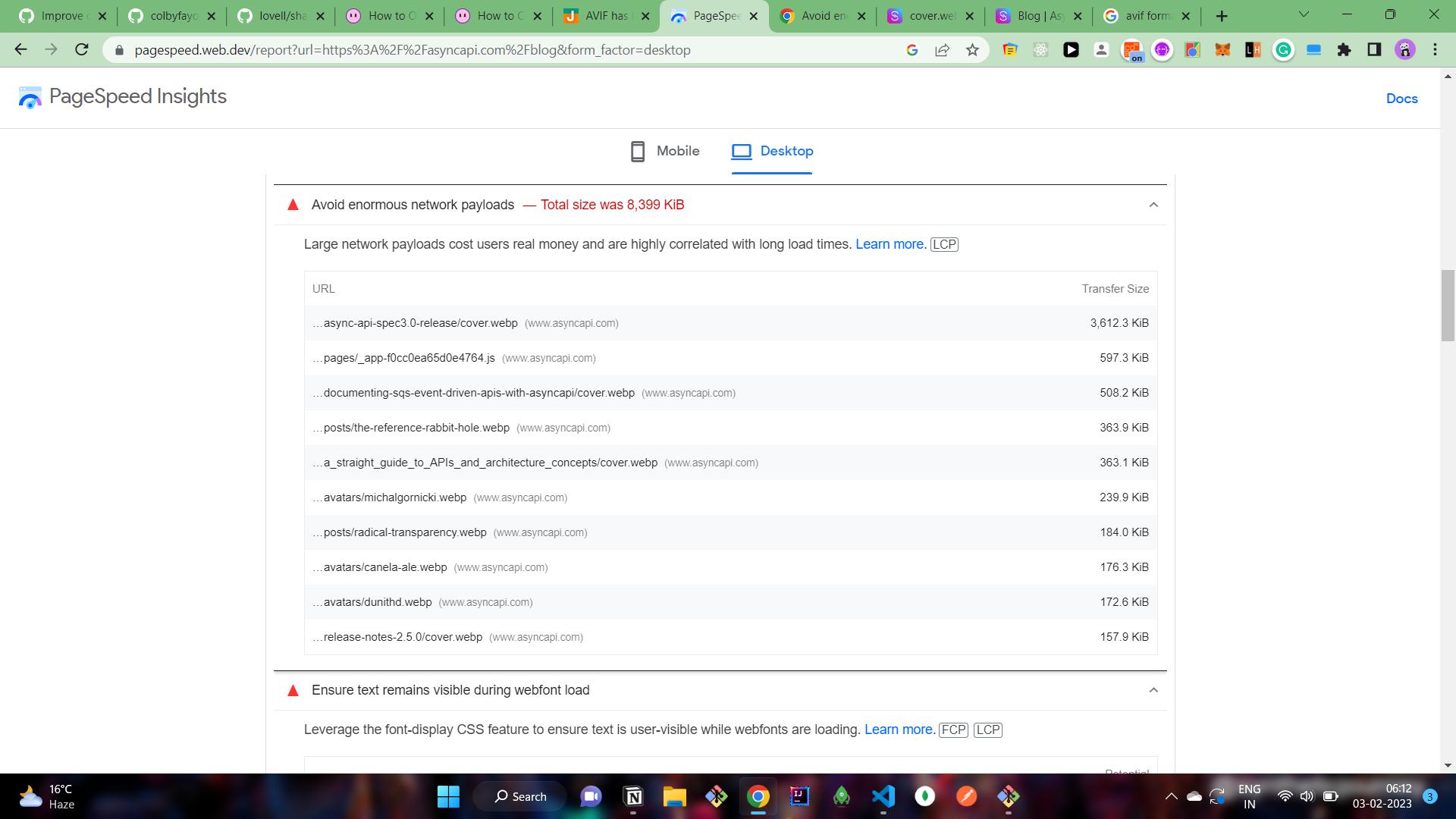 The large network payload is also due to the images. Maybe it will improve once we resize them.
Also, we have to ensure text is displayed during font load. For that we can use font-display:swap in our css, the swap will display unstyled font while the font loads.
We are using lazy loading to load all the images, can we eagerly load the images above the fold eagerly because sometimes they are rendered late in the page and it increases the perceived load speed.
The optimization can be done by using the https://www.npmjs.com/package/react-window, to reduce the number of DOM nodes created in the blog due to repeated elements. Increased DOM depths is affecting the speed due to the style calculations.