

 asyncapi
docs: new tutorial validate asyncapi documents using studio
Description
- NEW tutorial, "How to Validate AsyncAPI documents using studio"
Related issue(s)
#872

Deploy Preview for asyncapi-website ready!
Built without sensitive environment variables
| Name | Link |
|---|---|
| Latest commit | 3b84f2834b20c8c8d8cf8f793c52316f6934e91e |
| Latest deploy log | https://app.netlify.com/sites/asyncapi-website/deploys/63f935fba230370008eee6c0 |
| Deploy Preview | https://deploy-preview-1022--asyncapi-website.netlify.app |
| Preview on mobile | Toggle QR Code...Use your smartphone camera to open QR code link. |
To edit notification comments on pull requests, go to your Netlify site settings.
![netlify[bot] avatar](https://avatars.githubusercontent.com/in/13473?v=4 "Published by a pub.dev verified publisher")
⚡️ Lighthouse report for the changes in this PR:
| Category | Score |
|---|---|
| 🟠 Performance | 58 |
| 🟠 Accessibility | 88 |
| 🟢 Best practices | 100 |
| 🟢 SEO | 100 |
| 🔴 PWA | 30 |
Lighthouse ran on https://deploy-preview-1022--asyncapi-website.netlify.app/
![github-actions[bot] avatar](https://avatars.githubusercontent.com/in/15368?v=4 "Published by a pub.dev verified publisher")
📝 Hey @starlightknown, a few feedback notes:
- This tutorial had a lot of unnecessary content that was directly copied over from the 'guide' PR. This should have been rewritten entirely and edited to be much more succinct. (Ex: mention of diff ways to validate, writing a description of an AsyncAPI document and its sections (we already have a Quickstart), and even talking about parsers)
- This tutorial was not written in only sequential format, guiding us from steps 1-10. I re-wrote this content to show how tutorial steps should be written.
At this point, it would be great to have @derberg review it from a technical perspective and provide his feedback too on how to further improve this tutorial. I am curious to see if he thinks we should add more errors and what they might be. (I considered making an error in the Payload section (a number instead of the required string for email?) but wasn't 100% sure.
Thank you for all your work so far, Karuna! ✨✨✨✨

Oh and we need add the Prev/Next steps buttons to this doc page too :)
Oh and we need add the Prev/Next steps buttons to this doc page too :)
would that lead to my next tutorial?
Oh and we need add the Prev/Next steps buttons to this doc page too :)
would that lead to my next tutorial?
Yes @starlightknown, remember we're ordering the 4 new tutorials in the following order:
- Create AsyncAPI document
- Validate AsyncAPI document
- Generate Code
- Validate Events/Messages
Oh and we need add the Prev/Next steps buttons to this doc page too :)
would that lead to my next tutorial?
Yes @starlightknown, remember we're ordering the 4 new tutorials in the following order:
- Create AsyncAPI document
- Validate AsyncAPI document
- Generate Code
- Validate Events/Messages
added the buttons
@starlightknown Is this PR still in progress for development or completed? Because I can still see that the routes you added in the Prev and UpNext buttons are missing. Are you working on those pages in this PR only?

@starlightknown Is this PR still in progress for development or completed? Because I can still see that the routes you added in the Prev and UpNext buttons are missing. Are you working on those pages in this PR only?
Hey, I added the routes too but it doesn't work maybe because we don't have other PR merged yet.
Hey, I added the routes too but it doesn't work maybe because we don't have other PR merged yet.
@starlightknown We actually can't merge this PR with undefined routes right now. If the other PRs are taking time to get merged, I'll suggest making the routes of the buttons according to the current scenario of the Docs tree. If you want to wait for other PRs, just we should make sure we don't merge this PR first.
Also, please list down the PRs that are linked to this so that I could have a check on that also.
Hey, I added the routes too but it doesn't work maybe because we don't have other PR merged yet.
@starlightknown We actually can't merge this PR with undefined routes right now. If the other PRs are taking time to get merged, I'll suggest making the routes of the buttons according to the current scenario of the Docs tree. If you want to wait for other PRs, just we should make sure we don't merge this PR first.
Also, please list down the PRs that are linked to this so that I could have a check on that also.
Those are #1025 and #1023. I have added the buttons according that. #1023 is create documents which is the previous tutorial, this is the current tutorial and the next is #1025
yes, definitely
but please align with @alequetzalli and @Annysah because looks like now we will have the following tutorial flow:
- create AsyncAPI document
- validate document
- generate code
- validate messages
for generate code CLI is also needed. So I'm not 100% sure, but I think it doesn't make sense to have CLI installation instruction in both, validate document and generate code

Point 1: Prev/Next buttons
@starlightknown, @akshatnema is 100% right here. Adding next/prev buttons without routes or routes that don't exist yet is not what you should do. We've talked about this offline and in our GSoD calls, but there are 2 ways you can handle this:
- Include the routes of ONLY content currently LIVE and get your PR merged. Moving forward, as new content is merged, we will update the routes in those buttons. (not necessarily you, but whoever creates a PR that would require updating those buttons)
- WAIT to merge this PR until ALL 4 NEW gsod tutorials are ready to merge. In this case, it would be ok to use routes for content that is not yet LIVE because you're waiting to merge it.
I'm glad that @akshatnema noticed this because we need to ensure each new doc page has working routes in the prev/next buttons. Please let us know if this still doesn't make sense, and I can totally hop on a call if that helps. 😄
Point 2: Adding CLI commands to this tutorial
@derberg No, the purpose of this tutorial from the beginning has always been how to validate AsyncAPI documents with the Studio tool specifically. This does not mean we don't need a validation tutorial with CLI commands, it just means that is another topic. This tutorial is to showcase Studio validation, it should not go outside of the topic and discuss CLI commands. Each validation method requires its dedicated tutorial, focused and succinct to one scenario.
At this point, it is too late to ask the GSoD project ALSO to add a 'CLI validation' tutorial, so you should consider that work for me (Alejandra) that I pick up independently of GSoD via /website PR #1094. 😄✌🏽
Let's keep this tutorial focused on Studio validation example and I will create a NEW Docs issue outside of GSoD scope for a NEW tutorial on AsyncAPI document validation via CLI commands.
Something I will also point out is that creating a 2nd tutorial on the topic of validation methods opens the door for a new Tutorials sub-section on validation like so: asyncapi.com/docs/tutorials/validation. Personally, I have been looking forward to doing this for a while, and now that we have more content its a great time to make these improvements.
Point 3: Not including CLI installation information in individual tutorials
@derberg I see you asked: "So I'm not 100% sure, but I think it doesn't make sense to have CLI installation instruction in both, validate document and generate code"
So to answer that question, YES, each individual tutorial will always include required installation items. It doesn't matter if one or more tutorials need the same items installed. It only matters that any tutorial can stand on it's own, and include any and all info needed to install for that tutorial.
Never assume a user knows what to install or has already completed a previous tutorial with same installation items. 😜
just keep in mind that if we split these, have separate Studio and separate CLI tutorial, we will repeat a lot of content, about 80%, intro, summary and background will be almost the same. AsyncAPI file the same. The only difference will in direct instructions on how to check stuff in Studio and how to do it with CLI, which is just asyncapi validate <FILE_NAME>
and again, how is this PR related to https://github.com/asyncapi/website/pull/971 as I keep getting confused reviewing all these different PRs and sometimes seeing they overlapping each other 😅
just keep in mind that if we split these, have separate Studio and separate CLI tutorial, we will repeat a lot of content, about 80%, intro, summary and background will be almost the same. AsyncAPI file the same. The only difference will in direct instructions on how to check stuff in Studio and how to do it with CLI, which is just
asyncapi validate <FILE_NAME>
That is fine, and having a short CLI tutorial is fine. Again, it's about keeping the separation of scenarios (tools).
so as an example, users will now be able to read them in an order like so...
asyncapi.com/docs/tutorials/getting-started (our Quickstart)
|
asyncapi.com/docs/tutorials/create-asyncapi-document
|
asyncapi.com/docs/tutorials/validate-asyncapi-document/ (shorter /directory name alternative: /docs/tutorials/validate-document/)
|
asyncapi.com/docs/tutorials/validate-asyncapi-document/studio-validation
|
asyncapi.com/docs/tutorials/validate-asyncapi-document/cli-validation
|
asyncapi.com/docs/tutorials/generate-code
|
asyncapi.com/docs/tutorials/validate-messages
As a user, I can now see clearly that there is at least 2 tools/diff ways to validate my AsyncAPI documents. This is better than having to open 1 tutorial and dig around and find the diff ways I can do it. Then it wouldn't be a tutorial because it is talking about many diff ways to do something in diff scenarios.
and again, how is this PR related to #971 as I keep getting confused reviewing all these different PRs and sometimes seeing they overlapping each other 😅
hahaha yeah they got confused and opened an extra PR.. not a big deal but I can see why you got confused 😄
Notes (just for me) Validation keywords
- type( string, integer, boolean, number, object, array)
- constant values
- objects (properties, additional properties)
- arrays (items, additional items)
- numbers (multipleOf, minimum, maximum)
- string (minlength, maxlenght, email)
@magicmatatjahu you know studio and new layout the best, please do the technical review if all steps are accurate and all is properly explained 🙏🏼
technically all good, we just need to incorporate of course the new fragment with CLI installation
@alequetzalli leaving this one to you
@Annysah well done 👏🏼
Hehe it's me tho 😝
ups @starlightknown I was suppose to comment it here https://github.com/asyncapi/website/pull/1025#pullrequestreview-1201090665 😄
for this PR:
- just left one suggestion
- all good from my side, leaving it to @alequetzalli and also @magicmatatjahu in case of template in studio (not sure if @starlightknown what to try to contribute or not
anyway, my approval is not needed 👍
@magicmatatjahu I would like to add the template, could you please let me know what and where to do that?
@starlightknown
You should create (exactly copy and paste) your invalid AsyncAPI file to this location https://github.com/asyncapi/studio/tree/master/src/examples - please create tutorials folder and there paste that document.
Next thing is to create new example type in this file https://github.com/asyncapi/studio/blob/master/src/examples/index.tsx as tutorials. You should know what I mean - if not, let me know :)
And at the end you should update that file https://github.com/asyncapi/studio/blob/master/src/components/Modals/NewFileModal.tsx to render the new category, Tutorials - again, if you will have problems, let me know :)

@starlightknown
You should create (exactly copy and paste) your invalid AsyncAPI file to this location https://github.com/asyncapi/studio/tree/master/src/examples - please create
tutorialsfolder and there paste that document.Next thing is to create new example type in this file https://github.com/asyncapi/studio/blob/master/src/examples/index.tsx as
tutorials. You should know what I mean - if not, let me know :)And at the end you should update that file https://github.com/asyncapi/studio/blob/master/src/components/Modals/NewFileModal.tsx to render the new category,
Tutorials- again, if you will have problems, let me know :)
Done!
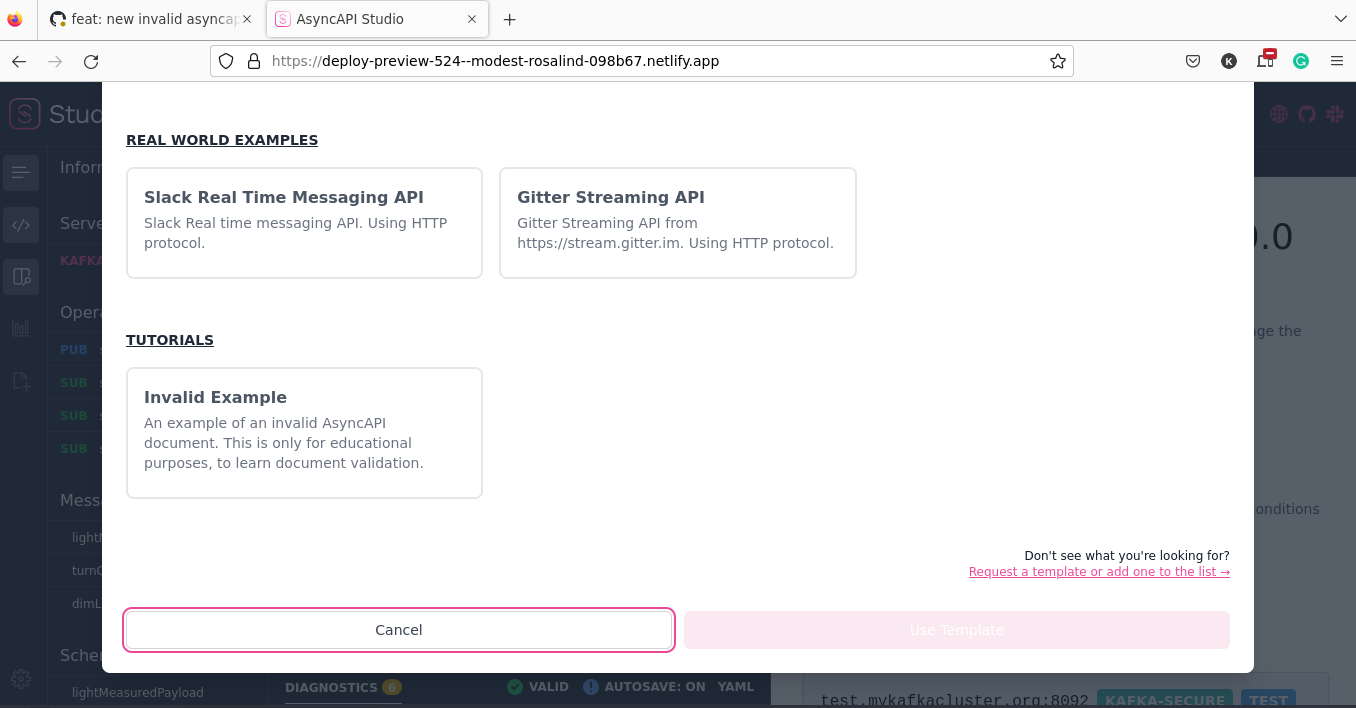
@starlightknown @derberg Let me know when you wanna merge that PR, I will merge PR in the Studio before this one.
just wanted to clarify, as I see Invalid Example there, do we really want to have invalid example in studio?
@derberg
just wanted to clarify, as I see Invalid Example there, do we really want to have invalid example in studio?
I asked about it a few days ago and we agreed that it would be described in the Studio as a non-working template for teaching purposes :) Or I don't understand your concern.
I suggested that we have a valid example, and that the flow of tutorial says, "you choose valid example and then just break it to get errors"
https://github.com/asyncapi/website/pull/1022#discussion_r1037156926