

 astorks
Can i run another version?

I just updated the plugin to v1.1.7 that should work on minecraft v1.13+
I've tested the example typescript source (https://github.com/astorks/ScriptableMC-TypeScript) in 1.13.2, 1.14.4. and 1.15.2 and can confirm it loads and works just fine. Just keep in mind the plugin is built with the spigot api v1.15 and exported libraries are v1.15, but as long as you only use features that are available in your minecraft version you should be fine.
Let me know if you find any issues and I'll fix them asap.

I just updated the plugin to v1.1.7 that should work on minecraft v1.13+
I've tested the example typescript source (https://github.com/astorks/ScriptableMC-TypeScript) in 1.13.2, 1.14.4. and 1.15.2 and can confirm it loads and works just fine. Just keep in mind the plugin is built with the spigot api v1.15 and exported libraries are v1.15, but as long as you only use features that are available in your minecraft version you should be fine.
Let me know if you find any issues and I'll fix them asap.
i want 1.12.2, I hope it will be officially supported soon. Thank you for the reply.
I just tested 1.12.2 and the plugin loads and basic events/commands work just fine. However the SmartInventory library only supports 1.13+ so inventory menus will not work.
I just updated the plugin to v1.1.8 that should fix the reload command on v1.12.2
Also I can confirm the SmartInventory library does support 1.12.2, it's just the example plugin uses materials that don't exist in 1.12. As long as you only use materials that are available in 1.12 inventory menus will work. I'll update the /smc menu and the example to use materials available in 1.12 in the next update later this week.
i want to dynamic plugin load. but i cant use fs module. can i use like fs module?
The Javascript engine is just a standard ECMAScript 2019/2020 engine (similar to a browser) so node js libraries like fs will not work. However if you just want to dynamically import a Javascript module you can use the dynamic import() statement https://javascript.info/modules-dynamic-imports
I've figured out how to dynamically load javascript plugins via the java file API. Here's an example main.js that should load all *.js files in the %ServerRoot%/scripts/dynamic/ folder.
import File from "./lib/java/io/File.js";

(async () => {
    let scriptsFolder = new File("./scripts/dynamic");
    let dynamicScriptFiles = scriptsFolder.listFiles();

    for(let i = 0; i < dynamicScriptFiles.length; i++) {
        let file = dynamicScriptFiles[i];
        if(file.getName().endsWith(".js")) {
            let dynamicPluginType = await import("./dynamic/" + file.getName());
            engine.loadPlugin(dynamicPluginType.default);
        }
    }

    engine.enableAllPlugins();
})();
I've figured out how to dynamically load javascript plugins via the java file API. Here's an example main.js that should load all
*.jsfiles in the%ServerRoot%/scripts/dynamic/folder.import File from "./lib/java/io/File.js"; (async () => { let scriptsFolder = new File("./scripts/dynamic"); let dynamicScriptFiles = scriptsFolder.listFiles(); for(let i = 0; i < dynamicScriptFiles.length; i++) { let file = dynamicScriptFiles[i]; if(file.getName().endsWith(".js")) { let dynamicPluginType = await import("./dynamic/" + file.getName()); engine.loadPlugin(dynamicPluginType.default); } } engine.enableAllPlugins(); })();
omg thanks
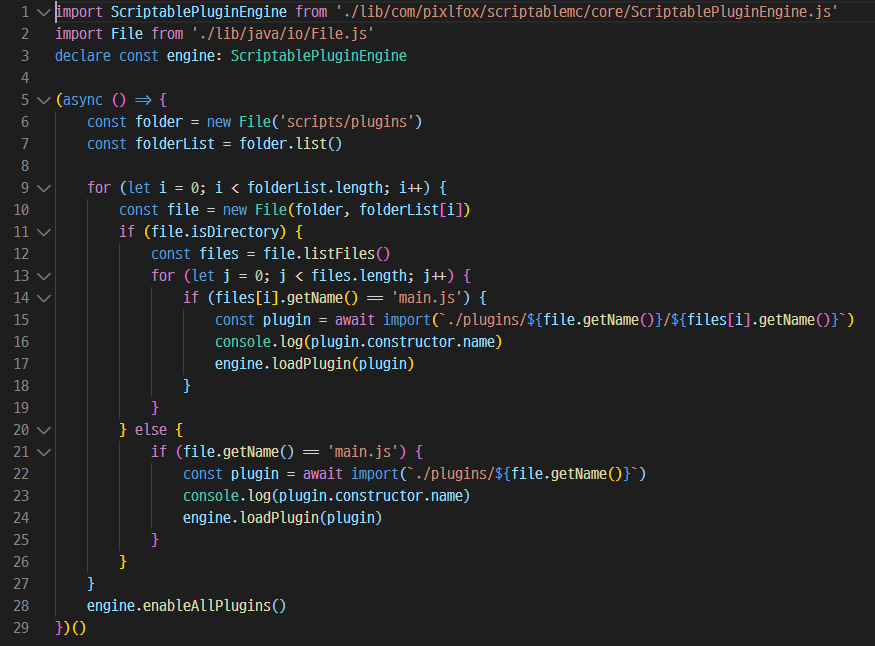 this code isn't working... console doesn't loging any class
So there was a couple issues with the java file api the main one being it isn't recursive so it can only list files/folders inside a single folder. So I added the apache FileUtils to the dev branch.
You can download the dev build (v1.2.0) here: https://github.com/astorks/ScriptableMC-Engine/actions/runs/40309344
You'll want to use the ScriptableMC-Engine-JS-Bundled.jar and be sure to update your typescript or javascript libraries with the ScriptableMC-TypeScript-Lib.zip or ScriptableMC-JavaScript-Lib.zip
And here's a working example main.ts
https://github.com/astorks/ScriptableMC-TypeScript/blob/dev/src/example-main-async.ts
import File from "./lib/java/io/File.js";
import ScriptablePluginEngine from "./lib/com/pixlfox/scriptablemc/core/ScriptablePluginEngine.js";
import FileUtils from "./lib/org/apache/commons/io/FileUtils.js";
import IOFileFilter from "./lib/org/apache/commons/io/filefilter/IOFileFilter.js";
declare const engine: ScriptablePluginEngine

class MainJsFileFilter implements IOFileFilter {
    accept(file: File): boolean {
        return file.getName() == "main.js";
    }
}

class PluginsFolderFilter implements IOFileFilter {
    accept(file: File): boolean {
        return file.isDirectory();
    }
}

(async () => {
    try {
        // Root folder to search for main.js plugins
        let scriptsFolder = new File("./scripts/plugins");
        let rootScriptsUri = new File("./scripts").getAbsoluteFile().toURI();

        let mainPluginFiles = (
            FileUtils.listFiles(
                scriptsFolder,
                new MainJsFileFilter(),
                new PluginsFolderFilter(),
            ).toArray()
        ) as Array<File>;

        for(let i = 0; i < mainPluginFiles.length; i++) {
            let file = mainPluginFiles[i];
            let pluginMainPath = "./" + rootScriptsUri.relativize(file.getAbsoluteFile().toURI()).getPath();

            let dynamicPluginType = await import(pluginMainPath);
            let pluginContext = engine.loadPlugin(dynamicPluginType.default);

            console.log("Loaded dynamic js plugin:", pluginContext.getPluginName(), "from", pluginMainPath)
        }

        engine.enableAllPlugins();
    }
    catch(e) {
        console.log(e);
    }
})();