aspnetboilerplate
 aspnetboilerplate copied to clipboard
 aspnetboilerplate
What are the best practices for reporting in ABP?
This is question which is about how to write reporting in aspnetboilerplate?
What do you think about of reporting in ABP.
In some cases, i need to write some codes of reporting and I don't want to use with Entities where in Core project.
- Should I define classes like DTO / VM in Core project?
I need your thinks for this topic.
Thanks.

@ismcagdas Have you ever considered this? Do you have any suggestions?
Should I define classes like DTO / VM in Core project?
I can only say that we don't do this in our projects. I don't have much experience with reporting actually.

I'm using SSRS and powerBI. in case of ssrs user can download report as pdf and in powerBI application service's methods call from powerBI

@Omital can you explain how to integrate abp with SSRS and powerBI? Do you have sample project that can you share? I'm also interested on this subject. Thanks 👍

@Omital Thank you!
Yes, It would be perfect if you share any sample.
But especially, customers want to export data as Excel. Could we export data as Excel by use SSRS or Power BI?
@onurcanyilmaz with ssrs, the final report can be prepared in any of the standard formats such as pdf, excel, word or tiff. @totpero In the next few days I will create a repository on how to implement ssrs and abp communication.
but for now
public class SSRSReportManager : ITransientDependency
    {
        public ServerConfig ServerConfig { get; set; }

        public IAbpSession AbpSession { get; set; }

        public ILogger logger { get; set; }

        public SSRSConnectionSetting SSRSConnectionSetting { get; set; }

        public async Task<byte[]> GetFile(SSRSReportFileType filetype, ReportBase _report)
        {
            string reportName = $"/{ServerConfig.BaseReportFolderName}/{_report.ReportName}";

            var _cred = new NetworkCredential(SSRSConnectionSetting.UserName, SSRSConnectionSetting.Password, SSRSConnectionSetting.Domain);

            Func<SSRSReportFileType, string> _ft = delegate (SSRSReportFileType _f)
            {
                switch (_f)
                {
                    case SSRSReportFileType.pdf:
                        return "pdf";
                    case SSRSReportFileType.word:
                        return "word";
                    case SSRSReportFileType.image:
                        return "image";
                    case SSRSReportFileType.excel:
                        return "excel";
                    default:
                        return "unknown";
                }
            };

            var targetUrl = new Uri(SSRSConnectionSetting.ServerAddress)
                        + "?"
                        + System.Net.WebUtility.UrlEncode(reportName)
                        + "&rs:Command=Render&rs:format=" + _ft(filetype) + "&";

            if (_report.Parameters.Count > 0)
                targetUrl = targetUrl + string.Join("&", _report.Parameters.Select(p => p.Name + (p.Value == null ? ":isnull=true" : ("=" + p.Value))).ToArray());
            else
                targetUrl = targetUrl.Remove(targetUrl.Length - 1, 1);

            rel.ExecutionPath = targetUrl;

            logger.Info("Start executing report " + reportName);
            logger.Info(targetUrl);

            HttpWebRequest req = (HttpWebRequest)WebRequest.Create(targetUrl);

            if (_cred != null)
            {
                req.Credentials = _cred;
            }
            else
            {
                req.Credentials = CredentialCache.DefaultCredentials;
            }

            HttpWebResponse HttpWResp = (HttpWebResponse)await req.GetResponseAsync();

            Stream fStream = HttpWResp.GetResponseStream();

            var bys = ADS.Base.Helper.StreamToByteArray(fStream);

            HttpWResp.Close();

            return bys;

        }

        public SSRSReportFileType ExtractFileTypeEnumFromReportExecutionPath(string reportExecutionPath)
        {
            var idx = reportExecutionPath.IndexOf("rs:format=");

            var tmp = reportExecutionPath.Substring(idx);
            var idxEqual = tmp.IndexOf("=");
            var idxAmpersand = tmp.IndexOf("&");

            string res = "";
            if (idxAmpersand != -1)
                res = tmp.Substring(idxEqual + 1, idxAmpersand - idxEqual - 1);
            else
                res = tmp.Substring(idxEqual + 1);

            return (SSRSReportFileType)Enum.Parse(typeof(SSRSReportFileType), res);
        }

        public static string ConvertTypeToFileExtention(SSRSReportFileType ft)
        {
            switch (ft)
            {
                case SSRSReportFileType.pdf:
                    return "pdf";
                case SSRSReportFileType.word:
                    return "doc";
                case SSRSReportFileType.image:
                    return "tif";
                case SSRSReportFileType.excel:
                    return "xls";
                default:
                    throw new AbpException("نوع فرمت خروجی گزارش تعریف نشده است. SSRSReportFileType: " + ft.ToString());
            }
        }


        private BasicHttpBinding CreateBinding()
        {
            HttpProxyCredentialType s;
            switch (SSRSConnectionSetting.SSRSCredentialType)
            {
                case HttpClientCredentialType.Ntlm:
                    s = HttpProxyCredentialType.Ntlm;
                    break;
                case HttpClientCredentialType.Windows:
                    s = HttpProxyCredentialType.Windows;
                    break;
                default:
                    throw new AbpException("can not convert from SSRSConnectionSetting.SSRSCredentialType=" + SSRSConnectionSetting.SSRSCredentialType.ToString() + " to HttpProxyCredentialType");
            }

            var bing = new BasicHttpBinding(BasicHttpSecurityMode.TransportCredentialOnly)
            {
                Security =
                        {
                            Transport = new HttpTransportSecurity {ClientCredentialType = SSRSConnectionSetting.SSRSCredentialType,
                                ProxyCredentialType =  s}
                        }
            };

            return bing;
        }
    }
and ReportBase class
public abstract class ReportBase
    {
        public ReportBase()
        {
            Parameters = new List<NameValueDto>();
        }
        public static string FriendlyName { get; set; }
        public string DefaultFolderName { get; set; }

        public string ReportName { get; protected set; }

        public List<NameValueDto> Parameters { get; protected set; }

    }
and SSRSConnectionSetting
public class SSRSConnectionSetting : ISingletonDependency
   {
       public string ServerAddress { get; set; }
       public string Domain { get; set; }
       public string UserName { get; set; }
       public string Password { get; set; }
       public object FolderName { get; set; }
       public HttpClientCredentialType SSRSCredentialType { get; set; } = HttpClientCredentialType.Ntlm;
   }
and this sample
public class TestReport : ReportBase
   {
       public ReportCom(int id)
       {
           Parameters = new List<NameValueDto>()
           {
               new NameValueDto()
               {
                   Name= nameof(id),
                   Value= id.ToString()
               }
           };
           ReportName = "anySSRSFolderStructure/TestReport";
       }

   }
and executing
byte[] file =await SSRSReportManager.GetFile(SSRSReportFileType.pdf, new TestReport(100));

 return new DownloadFileDto
{
  File = Convert.ToBase64String(file),
  FileContent = "application/octet-stream",
  fileName = "testReport.pdf"
};
Thanks @onurcanyilmaz 👍 I know that in SQL Server Reporting Services (SSRS) if you want to integrate in project, you need to create custom authentification. How to deal with security, if you can share in this sample (authentification, authorisation, users, roles, etc.) this is one of the important part of this topic and also the second important think is how to not expose external the SSRS server link to the users in UI.
We wait for your sample, this will be very important part for abp because any developer deal with this subject in enterprise applications and if abp will give a solution to this, will be big advantage to abp framework. @ismcagdas Thanks.
@totpero In the way we implemented in the company to communicate abp with ssrs, there is no need to use roles and accesses directly. ssrs prepares its required data from stored procedures designed in SQL, which you can send the information required to consider access as a parameter to the store procedure
SSRS address, user name and corresponding password to access that address are defined as settings in abp, and there is no need for the end user to access that address directly.
Thanks @onurcanyilmaz 👍 I know that in SQL Server Reporting Services (SSRS) if you want to integrate in project, you need to create custom authentification. How to deal with security, if you can share in this sample (authentification, authorisation, users, roles, etc.) this is one of the important part of this topic and also the second important think is how to not expose external the SSRS server link to the users in UI.
We wait for your sample, this will be very important part for abp because any developer deal with this subject in enterprise applications and if abp will give a solution to this, will be big advantage to abp framework. @ismcagdas Thanks.
You should thank to @Omital :)
Hi @onurcanyilmaz Yes thanks to @Omital, this was my intention :))) but thanks also to you for this interesting topic. And thanks to @ismcagdas for abp. 👍
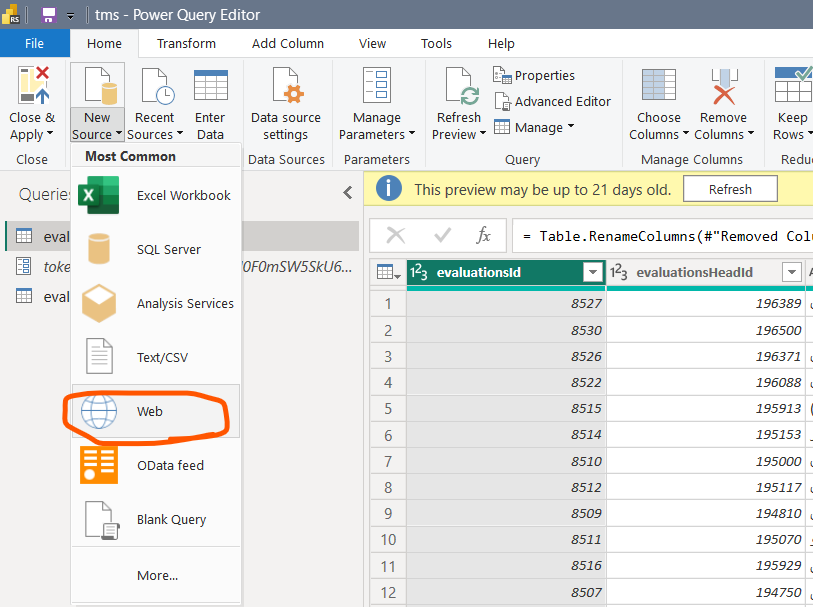
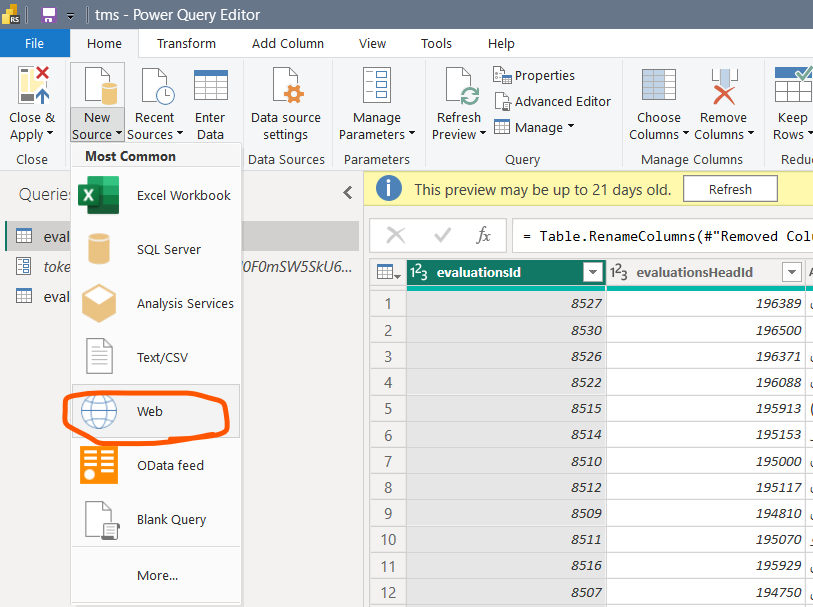
@totpero To retrieve data by powerbi, you must use the web data source and "advanced editor". like this:
let
url = "https://yourwebAddress.com/api/services/app/serviceName/MethodName",
body = "{""pi"":{""pageNumber"":0,""isDescending"":true,""ItemCount"":100
00000,""orderby"":""StartAsessmentTime""},""sc"":{""inspectorName"":"""",""hasGeo"":"""",""hasNotGeo"":"""",""medicalInstitueName"":"""",""address"":"""",""checkListName"":"""",""startDate"":""1401/01/01"",""endDate"":""1401/12/29"",""orgId"":"""",""city"":"""",""statuses"":[],""visitTypes"":[],""actions"":[],""grades"":[],""sectionTypes"":[],""checkListTypes"":[],""medicalInstitueTypes"":[],""medicalInstitueCities"":[]}}",
binaryText=Text.ToBinary(body),
Source = Json.Document(Web.Contents(url,[Headers = [#"Content-Type"="application/json",#"Authorization"="Bearer "&token], Content = binaryText ] )),
#"Converted to Table" = Table.FromRecords({Source}),
#"Removed Columns" = Table.RemoveColumns(#"Converted to Table",{"targetUrl", "success", "error", "unAuthorizedRequest", "__abp"}),
#"Expanded result" = Table.ExpandRecordColumn(#"Removed Columns", "result", {"po", "evaluations", "file"}, {"result.po", "result.evaluations", "result.file"}),
#"Expanded result.po" = Table.ExpandRecordColumn(#"Expanded result", "result.po", {"currentPage", "resultCount", "totalPage"}, {"result.po.currentPage", "result.po.resultCount", "result.po.totalPage"})
in
#"Expanded result.po"