

 asottile
Added colors and cumulative option
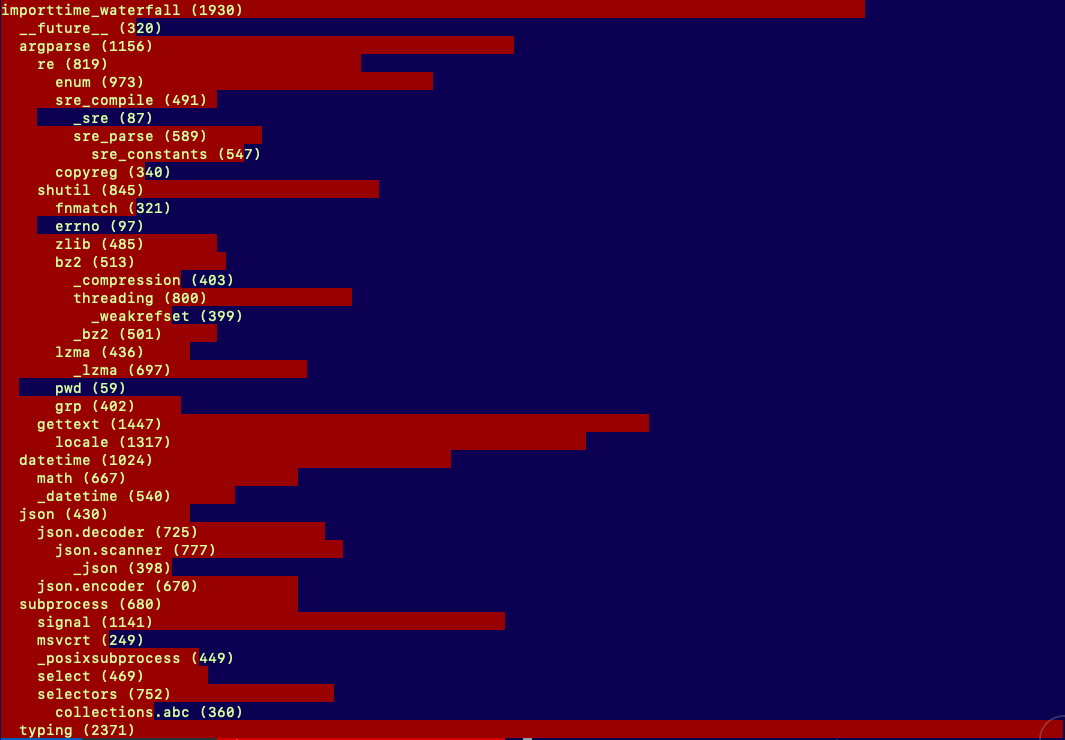

The colors show how much time is spent for the line compared to the max value. This makes it super easy to see where the problem is, especially when you have a very big output. This was the situation i had using this at work with hundred of lines of output. Finding the big numbers or seeing how big they are isn't really practical with the numbers in parenthesis.
The colors show how much time is spent for the line compared to the max value. This makes it super easy to see where the problem is, especially when you have a very big output. This was the situation i had using this at work with hundred of lines of output. Finding the big numbers or seeing how big they are isn't really practical with the numbers in parenthesis.
I'd suggest using the HAR viewer -- it makes this a lot easier to see

I did use that a bit, the problem with HAR is that it's super slow. Just pasting into the input field on the website is quite painful. And then after all that, it supplies roughly the same value as this simple coloring if you're iterating fast.