
Reachability.swift
 Reachability.swift copied to clipboard
 ashleymills
New version of Reachability (or iOS 12) causing issues with wi-fi connection status
What version of Reachability.Swift are you using? ReachabilitySwift (4.3.0) How is it installed? Manually, CocoaPods, Carthage? Cocoapods Does it occur on device or simulator? Which device? Device (iPhone 8 - users have reported it happening on others too)
What OS version are you running on? iOS 12.0.1
How often does it happen? Sporadically, but quite often when transitioning connections (i.e. from cellular only to cellular+wifi)
Are there steps you can take to reproduce it?
Transition from cellular only to cellular + wifi.
Issue: I set up Reachability in my app delegate, and it is global throughout the whole app. have some logic that checks whether or not we should do something based on whether the user is connected to wifi:
        if reachabilityManager.connection == .wifi {
            return true
        }

        if reachabilityManager.connection == .cellular {
             // do something else
        }
The connection does not indicate status == .wifi when connecting to a new wi-fi network. This is a new issue, so it may have been introduced after iOS 11.4.1 or upon the new version of reachability-swift. Please let me know how I might be able to contribute to help solve this issue asap.

Some more details - when I restart the app, the connection is properly set to "wi-fi." The bug occurs when you launch the app, (instantiate reachability manager) and then later on the connection changes to a wi-fi connection. I can probably get around this by re-instantiating reachability every time I want to use it, but that's not ideal.
Since iOS 12 the only message I get, in any situation is: "Reachable via Wifi".


@andrewkouri linking CoreTelephony.framework to the project fixed the issue for me (only for real devices, not in the simulator unfortunately). Related to https://github.com/ashleymills/Reachability.swift/issues/307#issuecomment-425377792

@corteggo Thank you, linking the CoreTelephony.framework fixed the problem.
I have linked the CoreTelephony.framework but it still does not work
I use ReachabilitySwift version 4.3.0
My code is very simple. This is a if-else statement that is executed with a button event
if(reachability.connection == .none){ print("Error") }else{ print("Connection OK") }
Disconnected and connect my wifi or data connection in the mobile app and the library is not able to recognize that I have returned to have connection


Same Issue I am facing
I'm using Alamofire to solve this problem
I've created a new class with this code:
import Foundation import Alamofire class NetworkState { class func isConnected() ->Bool { return NetworkReachabilityManager()!.isReachable } }
And its use is:
if NetworkState.isConnected() { print("Exists connection) }else{ print("Not connection") }
Facing the same issues, It was working earlier prior to iOS 12.
I have just updated the Xcode version and updated pod and same app it stop notify when network status changes.

Well for iOS12 Apple has added Capabilities requirement and needs to be configured in developer.apple.com and edit your AppId for WiFi access:
Important To use this function in iOS 12 and later, enable the Access WiFi Information capability for your app in Xcode. When you enable this capability, Xcode automatically adds the Access WiFi Information entitlement to your entitlements file and App ID. Documentation link
Also turn on Access Wifi Information in Capabilities for your application in XCode. Some guides to the said are represented picturesquely below:


Let me know if this helps.

@mohsinka ,
I have updated all the configuration on Developer apple account and enabled capability on Xcode as well. But the problem is still same.
I can confirm too that there is a serious issue regarding wifi connectivity. It does not report correctly and most of the time it is reported as unreachable. Should we expect a fix soon?

@nick3389 I am using Reachability without any problems on iOS12 (though the app targets 11.2)
I do see some odd behavior in the simulator when turning a VPN on and off, but it works perfectly on physical devices using Control Center to toggle airplane/wifi/cellular on and off.
I primarily use the .whenReachable and .whenUnreachable blocks, but I enabled the notifier and it correctly reported all of the state changes.
Do you start your notifier in the App Delegate? Mine is initialized in my root view controller and is used to initiate the network subsystem (meaning if Reachability isn't working, it would never connect)

@eliburke Yes I start it too in AppDelegate. It's like it's not recognizing when WiFi is connected and always reports unreachable. I also use these two blocks to get notified. Actually I would notice that there is no consistency for the notifiers.
Ok, interesting. I just did a quick test. Per example code my reachability init sets up the whenReachable/whenUnreachable blocks and then calls startNotifier()
When I comment out the call to startNotifier(), the whenReachable block does get called correctly (sometimes it was never called, sometimes it was called after I toggled the network connections).
It's unclear from the docs if startNotifier is required in conjunction with the (un)/reachable blocks, but it certainly seems to be the case.
So: if you do not start the notifier, try starting it if you do start the notifier, make sure it is AFTER you set up the two blocks if you already do those two things, maybe a try moving initialization out of your App Delegate to somewhere later in your startup code
Actually I use Reachability in two parts of my code. The first in a framework where I have the setup as you describe. The other one in an application where I start the notifier in AppDelegate and I only check:
reachability!.connection != .none
to check if there is internet connection.
The second implementation for sure fails and it's one I mentioned above. Sorry for the inconvenience caused. Also, I have only tested this in iOS 12 devices (not only one but around 10) and the experience is the same in all of them. Do you think that the second implementation might be faulty??
Earlier in this thread there was a link to #307 which describes a similar issue and mentions trying to link CoreTelephony to your project. I don't know if that will fix your problem or not. Can you try calling startNotifier in your app where you just check reachability!.connection != none? I don't think it will hurt anything or cause performance problems.
I already have linked CoreTelephony with no luck. Also, I start notifier in both implementations. For now, for iOS 12 I use the Network framework that Apple introduced and for older devices I use Reachability. I will test it in iOS 11 too and I will come back with results. @eliburke thanx for your help!
I am also facing the same issue in tvOS simulator.
What version of Reachability.Swift are you using? 4.3.1 How is it installed? Manually, CocoaPods, Carthage? Carthage Does it occur on device or simulator? Which device? Simulator, Apple TV simulator What OS version are you running on? tvOS 12.2 How often does it happen? Always Are there steps you can take to reproduce it? Please download and run https://github.com/abin0992/RechabilityBug
It detects when wifi connection is lost but doesn't detect when internet is back. My implementation is https://github.com/abin0992/RechabilityBug/blob/master/Rechability%20Bug/ViewController.swift

I want to notify user when the internet connection is lost and reconnected. Is there something wrong with my implementation?

@abinrm Exactly the same as me! It never detects if internet connection is restored.
I found something interesting. It works fine when my VPN is turned on 🤔
(cyberghost icon in yellow colour means VPN is ON)
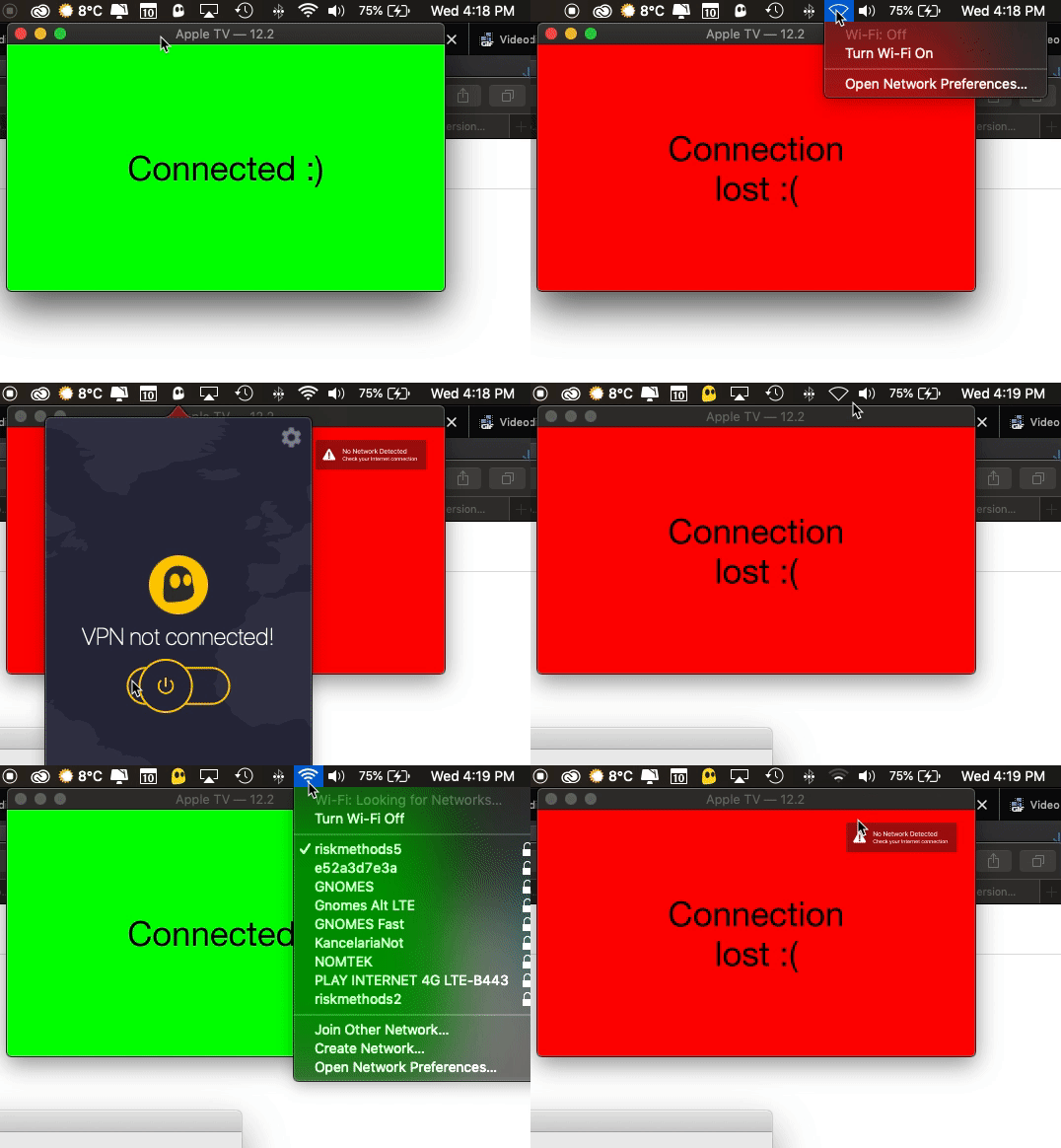
Update - Tested with actual device (Ethernet and wifi) and everything works as expected. I suspect there was issues with simulator because I use VPN and Charles proxy (It installs SSL certificate in simulator and monitors all requests made) in my MacBook.
for me its working fine with the actual device. try to run on the device and check

I had the same issue with Xcode 10.3 and iOS 12.4 Simulator.
Came across this conversation, tried it on a physical device running iOS 12.4 and it's working fine.

On the physical devices its working fine. Problem is persistence on the simulator only.