

 aseprite
Single frame tags hard to read
Automatically rotate tag names 90deg when there are too many overlapping tags.
I'm working on emoji, such that each frame is a different picture and use tags to give them names and later export. However this means that my timeline looks like this:
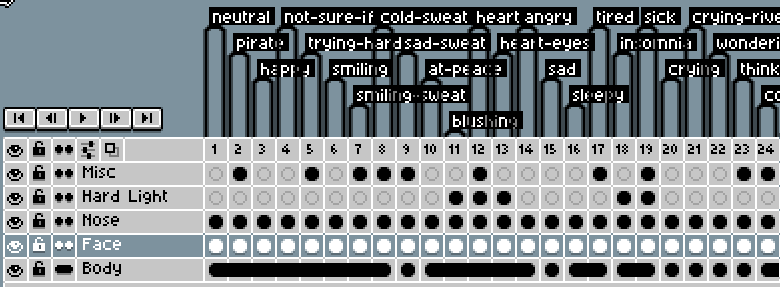
Whereas something like this would be easier to read:
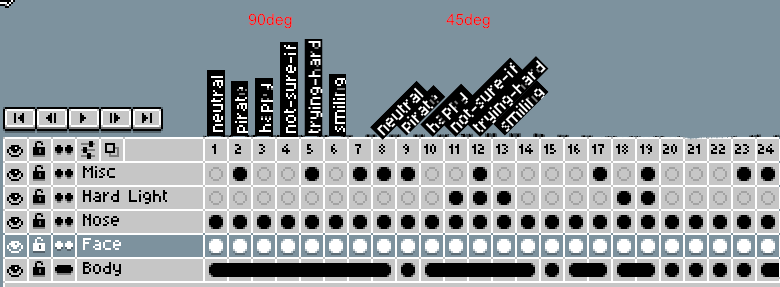
One thing that would also improve slightly is to use only one line for "single-frame-tags", e.g.
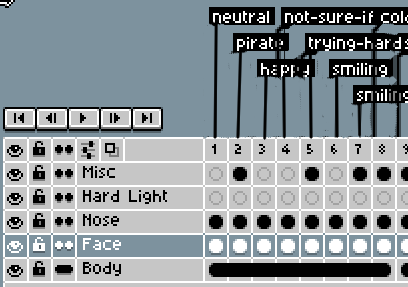
I suspect there might be ways to improve the tag text placement as well (e.g. ensure that there is always at least 5px margin before and after the label. As currently some of these labels run into each other. Not sure what it would look like when it started stacking the labels from the bottom rather than top?
Anyways, there might be other ways to make the tags more easier to read.
Aseprite and System version
- Aseprite version: v1.2.6-x64 Steam
- System: Windows and MacOS

Bumping this, I am having similar difficulties with a lot of single frame sprites for a character
