

 arrowtype
Old CSS style overrides are "sticking" even after deletion
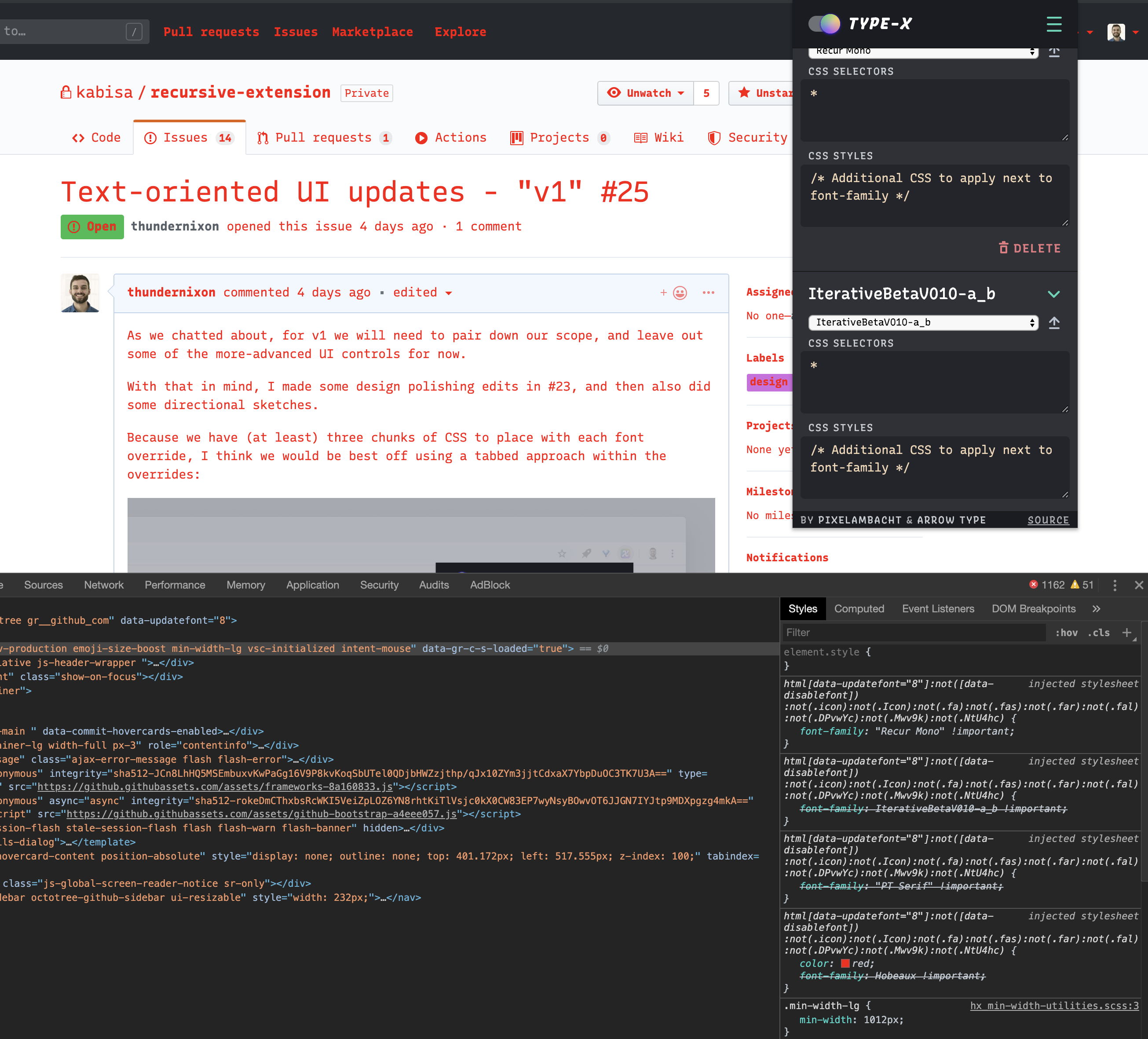
To try out the "CSS STYLES" feature, I added color: red while I was also looking at a website with Hobeaux overriding the fonts.
After deleting this override, I was surprised to see that effect still overriding page styles, after deleting and adding new "font overrides."
Here's a screenshot showing the issue, along with the devtools showing how the CSS overrides weren't quite deleted, even though they appear to be in the extension itself.

I can't replicate this in the current master 🤔 Do you have steps how to reproduce this?
By the looks of it there's still PT Sans and Hobeaux being applied (but all overwritten by the fons that follow). The color property isn't being overridden so it remains visible. Could that have been the case here?

The color property isn't being overridden so it remains visible. Could that have been the case here?
Yes, that seems to be exactly what was happening.
I am not experiencing it in the latest master, but I'll let you know if it turns up again. As far as I can tell, the problem is gone!
Okay, coming across this issue again. Here are the steps I took:
- Delete Recursive Sans
- Add override, change to Hobeaux
- Add override, change to SignPainter, set it to
h1, and give that afont-size: 48px - Toggle extension off and on
- Delete Hobeaux and SignPainter overrides
- Add override, change to Recursive Sans
SignPainter is still "sticking" as the style for H1. This was fixed by a simple hard refresh, and now I'm not able to reproduce it consistently, but only sometimes ... so, this isn't very helpful other than to say sometimes, styles still seem to hang around longer than I expect. Potentially, we should warn people of it, and ideally, we could find a way to prevent it.
One possibility: if the "apply changes" button were always available, might that provide a simple and intuitive way for users to "kick the machine" if old styles were sticking?
Is this still an issue? I didn't come across it myself, and is fixes/nullified by the "live update" feature. Otherwise close this issue?
Hmm, I just experienced this again after using the "reset" function.
I had applied letter-spacing: 0.2em for a display font, then reset, and then noticed that when I began using a text font, it had way too much spacing.
