

 ares-emulator
[N64] Conker's Bad Fur Day (USA) - Graphical artifacts when pausing
Occasionally, when you pause ingame, artifacts will appear at the top of the screen. To reproduce, simply pause and unpause repeatedly during gameplay until they appear.


Tested on Ares v123, compiled 9/16/2021, on Linux Mint 20.

Not seem to be reproducible in 9f55e66 anymore. Probably fixed with parallel-rdp update in the most recent revision.


I an unable to test, because every N64 game crashes Ares on the latest build.
I an unable to test, because every N64 game crashes Ares on the latest build.
Hmm they don't crash for me on master.

I had to recompile, N64 games work fine for me now. Anyways, it's definitely not fixed on the latest build. As I mentioned, it can take quite a few pauses before you can reproduce the issue.

I had to recompile, N64 games work fine for me now. Anyways, it's definitely not fixed on the latest build. As I mentioned, it can take quite a few pauses before you can reproduce the issue.
Are you using savestates?
No, I did not use any save states when testing, and I do not have any save states in the game to begin with.
While it isn't related to the use of save states, I also wanted to mention that I deleted my existing cartridge save files and tried it on a new one, just to verify it still happened.

I tried to pause/unpause a lot of times and didn't reproduced https://youtu.be/VU7J-wHnJl8
Please, what's your N64 render Settings? I suspect what you are experiencing is not a graphical emulation bug but rather a high-scalling side-effect. If that's the case, unfortunately maybe it isn't easy fixable, as the game wasn't projected to run in those circumstances.

I did all my testing on SD rendering, and did not upscale. Here's a video showing proof. Sorry it's so long, but I wanted to do it on a blank save file just after compiling the latest release. I recommend skipping to the last minute or two after viewing my settings in the beginning. https://drive.google.com/file/d/11BJSrgdaN6dzrFBQiGa7Lelq2w410nMI/view?usp=sharing
I tried to pause/unpause a lot of times and didn't reproduced https://youtu.be/VU7J-wHnJl8
Please, what's your N64 render Settings? I suspect what you are experiencing is not a graphical emulation bug but rather a high-scalling side-effect. If that's the case, unfortunately maybe it isn't easy fixable, as the game wasn't projected to run in those circumstances.
Very interesting. Thank you for share all these details with us. Don't worry about the video being long, the context is very important for reproducibility, that's why I'd asked some questions before. Nice to know the issue can be triggered in the first cutscene as in the first moment I'd though that it need to be triggered in the second area (overworld).
Yeah, I thought so too initially, but it turns out it's just the first part of the opening cutscene (with conker sitting on the throne) that doesn't give results as often (although it sometimes still does). As soon as the camera cuts to Berri's house, I can get it much more reliably. That might just be a placebo though, I haven't exactly tested that theory.
I finaly could replicate this bug in SD, in the intro cutscene.
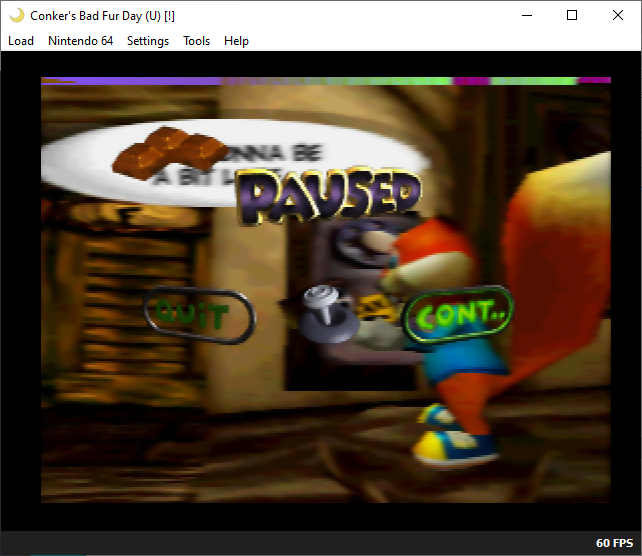
Are you sure this doesn't happen in the console itself? If the answer is "no" and I had to bet, I think it's related with garbage on VRAM.
I've never seen the bug happen on console. If you have proof of otherwise, let me know.
Unable to recreate on lastest master. Can someone else test, since Shideravan's testing seems to indicate this issue's frequency can vary between computers?
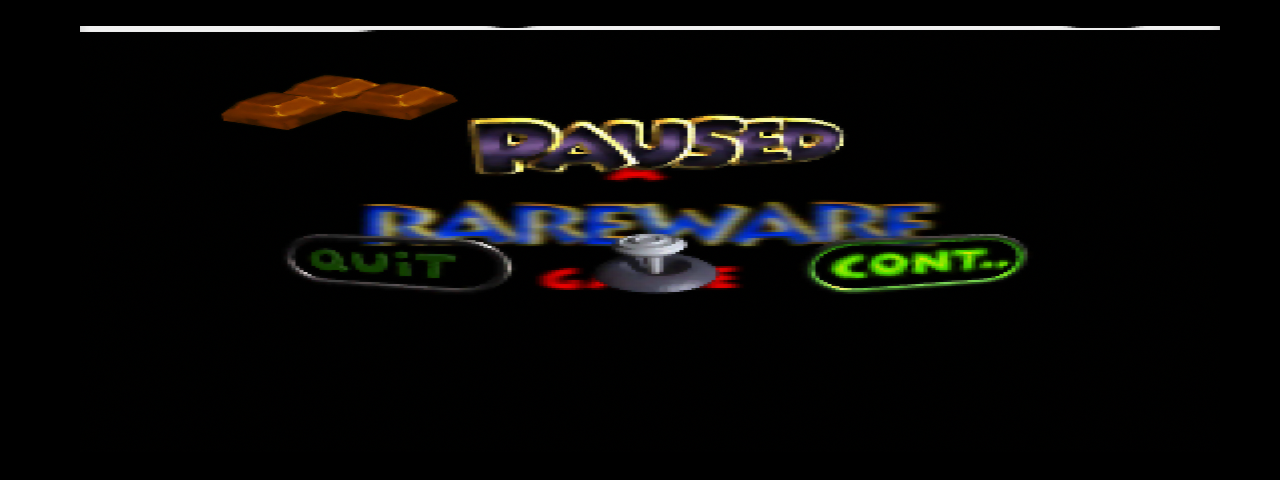


Found this issue to be a regression. Commit 8c7bad1 (ares v120r03) causes the corrupted line to appear. There are numerous timing changes and additions to this commit.
