
archi-modelrepository-plugin
 archi-modelrepository-plugin copied to clipboard
 archimatetool
Define MVP for "Branching" sprint
My first thoughts on this are:
- Add a way (through Collaboration and contextual menu) to select the current branch. By default only "master" should exist.
- Change plugin's internals to use this "current branch" instead of master for commit/fetch/pull/push operations.
- Add option to create new branch
- Add option to remove branch
- Add option to merge two branches (and choosing whether one of the branches disappears or not)

About the merging. A possible (first) step could be only merging branches to master, thus “accept architecture asset to accepted architecture landscape”.

Change plugin's internals to use this "current branch" instead of master for commit/fetch/pull/push operations.
This should also affect the change history tab which should list commits accordingly. I think that we don't need (at least as a first step) to show the whole log with all branches. We should instead focus on commits that lead to the selected "current branch".
Once done, a possible enhancement could be to add some additional informations like:
- icon for merge commits
- icon and name for tags (which will be used for release in Archi Collaboration Server
As History and Branches are so closely connected I thought that it might be better to keep them together visually in the same Eclipse View:
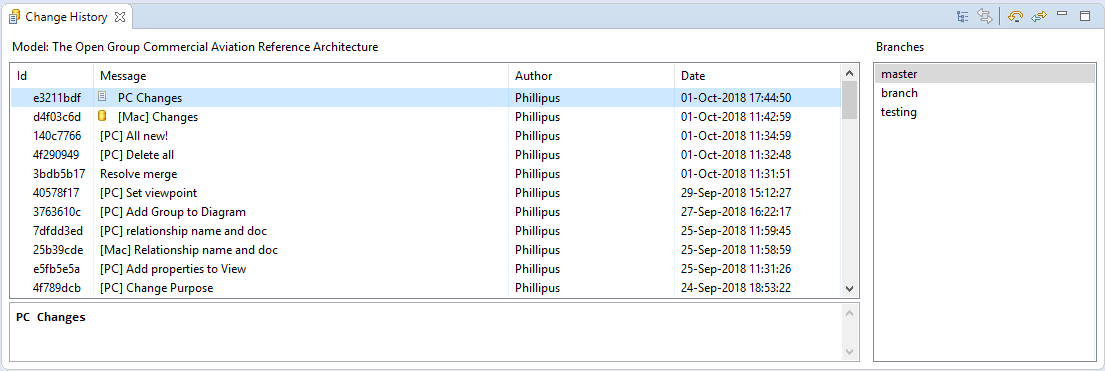
Before proceeding can we agree or not on this? The other option is to have a separate Eclipse View for Branches. This can be done but I wonder if users will be jumping between them and if this clutters the UI.

Branches exist locally and/or online. How do we want to handle that logically and in the UI?
Here's how SmartGit does it for local and remote branches and tags:
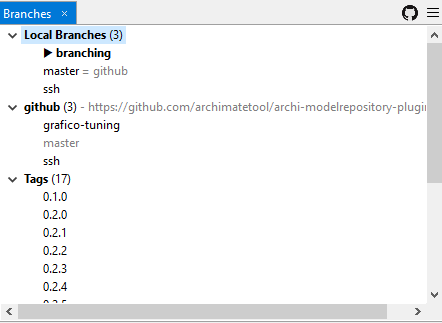
I totally agree on the relationship between branches and history and therefor it’s logical to display them along with each other.
About branches and their locations. For me the most intuitive UI would display “available branches”, either the union of local and remote branches or possibly only remotes. The latter would be possible if new local branches always are pushed upon creation (empty) and tracking between the local and remote branches are set. This probably will make the general push a little bit easier. The drawback? Maybe a remote repository cluttered with empty branches.
Another question is from where branches should be made, from the current point or always from master?
If we're going to have tags as well then I think we need to do as SmartGit does it with a tree of three things - Remote branches, Local branches and Tags. Or we could have a table with columns denoting L / R / T.
Branch management in Git can be tricky. There is the concept of "tracked branch" where your local branch is set to the remote branch. We should avoid having to worry about that.
Yes, Git can be tricky so this is a matter of user interaction and the goal for the collaboration plugin, should it provide Git functionality or functionality for an architecture workflow with versioning, based on Git.
As I got a developer perspective, I’m familiar with refs and will have no problem whatsoever which choice is made. Since tags are references in Git, it got a tight relationship with branches. From an Archi-user (architect) perspective this could be separated in “work in progress” (branches) and “release versions” (tags) and therefore no need to couple them tight in the UI.
However, is it possible to find an intuitive UI with local and remote branches along with tags that will be really fine.
My Archi-user (architect) point of view, (i.e. an unexperienced git user) managing an architect team using Archimate to modelize and a git to collabore:
> Another question is from where branches should be made, from the current point or always from master? Our usage, is to have the modelisation of IS/IT in one model (in master) and to create one branch for each project starting, and only from master which contain our reference model. The merge is reserve to me only when our architectural committee has validated the proposed architecture. After a merge, all new concept are available in master and the branch is deleted.
> From an Archi-user (architect) perspective this could be separated in “work in progress” (branches) and “release versions” (tags) and therefore no need to couple them tight in the UI. the meaning of branch is exactly "work in progress" in our case, but the "release version" doesn't exists.
> Yes, Git can be tricky so this is a matter of user interaction and the goal for the collaboration plugin, should it provide Git functionality or functionality for an architecture workflow with versioning, based on Git. Functionnality for an architecture workflow should be enought I think. If somebody needs git functionnality for a specific purpose, he could use a real git client. In our organization, each architect in my team have their own branches locally, and only me as a referent architect open all branches if they need help or advice.
Hope I am clear, if not, please ask.

A third option (aside with History- and a separate Branch view) for branches in the UI would of course be the Collaboration view. This could be a tree of repositories expanded with available branches.
Pros for this option would be more space for the history in the history view and not having a three-level parent-(child/parent)-child relationship of the controls.
Actually, I can’t see any direct cons at the moment. The Collaboration view has room for more information and functions I believe.
If branches are in the Collaboration view, the user will always need to have that view and the History view open to switch branches and see the updated list of commits.
Keeping branches in the History view keeps everything together, and you can just have that one view open.
That’s true, the best thing is probably to use the history view. I only try different ideas to avoid bad choices. =)
There's a new GitHub branch called "branching" here now.
This has the basic UI of a branches table in the History view. Selecting a branch updates the history view.
At this point I'm not entirely clear on what we should be doing in git terms. Creating and deleting branches can be set aside for the moment as we can do that manually in SmartGit or CLI for testing.
- What branches should be displayed?
- What do we display in the history when a branch is selected?
- What about untracked branches? Branch can be local and/or remote.
- When a branch is selected do we check it out? Or do we need a checkout branch action?
Change plugin's internals to use this "current branch" instead of master for commit/fetch/pull/push operations.
I think these actions work on the currently checked out branch, don't they?
Ok, I've finally found some time to think about it and share my thoughts with you, so here we go...
Let's first set some basic but very important principles:
- [P1] Users should always and clearly see in which branch they work
- [P2] Changing the current branch must be a conscious action and not a side effect of other actions
- [P3] We should try to simplify and hide git as much as possible
From P1 I conclude that we should show the current branch name in several places:
- In the Collaboration Workspace, the branch name should be added to the model name: label should become something like "ModelName [CurrentBranch]"
- In the Property view when a Collaboration Workspace entry is selected. Maybe in the "Information" tab below Location and URL.
- In most dialogs: when Refreshing, Aborting changes, Commiting changes, Publishing...
- In the Change History view. In this case this is a bit more complex has this is a bit conflicting with another use-case: being able to look at the history of another (ie. not current) branch. That's the reason why I would not go for the current (of course experimental) proposal (see below).
My proposal for the Change History view Instead of listing all branches in a separate list show on the right of the commit list, I would simply add a drop down list and a short message on the same line of the "Model: ModelName". In addition, I would also make it clear which branch is the current one (ie the one in which commits will be saved). So I would add a "(current)" to the name of the current one:
+----------------+
| Change History |
+----------------+---------------------------------------------------+
|                               +----------------------+             |
| Model: ModelName Shown Branch:| Project #1           |             |
|                               +----------------------+             |
| +-----------------------------|                      |-----------+ |
| |Id      |Message             | Project #2           | |Date     | |
| |        |                    | Project #3 (current) | |         | |
| |        |                    | Master               | |         | |
| |        |                    |                      | |         | |
| |        |                    +----------------------+ |         | |
| |        |                                    |        |         | |
| |        |                                    |        |         | |
| +----------------------------------------------------------------+ |
| +----------------------------------------------------------------+ |
| |                                                                | |
| |                         COMMIT MESSAGE                         | |
| |                                                                | |
| +----------------------------------------------------------------+ |
+--------------------------------------------------------------------+
From P2 I conclude that we need some explicit action to change the current branch. I would put it in the (global and contextual) menu. Of course, at the beginning for our experimentation we don't need actions to add/remove branches, but at some point we'll need it. I'm still not decided on whether we need explicit menu actions (seems simpler to me) or if we can create a more advance UI/dialog that would support all needs (switch and manage branches).
At the minimum, I'd suggest to add a "Switch Branch" menu entry:
+---------------+
| Collaboration |
+---------------+--------------------------+
| Add local model to workspace and publish |
| Import remote model to workspace         |
| Delete model from workspace              |
+------------------------------------------+
| Refresh model                            |
| Abort uncommited changes                 |
| Commit changes                           |
| Publish changes                          |
+------------------------------------------+
| Switch branch                            |
| Add branch                               |
| Delete branch                            |
+------------------------------------------+
| Toggle collaboration workspace           |
| Toggle change history                    |
+------------------------------------------+
From P3 I conclude that we should try to simplify the way git manages branches. So we should try to merge the list of local and remote branches. I don't think we should create remote branches as soon as a local branch is created, mainly because we support a local/remote/offline work. So I would argue that we should allow creation of new branches offline, but in this case we should mark these branches as "unpublished" anywhere we show the branch name in UI. BTW, the current Change History view already merge informations from local and remote branch for master (we show a unified list of commits with icons for local and remote HEAD).
Problem: If someone delete a remote branch, we have to distinguish this local/orphan branch from previous case (local/unpublished). The only way I see for the moment to solve this would be to use the tracking information for remote branch:
- A new branch is created locally and doesn't track remote branch: this is an "unpublished" branch
- When a branch is published for the first time, it is changed to track the remote branch. It is no more "unpublished"
- When a user switch for the first time to a branch which has been created y someone else, the local branch is created and set to track the remote branch.
- When a user delete a branch, this deletes the local branch but also forces (with a warning) a deletion of the remote (tracked) branch.
- When a user still has a local branch previously published (thus set to track the remote branch) but the remote branch has been deleted by someone else, then we show it as "remotely deleted" (or simply hide it, but this could lead to some questions and "fear").
Enough for now I think. Over to you.
Overall, I like the ambition. It makes sense and is (so far) the clearest concept of how to work with versions on different levels in a UI intended for users without Git knowledge.
About the technical part of branching this means we have three states for branches, unpublished, published and orphans. But does the UI also has to signal the states for each published branch like up-to-date, ahead of remote or behind remote? In that case we have five states.
There will be no problem getting the status from JGit as long as we use the equivalent of git fetch -p (I’ve seen git.fetch().setRemoveDeletedRefs(true).call()) that removes deleted remote refs locally. Since the Ref and BranchTrackingStatus objects doesn’t really contain all the information and logic to get these plugin states there has to be some coding for this.
Should switch to another branch force a commit or reset? If not, Git stashing has to used. This complicates the state machine for published branches since ahead of remote then means both ahead with commits and ahead with a popable stash.
I will do some testing of such a collection of branches.
@jbsarrodie Some good ideas there. Let's try some of these out.
I'd like to take one task at a time and then proceed to the others.
Display the branches in the history view
- Use a combo box as suggested
- Collect local/remote branches and combine into single entries (local / published)
- Make clear what is the current checked out branch
- Does selecting a branch in the list actually switch the branch (checkout) or just display that branch in the History table?
- If a different branch is selected in the list, and the history is updated, will this affect the target of the menu actions in the history view? ("Undo latest commit", "Restore to this commit", "Reset to the remote commit")
Git tasks required
- Ascertain all branches (Refresh / Fetch will get latest online branches)
- Find out if a branch is local, remote and whether tracked (both)
- Combine tracked branches into one (remote/ local)
- Ascertain the current checked out branch
- Checkout a branch
If anyone can help out on some of these git mechanics that would be useful. It's not always clear how to do some of these tasks.
Should switch to another branch force a commit or reset? If not, Git stashing has to used. This complicates the state machine for published branches since ahead of remote then means both ahead with commits and ahead with a popable stash.
@mjardemalm Can we avoid using stashing? This would require a whole set of stash management features - apply stash (with possible merge conflicts), drop stash, view stashes, etc. Perhaps switching branches should ask the user to commit or abandon?
@mjardemalm Can we avoid using stashing? This would require a whole set of stash management features - apply stash (with possible merge conflicts), drop stash, view stashes, etc. Perhaps switching branches should ask the user to commit or abandon?
Yes, it will be wise to avoid stashing (stash is global), commit or abandon (checkout -f) sounds like a good option.
- Find out if a branch is local, remote and whether tracked (both)
- Combine tracked branches into one (remote/ local)
- Ascertain the current checked out branch
I have a Class for this. If I do some cleanup and merge it to the branching branch, I can send you a pull request.
- Checkout a branch
I have some code for this to, e.g. create local if branch does not exist otherwise just check out. I’ve made some additions to the IArchiRepository and implementation in ArchiRepository.
I have a Class for this. If I do some cleanup and merge it to the branching branch, I can send you a pull request.
I'm working on one too. Not sure how to manage sharing of code ideas. A straight PR isn't always going to work.
There seems to be a little bit of trouble with orphans. In Git, tracked references could point to a deleted remote branch, so a CLI shows the (broken) reference ~~(but with no indication that the target doesn’t exist)~~. However, JGit seems to do a little cleanup amongst broken references. This gives no chance to separate a new branch from an orphan. Both of these lacks references (BranchTrackingStatus).
I've committed some more code. This provides the basic Branch view and selection in the History View.
I've added a BranchStatus class with a bunch of static methods for branch info. These methods may get pushed somewhere else eventually.
I've gone for the approach of handling branches by name assuming the following pattern:
local refs/heads/branchname
remote refs/remotes/origin/branchname
This means we can determine branch names for local and remote using that string pattern, then see if the Ref exists or not.
Some answers/remarks to today's comments...
About the technical part of branching this means we have three states for branches, unpublished, published and orphans. But does the UI also has to signal the states for each published branch like up-to-date, ahead of remote or behind remote? In that case we have five states.
Not really, at least not as a "branch state". I think we should keep the way this is already managed: When showing the change history, we in fact always show the list of commits including those that are on remote and have not been locally merge (ie. user has not used the refresh action yet). In this list we use two different icons to indicate where are local and remote HEAD. This has proven to be easy to understand by users I know.
Should switch to another branch force a commit or reset? If not, Git stashing has to used. This complicates the state machine for published branches since ahead of remote then means both ahead with commits and ahead with a popable stash.
Stash should not be used.
Perhaps switching branches should ask the user to commit or abandon?
Exactly !
I'd like to take one task at a time and then proceed to the others.
That's the goal of the issue... sort out the mess and share our direction
Does selecting a branch in the list actually switch the branch (checkout) or just display that branch in the History table?
No, changing the current branch should be an explicit action from the (global/contextual) menu.Selecting a branch in the list (in the Change History view) only display that branch in the history table.
If a different branch is selected in the list, and the history is updated, will this affect the target of the menu actions in the history view? ("Undo latest commit", "Restore to this commit", "Reset to the remote commit")
Good point. I'd say that some actions don't make sens if the history table is not related to current branch. In this context I would keep only "Extract model from this commit" enabled and would disable other actions.
I've gone for the approach of handling branches by name assuming the following pattern:
One remark about branch name: to simplify and avoid issues, I would avoid allowing user to change branch name after creation (we want to make sure everyone in a team is sharing the same "language"). With this (safe) constraint, then using the naming pattern should be ok.
I've committed some more code.
I'm gonna test it now ;-)
local
refs/heads/branchnameremoterefs/remotes/origin/branchname
Yes, a naming convention circumvents JGits feature.
Have you any thoughts of the user interaction for a merge function (to master)?
local refs/heads/branchnameremote refs/remotes/origin/branchname
Yes, a naming convention circumvents JGits feature. <- me
@Phillipus Does it really? If a remote branch is looked up by the naming convention, but now found. Then it’s impossible to know if it never was there (unpublished) or if it's deleted (orphan). So, it's impossible to separate those states.
Then the naming convention and JGits BranchTrackingStatus does pretty much the same. To separate those states, JGit needs to be passed or patched. Then we might be back on the question about the strength of the requirement to symbolize an orphan local branch as something else then unpublished.
Assuming we have a local branch then we will have a Ref for it. Changing the prefix of that branch name to refs/remotes/origin/* then we can query JGit if there is a Ref for that branch name. If there is, then it exists online, if not then it's not on the remote. That's my thinking behind it.
The next step is to go through the code and change where we have assumed that the current branch is "master". There are several places that make this assumption. We have to change these to whatever is the current checked out branch.
The next step is to go through the code and change where we have assumed that the current branch is "master". There are several places that make this assumption. We have to change these to whatever is the current checked out branch.
That should be done now. They key is to use "HEAD" for the local branch and then see if the remote branch actually exists from its name as an actual Ref.
Nest step is to disable those History View menu items if the selected branch is not the current branch.
However, JGit seems to do a little cleanup amongst broken references. This gives no chance to separate a new branch from an orphan.
It seems that this behavior can be changed through FetchCommand setRemoveDeletedRefs()
Have you any thoughts of the user interaction for a merge function (to master)?
Well, I thought about it a bit...
- I wonder if we should allow merge locally? This could be useful in some cases, but there is a high risk that someone add other commits on remote branches, leading to unwanted/unexpected situation. Maybe we should (at least for some time) only allow merge when remote is accessible.
- I can see another potential issue: when doing a merge, we in fact have multiple merges to manage. the first ones are related to the publication of new local commits to the remote tracked branch (as we don't want to merge two branches without including all potential new commits on remote). The last one is the merge of one branch into another. I could imagine the following steps:
- User wants to merge its current branch into another branch and runs an action (through menu or toolbar)
- We check if remote is available. If not, an error dialog is shown to explain that merge is only possible when "connected". If yes, a dialog is opened for the user to select to branch into which we'll merge the current branch.
- If needed user is prompted to save its model
- if needed user is prompted to commit its changes
- We publish local changes to the remote (tracked) branch. This can raise the conflict dialog if needed.
- We switch to the target branch (the one into which we'll merge)
- As we might have some unpublished commits or there might exist some new commits on remote, we start a "publish" action. This can raise the conflict dialog if needed.
- We can now run the merge itself. This can raise the conflict dialog if needed.
- The merge been (hopefully) successful, we can now remove the branch locally and remotely
I’ve thought about merging a little bit too. There are some decisions that must be made.
At first there has to be a choice made regarding branching strategy (i.e. the Git workflow). There are several pre-defined workflows for different purposes. A possible, quite simple, workflow is feature branches where branches are branched off from master.
           +--9--10--12--13   Architecture Asset 2
          /         /      \
1--2--5--8--------11--------14   Accepted Architecture Landscape
    \     \       /
     +--3--4--6--7   Architecture Asset 1
For merges there are other choices. The first choice that has to be made is whether commits should come along into the master branch or a single merge commit should represent the sum of the work for a certain feature. These two different approaches are made in separate ways in git and I’m not sure of how the merge view will support the rebase function that adds all the commits made in one branch to another. I say, go for the one merge commit approach, might be most straight forward.
There are also different schools about in which order the various operations are to be performed - just merge into master or first merge master branch changes into feature branch before merge into master.
From an Archi user perspective both directions of merging probably have to be available. An architect that is working on an architecture asset during a long time has to be up to date with the accepted architecture landscape from start to finish, so Git functionality like ‘update current branch from master’ must be available. From the other perspective of an architecture workflow, there has to be a function for accepting a new architecture asset to the accepted architecture landscape, in Git terms, merge branch into master.
The sum of the above is two new actions (aside the existing Refresh):
- Update branch from master
- Merge branch into master
Maybe we should (at least for some time) only allow merge when remote is accessible.
Yes, a common flow of activities of merging includes pulls of the included branches before merging as
git checkout source_branch
git pull
git checkout target_branch
git pull
Not including the pull in a merge-flow will probably trigger a new merge when pushing to a remote.
Latest commits have done:
- Disable actions in History View if selected branch != current checked out branch
- Show current checked out branch in Collaboration View, Dialogs, and Properties Information tab
Next stage is Branch Management:
- Add / Delete / Rename / Checkout Branch
A possible, quite simple, workflow is feature branches where branches are branched off from master.
I agree that in practice this might be the simplest workflow for users, but I don't think we should put some constraint in the plugin's code, unless this really simplify things at this level too.
For merges there are other choices. The first choice that has to be made is whether commits should come along into the master branch or a single merge commit should represent the sum of the work for a certain feature.
My view on this is to use the same strategy that the one currently in place when merging local work into remote master: don't force a rebase nor a squash, use a simple (potentially fast-forward) merge.
There are also different schools about in which order the various operations are to be performed - just merge into master or first merge master branch changes into feature branch before merge into master.
Good remark. The sole purpose of this being to avoid solving conflicts during a merge that involves two different branches (and not the same local/remote branch), we could add an option to enforce this (ie. automatically abort a branch merge if there are conflicts).
From an Archi user perspective both directions of merging probably have to be available
I agree for the same reasons: Architecture work can be long :-)
The sum of the above is two new actions
Well, we could also decide to simply add options to current "Refresh" and "Publish" (so we could refresh from, and publish to, another branch.