

 archcraft-os
Ended Up in GRUB Rescue after trying to install Archcraft over a previous Manjaro partition
Detailed Description
I had actually originally posted this on r/archcraft, but, since others might have the same issue, I'll also post it here — and keep both updated.
My setup is currently a dual-boot of Windows and Archcraft (over a previous Manjaro partition). Is Archcraft's Calamares install prepared for this type of setup?
Anyway, how do I fix this? I've tried following this very nice guide but it wasn't enough, unfortunately, here is the resulting screenshot.
In the video, he didn't mention the cmdpath variable, but it's still lingering with Manjaro. Should I maybe do something like set cmdpath=(hd2,gpt5)/EFI/ARCHCRAFT? Does EFI/ARCHCRAFT exist?
I was also thinking about reinstalling Archcraft over itself to see if it maybe then identifies Grub correctly, but I have the feeling nothing will change because this Manjaro variable will still linger on.
In the UEFI Boot Menu (F12), I still see a Manjaro entry, which leads again to a GRUB rescue, but no mention of Archcraft there.

Context
- ISO Version:
archcraft-2022.07.18-x86_64.iso - System Specs: Intel i7-8700
- Graphics Card: NVIDIA GeForce 1060 6GB Mini

I've followed this tutorial, which a Reddit user recommended me, and I managed to delete previous GRUB installs. However, Archcraft's GRUB still doesn't appear, and I suspect it is installed not on the EFI folder, but on the top-most level:
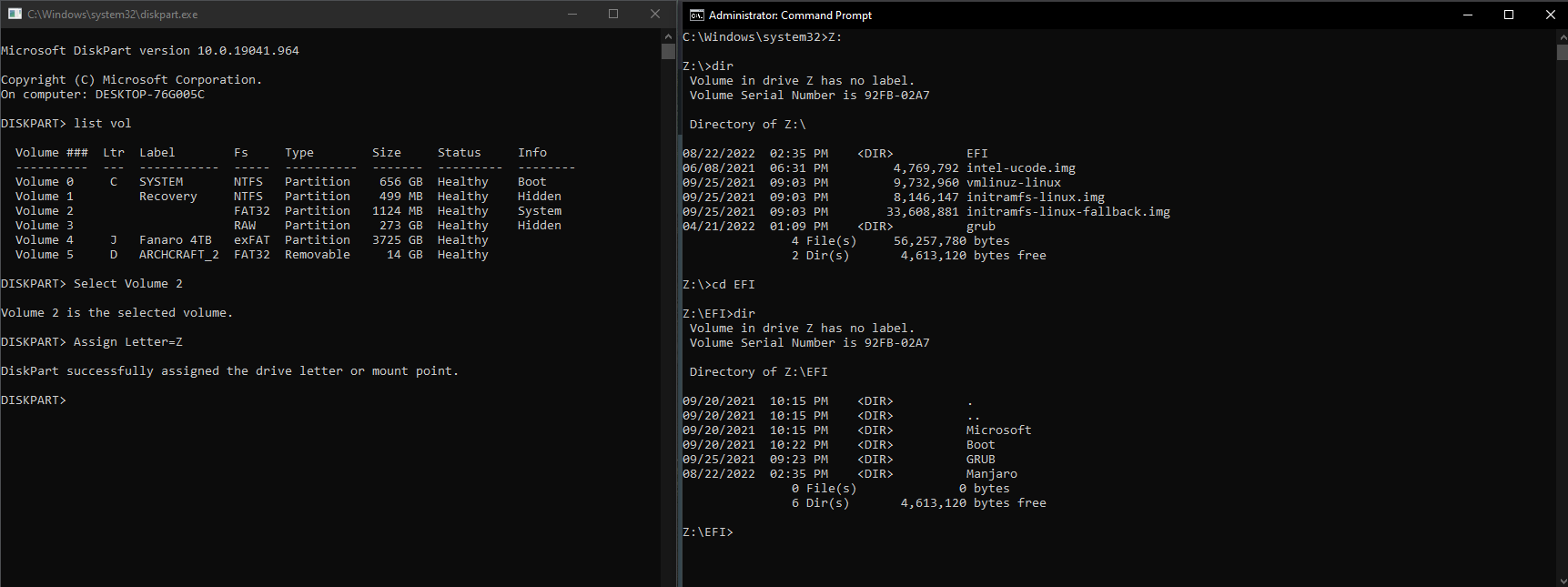
Fortunately, I can still access it if I go into my BIOS menu and choose the top-most way of accessing my NVMe.
Depending on your OS, you have a tiny window during the logo or white screen (iMac users) where you can press the option key or boot menu key. Insert the boot USB for Archcraft When you get to the installation for Archcraft first use Gparted to DELETE the partition again and proceed with install. Manually partitioning Archcraft will ensure your disk is formatted correctly.

I assume you have mounted the EFI partition correctly, and using /boot/efi as mountpoint for bootloader. I'm also dualbooting Archcraft with windows 10, everything is fine here.
