
appsmith
 appsmith copied to clipboard
 appsmithorg
fix: workspace context menu is not permission driven
Description
-
Now even more workspace context menu options are permission driven.
-
Also now when the user doesn't have any Action Creation options in the omnibar,
Create Newoption will be hidden.
Fixes #18643 Fixes #18030 Fixes #18551
Media
- https://www.loom.com/share/d20e0b22eb524c389565a60ef41a8196
- https://www.loom.com/share/27cb577e321449588d0f697f2764ea2f
Type of change
- Bug fix (non-breaking change which fixes an issue)
How Has This Been Tested?
- Manual
Checklist:
Dev activity
- [x] My code follows the style guidelines of this project
- [x] I have performed a self-review of my own code
- [ ] I have commented my code, particularly in hard-to-understand areas
- [ ] I have made corresponding changes to the documentation
- [x] My changes generate no new warnings
- [ ] I have added tests that prove my fix is effective or that my feature works
- [x] New and existing unit tests pass locally with my changes
- [x] PR is being merged under a feature flag

The latest updates on your projects. Learn more about Vercel for Git ↗︎
| Name | Status | Preview | Updated |
|---|---|---|---|
| appsmith | ✅ Ready (Inspect) | Visit Preview | Dec 6, 2022 at 3:28PM (UTC) |
![vercel[bot] avatar](https://avatars.githubusercontent.com/in/8329?v=4 "Published by a pub.dev verified publisher")
Unable to find test scripts. Please add necessary tests to the PR.
![github-actions[bot] avatar](https://avatars.githubusercontent.com/in/15368?v=4 "Published by a pub.dev verified publisher")
Unable to find test scripts. Please add necessary tests to the PR.
Unable to find test scripts. Please add necessary tests to the PR.
Unable to find test scripts. Please add necessary tests to the PR.
Tests running at: https://github.com/appsmithorg/appsmith/actions/runs/3602578329.
Workflow: Appsmith External Integration Test Workflow.
Commit: d285669.
PR: 18642.
Perf tests will be available at https://app.appsmith.com/app/performance-infra-dashboard/pr-details-63465d4789020c7ac296d08d?pr=18642&runId=3602578329_1
Tests running at: https://github.com/appsmithorg/appsmith/actions/runs/3602579336.
Workflow: Appsmith External Integration Test Workflow.
Commit: c896580.
PR: 18642.
Perf tests will be available at https://app.appsmith.com/app/performance-infra-dashboard/pr-details-63465d4789020c7ac296d08d?pr=18642&runId=3602579336_1
Unable to find test scripts. Please add necessary tests to the PR.
Unable to find test scripts. Please add necessary tests to the PR.
Tests running at: https://github.com/appsmithorg/appsmith/actions/runs/3603303285.
Workflow: Appsmith External Integration Test Workflow.
Commit: bbecf3f.
PR: 18642.
Perf tests will be available at https://app.appsmith.com/app/performance-infra-dashboard/pr-details-63465d4789020c7ac296d08d?pr=18642&runId=3603303285_1
Tests running at: https://github.com/appsmithorg/appsmith/actions/runs/3613704608.
Workflow: Appsmith External Integration Test Workflow.
Commit: 89d0271.
PR: 18642.
Perf tests will be available at https://app.appsmith.com/app/performance-infra-dashboard/pr-details-63465d4789020c7ac296d08d?pr=18642&runId=3613704608_1
@berzerkeer Just sharing a loom video here notifying about something I noticed that'll happen when this PR gets merged: https://www.loom.com/share/d20bd7ab520b4d4a9fde44f5216b8e2a

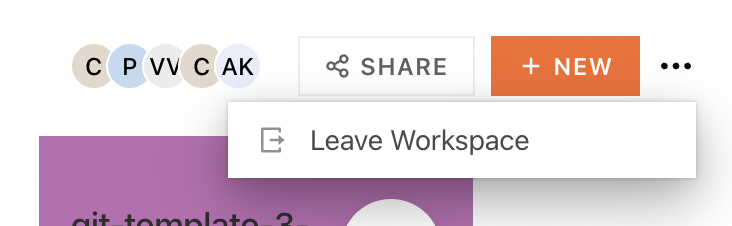
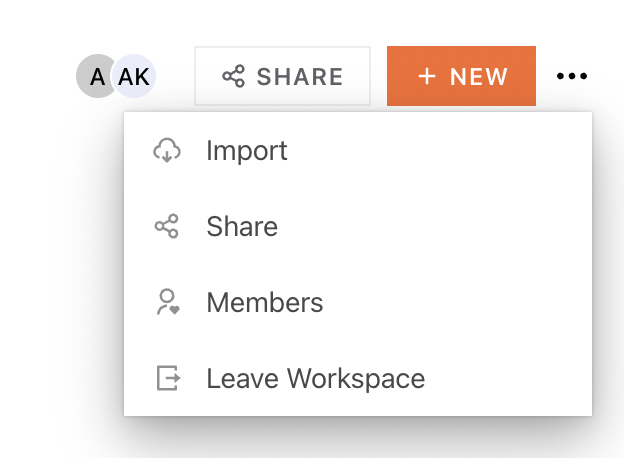
@berzerkeer Just sharing a loom video here notifying about something I noticed that'll happen when this PR gets merged: https://www.loom.com/share/d20bd7ab520b4d4a9fde44f5216b8e2a
@trishaanand So before developer access and app viewer access users were only able to see Leave workspace option in the menu options. Now since I added a permission check to Members ,Share & Leave workspace options which is only visible if the user is a member of the workspace (inviteUsers:workspace) . These things are visible means , the server is sending the user with App viewer Developer who are also members of the workspace the said permission. Is this correct or should it be different ?
@berzerkeer Just sharing a loom video here notifying about something I noticed that'll happen when this PR gets merged: https://www.loom.com/share/d20bd7ab520b4d4a9fde44f5216b8e2a
@trishaanand So before developer access and app viewer access users were only able to see
Leave workspaceoption in the menu options. Now since I added a permission check toMembers,Share&Leave workspaceoptions which is only visible if the user is a member of the workspace (inviteUsers:workspace) . These things are visible means , the server is sending the user withApp viewerDeveloperwho are also members of the workspace the said permission. Is this correct or should it be different ?
No, we would have to revert to bring this back to the existing behaviour. I suggest the following : You must have manage:workspace to see Import (which is AS IS today, correct)? You must have manage:workspace + inviteUsers:workspace to see Members page You must have inviteUsers:workspace permission to leave the workspace
I do not understand why there is a Share option when we give the Share modal right above.

@berzerkeer Just sharing a loom video here notifying about something I noticed that'll happen when this PR gets merged: https://www.loom.com/share/d20bd7ab520b4d4a9fde44f5216b8e2a
@trishaanand So before developer access and app viewer access users were only able to see
Leave workspaceoption in the menu options. Now since I added a permission check toMembers,Share&Leave workspaceoptions which is only visible if the user is a member of the workspace (inviteUsers:workspace) . These things are visible means , the server is sending the user withApp viewerDeveloperwho are also members of the workspace the said permission. Is this correct or should it be different ?No, we would have to revert to bring this back to the existing behaviour. I suggest the following : You must have manage:workspace to see Import (which is AS IS today, correct)? You must have manage:workspace + inviteUsers:workspace to see Members page You must have inviteUsers:workspace permission to leave the workspace
I do not understand why there is a Share option when we give the Share modal right above.
Actually, the other day on call we discussed that Import is basically a create new application. As of today the +New on workspace is behind manage:workspaceApplications hence I used the same permission for Import. Should this be manage:workspace then ? thanks.
Unable to find test scripts. Please add necessary tests to the PR.
Tests running at: https://github.com/appsmithorg/appsmith/actions/runs/3627157507.
Workflow: Appsmith External Integration Test Workflow.
Commit: e062764.
PR: 18642.
Perf tests will be available at https://app.appsmith.com/app/performance-infra-dashboard/pr-details-638dd7cd2913ba43778b915e?pr=18642&runId=3627157507_1
Tests running at: https://github.com/appsmithorg/appsmith/actions/runs/3630913246.
Workflow: Appsmith External Integration Test Workflow.
Commit: b3ed56f.
PR: 18642.
Perf tests will be available at https://app.appsmith.com/app/performance-infra-dashboard/pr-details-638dd7cd2913ba43778b915e?pr=18642&runId=3630913246_1