

 approvals
ApprovalTests is not detecting the proper source path - nUnit / MSTest2
Tryed a simple example, to test the Library, but can't bring it to work.
Using VS2019, NetCore 3.1 with MSTest2 and nUnit both bring the same error. Checked DebugType is full for Test and Library as well. Tried with your simple Exampe:
   [Test]
    public void TestList()
    {
        var names = new[] {"Llewellyn", "James", "Dan", "Jason", "Katrina"};
        Array.Sort(names);
        Approvals.VerifyAll(names, label: "");
    }
Result:
System.Exception :
ApprovalTests is not detecting the proper source path

This is probably because you're missing the following
line in your .csproj file:
	  <DebugType>full</DebugType>
in the
<Project>
  <PropertyGroup>
element.

Solution:
a) Add <DebugType>full</DebugType> to your .csproj file.
b) OR Build->Advanced->DebugInfo to Full
   at ApprovalTests.Namers.StackTraceParsers.StackTraceParser.get_SourcePath() in C:\projects\approvaltests-net\src\ApprovalTests\Namers\StackTraceParsers\StackTraceParser.cs:line 80
   at ApprovalTests.Namers.UnitTestFrameworkNamer.get_SourcePath() in C:\projects\approvaltests-net\src\ApprovalTests\Namers\UnitTestFrameworkNamer.cs:line 28
   at ApprovalTests.Approvers.FileApprover.Approve() in C:\projects\approvaltests-net\src\ApprovalTests\Approvers\FileApprover.cs:line 27
   at ApprovalTests.Core.Approver.Verify(IApprovalApprover approver, IApprovalFailureReporter reporter) in C:\projects\approvaltests-net\src\ApprovalTests\Core\Approver.cs:line 7
   at ApprovalTests.Approvals.Verify(IApprovalApprover approver, IApprovalFailureReporter reporter) in C:\projects\approvaltests-net\src\ApprovalTests\Approvals.cs:line 71
   at ApprovalTests.Approvals.Verify(IApprovalWriter writer, IApprovalNamer namer, IApprovalFailureReporter reporter) in C:\projects\approvaltests-net\src\ApprovalTests\Approvals.cs:line 52
   at ApprovalTests.Approvals.Verify(IApprovalWriter writer) in C:\projects\approvaltests-net\src\ApprovalTests\Approvals.cs:line 124
   at ApprovalTests.Approvals.Verify(Object text) in C:\projects\approvaltests-net\src\ApprovalTests\Approvals.cs:line 171
   at ApprovalTestsExcel.NUnitApprovalTests.ReadExcelFilesTests.CWPStatusTypesAreExcpected() in D:\Work\ApprovalTestsExcel\tests\ApprovalTestsExcel.NUnitApprovalTests\ReadExcelFilesTests.cs:line 32
To get the CallStack, which seems to be used by the Parser, i used the following code, maybe the Information helps to figure out the problem:
            ThreadLocal<Caller> currentCaller = new ThreadLocal<Caller>();
            currentCaller.Value = new Caller();
            Console.WriteLine("---------------");
            Console.WriteLine(currentCaller.Value.StackTrace);
            Console.WriteLine("-------------");
Result (example):
---------------
at ApprovalUtilities.CallStack.Caller..ctor() in C:\projects\approvaltests-net\src\ApprovalUtilities\CallStack\Caller.cs:line 15
   at ApprovalTestsExcel.NUnitApprovalTests.ReadExcelFilesTests.CWPStatusTypesAreExcpected() in D:\Work\ApprovalTestsExcel\tests\ApprovalTestsExcel.NUnitApprovalTests\ReadExcelFilesTests.cs:line 19
   at System.RuntimeMethodHandle.InvokeMethod(Object target, Object[] arguments, Signature sig, Boolean constructor, Boolean wrapExceptions)
   at System.Reflection.RuntimeMethodInfo.Invoke(Object obj, BindingFlags invokeAttr, Binder binder, Object[] parameters, CultureInfo culture)
   at System.Reflection.MethodBase.Invoke(Object obj, Object[] parameters)
   at NUnit.Framework.Internal.Reflect.InvokeMethod(MethodInfo method, Object fixture, Object[] args)
   at NUnit.Framework.Internal.MethodWrapper.Invoke(Object fixture, Object[] args)
   at NUnit.Framework.Internal.Commands.TestMethodCommand.InvokeTestMethod(TestExecutionContext context)
   at NUnit.Framework.Internal.Commands.TestMethodCommand.RunTestMethod(TestExecutionContext context)
   at NUnit.Framework.Internal.Commands.TestMethodCommand.Execute(TestExecutionContext context)
   at NUnit.Framework.Internal.Execution.SimpleWorkItem.PerformWork()
   at NUnit.Framework.Internal.Execution.WorkItem.RunOnCurrentThread()
   at NUnit.Framework.Internal.Execution.WorkItem.Execute()
   at NUnit.Framework.Internal.Execution.ParallelWorkItemDispatcher.Dispatch(WorkItem work, ParallelExecutionStrategy strategy)
   at NUnit.Framework.Internal.Execution.ParallelWorkItemDispatcher.Dispatch(WorkItem work)
   at NUnit.Framework.Internal.Execution.CompositeWorkItem.RunChildren()
   at NUnit.Framework.Internal.Execution.CompositeWorkItem.PerformWork()
   at NUnit.Framework.Internal.Execution.WorkItem.RunOnCurrentThread()
   at NUnit.Framework.Internal.Execution.WorkItem.Execute()
   at NUnit.Framework.Internal.Execution.TestWorker.TestWorkerThreadProc()
   at System.Threading.ThreadHelper.ThreadStart_Context(Object state)
   at System.Threading.ExecutionContext.RunInternal(ExecutionContext executionContext, ContextCallback callback, Object state)
   at System.Threading.ThreadHelper.ThreadStart()

-------------
The Path (D:\Work\ApprovalTestsExcel\tests\ApprovalTestsExcel.NUnitApprovalTests\ReadExcelFilesTests.cs) of the current class seems to be visible.
Any suggestions?

Note: i've downloaded the Source Code, copied only the project ApprovalTests.MSTest, removed project references, added Nuget Package, and tested it again, it works.
So there must be some Project Specific Problems with my first Test, i will investigate if i can figure out what the source is.
Thanks to the running example from ApprovalTests.MSTest, i could figure out why my project wasn't running by trial and error manipulations.
However i can't understand why it is like that (it seems not to be a documented issue?)
The Main Issue was the missing References to ModuleInit.Fody
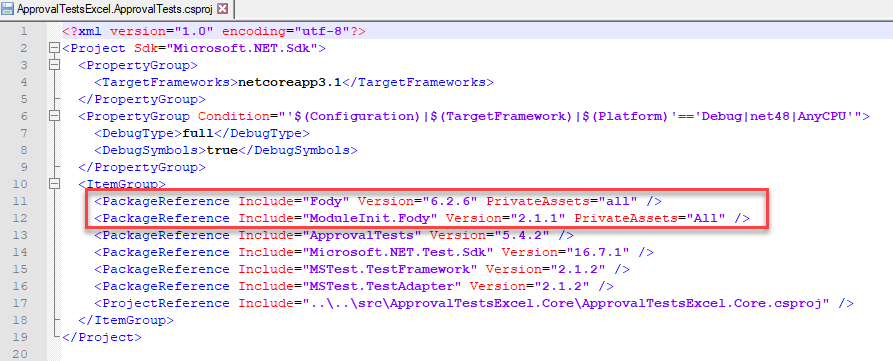
And the Class "ModuleInitializer":
using ApprovalTests.Namers.StackTraceParsers;

public static class ModuleInitializer
{
    public static void Initialize()
    {
        AttributeStackTraceParser.FileInfoIsValidFilter = caller => true;
    }
}
can you upload your simple example to a github repository so i can have a look at it

I've uploaded here: https://github.com/farangkao/ApprovalTests-Problem
Non Working Example on Branch "master" Working Version on branch "workaround"
@isidore can confirm this is a bug. no idea why yet. do you have time to look into it?
Additional Info: I managed to add ApprovalTests without the modifications above to an existing larger Project and it worked right on. I tried to find any differences (like MSTest/Framework Version etc.) ,but couldn't find a reason why my Example Project is not working without the Workaround.
i recommend moving to https://github.com/VerifyTests/Verify since it does not rely on stack trace parsing