
terraform-provider-appgatesdp
 terraform-provider-appgatesdp copied to clipboard
 appgate
appgatesdp provider configuration fails on Terraform Cloud/Enterprise
When running identical terraform code to deploy a gateways in Terraform Enterprise/Cloud workspace with remote execution mode we get failures authenticating to the controller with any appgatesdp_* resources. When we change to local execution mode, it works just fine. We've noticed some of the documented reference designs makes heavy use of files to pass information in and out of part of the different modules and for the configuration. We've had to remove the use of file based configuration in preference for ENV based configuration of the provider. I wonder if the provide itself is doing something under the hood that is failing for similar reasons.
Terraform CLI, Terraform appgatesdp Provider Version, and Appgate Appliance version(s)
terraform cli: v1.3.3 terraform-provider-appgatesdp: appgate/appgatesdp v1.0.2 appgate appliance version: d16f3f9a
Affected Resource(s)
- appgatesdp_XXXXX

Hello,
I personally don't have any experience with terraform cloud, so I can't give any direct advice for running within that environment.
Using environment variables is of course a viable option.
I suppose that you refer to sdp-tf-reference-architecture with the use of config file, The reason behind why we did that, was a hack around how terraform internal works, So I could do a proper depends_on chain when the first controller is created and ready.
This can be considered as a special case if you want to have the primary controller in the same state file as the rest of the resources.
Another way to solve this is could be:
- Create the first/primary controller in a separate module in a separate state file.
- Create additional appgatesdp resource in another state file using environment variable to authenticate, Run this state after the first one has finished.

We did move to using the environment variables and it still won't work. The problem occurs as the module is processing data sources, not initializing the provider.
From: Daniel Nilsson @.> Sent: Monday, November 21, 2022 2:53:54 AM To: appgate/terraform-provider-appgatesdp @.> Cc: Josiah Ritchie @.>; Author @.> Subject: Re: [appgate/terraform-provider-appgatesdp] appgatesdp provider configuration fails on Terraform Cloud/Enterprise (Issue #264)
[External: This message originated outside SOLUTE. Click links or open attachments only if you recognize the sender and know the contents are safe.]
Hello,
I personally don't have any experience with terraform cloud, so I can't give any direct advice for running within that environment.
Using environment variableshttps://registry.terraform.io/providers/appgate/appgatesdp/latest/docs#environment-variables is of course a viable option.
I suppose that you refer to sdp-tf-reference-architecturehttps://github.com/appgate/sdp-tf-reference-architecture with the use of config file, The reason behind why we did that, was a hack around how terraform internal works, So I could do a proper depends_on chain when the first controller is created and ready.
This can be considered as a special case if you want to have the primary controller in the same state file as the rest of the resources.
Another way to solve this is could be:
- Create the first/primary controller in a separate module in a separate state file.
- Create additional appgatesdp resource in another state file using environment variable to authenticate, Run this state after the first one has finished.
— Reply to this email directly, view it on GitHubhttps://github.com/appgate/terraform-provider-appgatesdp/issues/264#issuecomment-1321601928, or unsubscribehttps://github.com/notifications/unsubscribe-auth/AAA5JFKV5VU7ACXCWDWV5PDWJMTBFANCNFSM6AAAAAASCU2HAA. You are receiving this because you authored the thread.Message ID: @.***>
I see. If you don't mind, could you compose a minimum viable example of how you setup your dependencies between resources, and/or logs of terraform when running apply so that I can reproduce this.
for verbose logs you can add prepend the TF_LOG environment variable before running apply. for example.
export TF_LOG=DEBUG
terraform apply
Yeah, we basically just used the autoscaling ref architecture and moved it to using environment variables: https://github.com/appgate/sdp-tf-reference-architecture/tree/main/deployment/aws/autoscaling-gateways
I use this code the environment variables "AWS_ACCESS_KEY_ID", "AWS_SECRET_ACCESS_KEY", "AWS_REGION" APPGATE_INSECURE", "APPGATE_PASSWORD", "APPGATE_PROVIDER", "APPGATE_ADDRESS" and "APPGATE_USERNAME" set. Terraform Enterprise is set to "Remote Mode" meaning it runs the plan within its context.
terraform {
  required_providers {
    aws    = ">= 2.41"
    random = ">= 2.0"
    null   = ">= 2.0"
    appgatesdp = {
      source = "appgate/appgatesdp"
      version = "1.0.2"
    }
  }
}

data "appgatesdp_identity_provider" "local_identity_provider" {
  identity_provider_name = "local"
}
I have the APPGATE_PASSWORD set incorrectly because I don't have that available. This returns the following response.
$ terraform init
...
$ terraform plan
data.appgatesdp_identity_provider.local_identity_provider: Reading...
╷
│ Error: 401 Unauthorized
│
│   with data.appgatesdp_identity_provider.local_identity_provider,
│   on main.tf line 21, in data "appgatesdp_identity_provider" "local_identity_provider":
│   21: data "appgatesdp_identity_provider" "local_identity_provider" {
│
╵
When running a plan in Remote mode I get this consistent with what I saw in failure on my more complex setup.
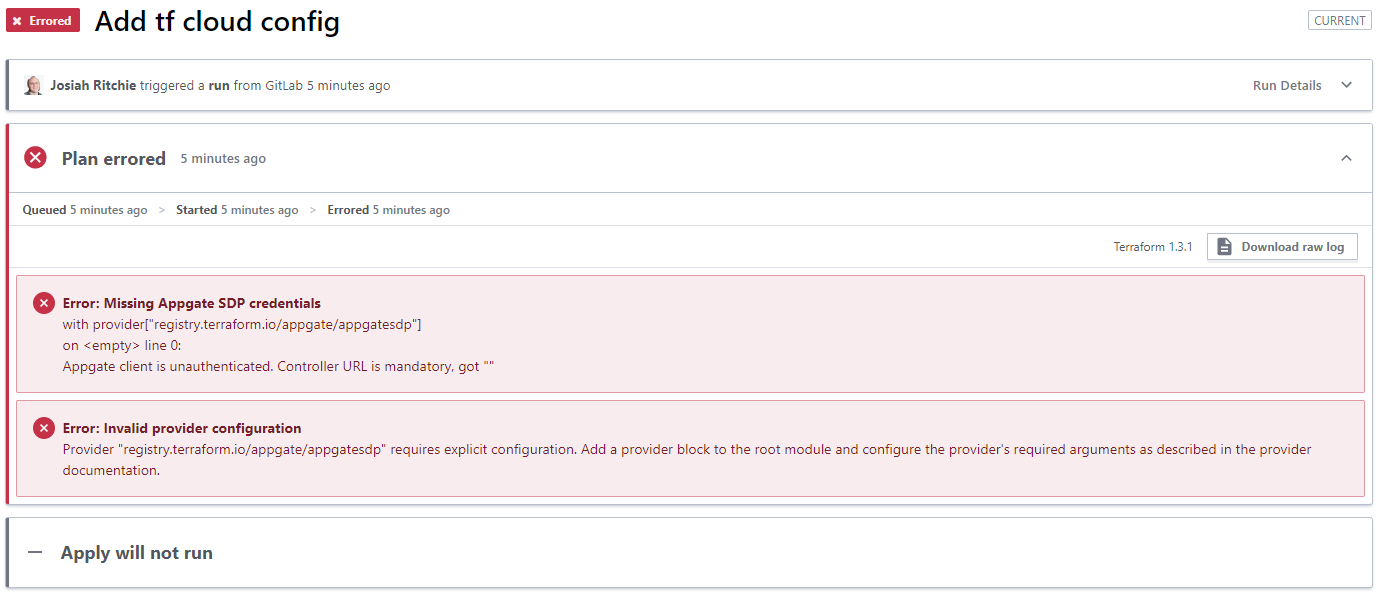
The only difference I'm aware of outside the running environment is that I have the APPGATE_PASSWORD set correctly in Terraform Enterprise so I'd expect more success, not less.