

 apinf
apinf
Indicate user that values added in the fields are saved automatically
In usability testing, participant was checking the sections back and forth to see if the added values remained there. At one point s/he was looking for save button in a section. After s/he reloaded the page, participant thought the values have been cleared off. It is not clear to user that the contents added in the fields are saved automatically and would be cleared only if Clear All button is pressed. So some info tip or s-alert should give this feedback.

@bajiat : can you give a decision about implementing this solution. For a positive decision, I'd create an implementation issue.
Is this still something we should implement? It would need to be very non-intrusive, as the document is saved pretty much instantly every time the user types a letter.

The about page now (after #302) tells that local saving is automatic and instant.
The about page now (after #302) tells that local saving is automatic and instant.
If it appears as a text animation each time after user puts some input, then I think we are good to go. We can close this issue.

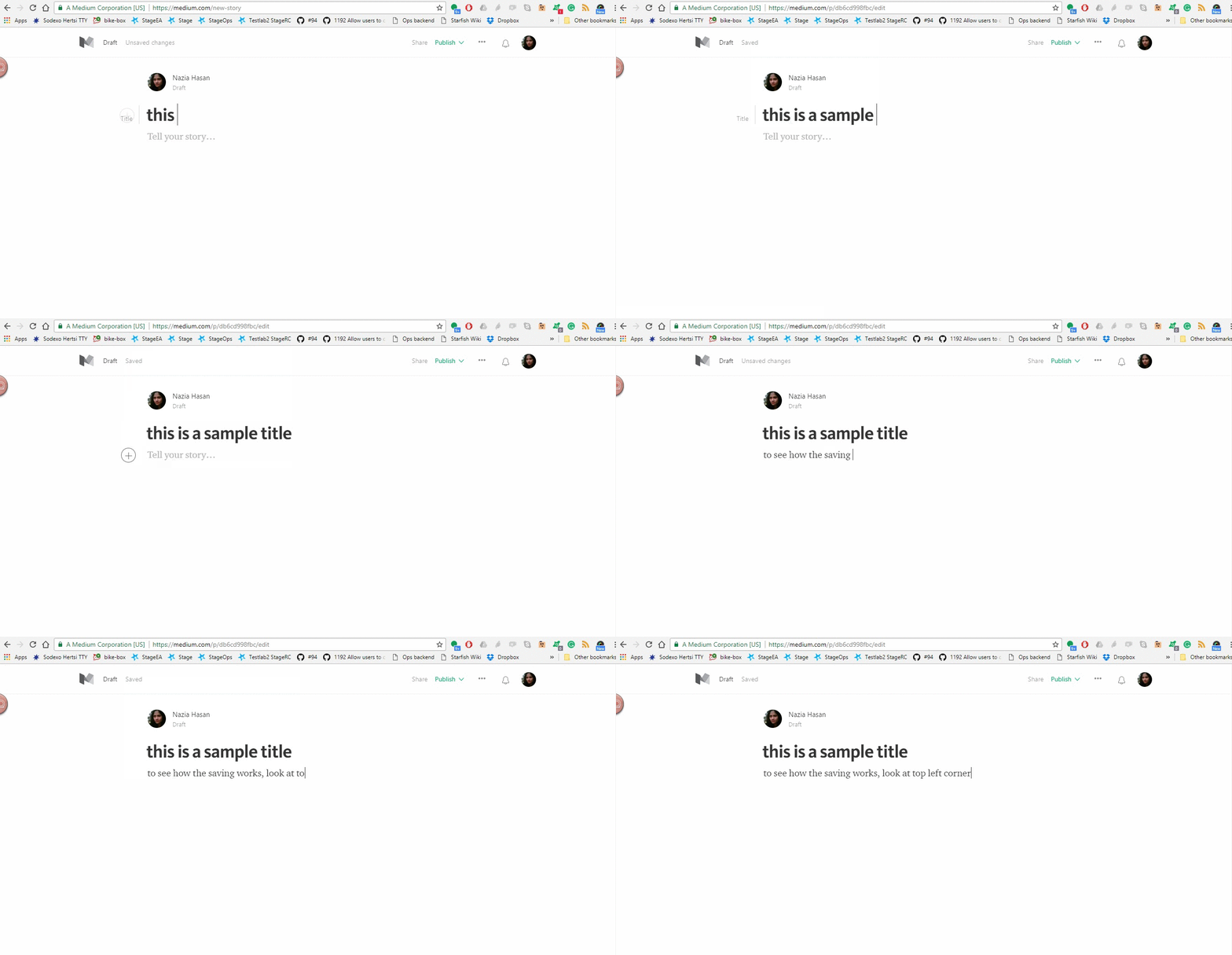
See in this example. Whenever I am typing something, a text in top left corner is showing the state. It would be good to have something like this, preferably at some corner of the view.
@Nazarah That would look kind of ridiculous because our saving is local, and so it takes under 0.1s per save. If you think it's a needed feature then a wireframe would be good.
Let's do a user testing first. We can always work on it if users feel they don't know if the document gets saved automatically. Adding a "low priority" label in this issue.