

 apache
Make an http request to the "Download as Image" button on the Dashboard page
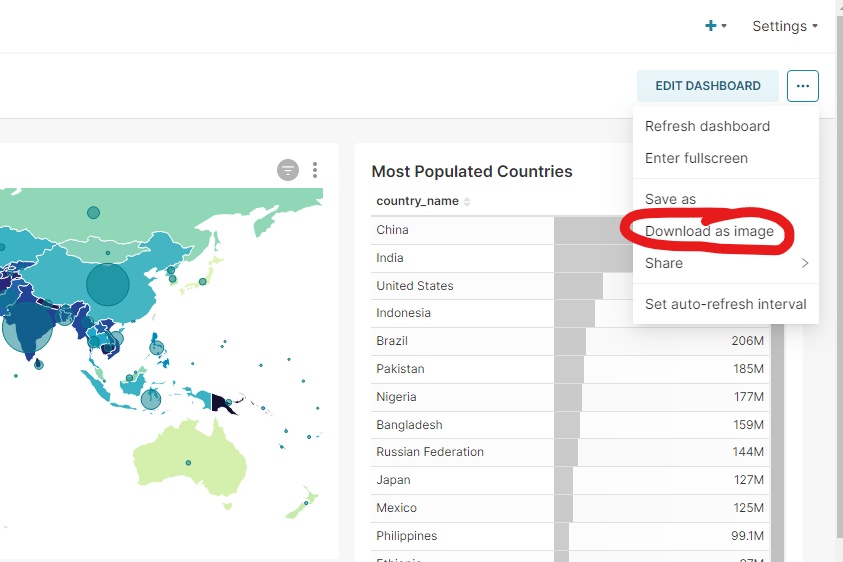
Hello contributors C: is it currently possible to send an HTTP request to trigger the behavior that the "Download As Image" button has below? And if that feature is not currently available, could we possibly add that?
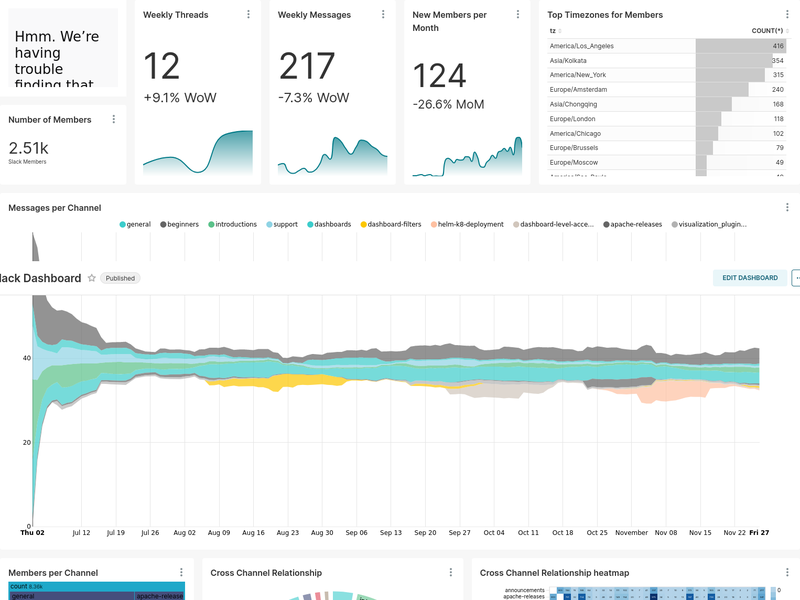
I've successfully downloaded chart screenshots using the Superset API. However, for my use case, I would prefer to keep the layout of the dashboard in the exported image. I've also successfully downloaded dashboard thumbnails using the API (and setting up Celery/Redis) but the resolution on these images isn't great and it appears to cut off the bottom of the dashboard (unless I set it up wrong; feel free to let me know).
On the other hand, the "Download As Image" button does exactly what I need! It seems to adapt to the length of the dashboard and the resolution is good. I can't seem to find a link to it anywhere though; I've even tried monitoring the traffic between my server and client but I still haven't found a way to trigger that button with a URL or a raw HTTP request C: Thank you guys so much for your help and time!

In case anyone's wondering, I ended up just making my own custom Celery task and using Puppeteer to navigate to all of my dashboards and take screenshots of them. Apparently, all Superset is really doing with this button is taking the DOM elements on the current webpage and using the dom-to-image-more (which itself uses browser functions on the client side) to download the dashboard as an image.
Hello contributors C: is it currently possible to send an HTTP request to trigger the behavior that the "Download As Image" button has below? And if that feature is not currently available, could we possibly add that?
I've successfully downloaded chart screenshots using the Superset API. However, for my use case, I would prefer to keep the layout of the dashboard in the exported image. I've also successfully downloaded dashboard thumbnails using the API (and setting up Celery/Redis) but the resolution on these images isn't great and it appears to cut off the bottom of the dashboard (unless I set it up wrong; feel free to let me know).
On the other hand, the "Download As Image" button does exactly what I need! It seems to adapt to the length of the dashboard and the resolution is good. I can't seem to find a link to it anywhere though; I've even tried monitoring the traffic between my server and client but I still haven't found a way to trigger that button with a URL or a raw HTTP request C: Thank you guys so much for your help and time!
Is it possible for you to share your configuration for setting up the cache and make the thumbnails and charts configuration works properly ? I am struggling at this, and the documentation is not quite clear about how to do it.
I have the same UC of extracting the dashboard into an image, so if you are not satisfied with your solution, I'll end up creating specific tasks to take those screenshots too ... Thanks for your input !

Sure @Chamawix! The only thing I needed to change to set up thumbnails and chart screenshots was the superset_config.py file. Here it is:
import logging
import os
from datetime import timedelta
from typing import Optional

from cachelib.file import FileSystemCache
from celery.schedules import crontab
from superset.superset_typing import CacheConfig

logger = logging.getLogger()


def get_env_variable(var_name: str, default: Optional[str] = None) -> str:
    """Get the environment variable or raise exception."""
    try:
        return os.environ[var_name]
    except KeyError:
        if default is not None:
            return default
        else:
            error_msg = "The environment variable {} was missing, abort...".format(
                var_name
            )
            raise EnvironmentError(error_msg)


DATABASE_DIALECT = get_env_variable("DATABASE_DIALECT")
DATABASE_USER = get_env_variable("DATABASE_USER")
DATABASE_PASSWORD = get_env_variable("DATABASE_PASSWORD")
DATABASE_HOST = get_env_variable("DATABASE_HOST")
DATABASE_PORT = get_env_variable("DATABASE_PORT")
DATABASE_DB = get_env_variable("DATABASE_DB")

# The SQLAlchemy connection string.
SQLALCHEMY_DATABASE_URI = "%s://%s:%s@%s:%s/%s" % (
    DATABASE_DIALECT,
    DATABASE_USER,
    DATABASE_PASSWORD,
    DATABASE_HOST,
    DATABASE_PORT,
    DATABASE_DB,
)

REDIS_HOST = get_env_variable("REDIS_HOST")
REDIS_PORT = get_env_variable("REDIS_PORT")
REDIS_CELERY_DB = get_env_variable("REDIS_CELERY_DB", "0")
REDIS_RESULTS_DB = get_env_variable("REDIS_RESULTS_DB", "1")

CACHE_DEFAULT_TIMEOUT = int(timedelta(days=1).total_seconds())
CACHE_CONFIG: CacheConfig = {
    'CACHE_TYPE': 'RedisCache',
    'CACHE_DEFAULT_TIMEOUT': CACHE_DEFAULT_TIMEOUT,
    'CACHE_KEY_PREFIX': 'meta_',
    'CACHE_REDIS_URL': f'redis://{REDIS_HOST}:{REDIS_PORT}/2'
}
DATA_CACHE_CONFIG: CacheConfig = {
    'CACHE_TYPE': 'RedisCache',
    'CACHE_DEFAULT_TIMEOUT': CACHE_DEFAULT_TIMEOUT,
    'CACHE_KEY_PREFIX': 'data_',
    'CACHE_REDIS_URL': f'redis://{REDIS_HOST}:{REDIS_PORT}/3'
}
# RESULTS_BACKEND = FileSyst  emCache("/app/superset_home/sqllab")
RESULTS_BACKEND: CacheConfig = {
    'CACHE_TYPE': 'RedisCache',
    'CACHE_DEFAULT_TIMEOUT': CACHE_DEFAULT_TIMEOUT,
    'CACHE_KEY_PREFIX': 'results_',
    'CACHE_REDIS_URL': f'redis://{REDIS_HOST}:{REDIS_PORT}/{REDIS_RESULTS_DB}'
}
FILTER_STATE_CACHE_CONFIG: CacheConfig = {
    'CACHE_TYPE': 'RedisCache',
    'CACHE_DEFAULT_TIMEOUT': CACHE_DEFAULT_TIMEOUT,
    'CACHE_KEY_PREFIX': 'filter_',
    'CACHE_REDIS_URL': f'redis://{REDIS_HOST}:{REDIS_PORT}/4'
}
EXPLORE_FORM_DATA_CACHE_CONFIG: CacheConfig = {
    'CACHE_TYPE': 'RedisCache',
    'CACHE_DEFAULT_TIMEOUT': CACHE_DEFAULT_TIMEOUT,
    'CACHE_KEY_PREFIX': 'explore_',
    'CACHE_REDIS_URL': f'redis://{REDIS_HOST}:{REDIS_PORT}/5'
}
THUMBNAIL_SELENIUM_USER = "admin"
THUMBNAIL_CACHE_CONFIG: CacheConfig = {
    'CACHE_TYPE': 'RedisCache',
    'CACHE_DEFAULT_TIMEOUT': CACHE_DEFAULT_TIMEOUT,
    'CACHE_KEY_PREFIX': 'thumbnail_',
    'CACHE_REDIS_URL': f'redis://{REDIS_HOST}:{REDIS_PORT}/6'
}


class CeleryConfig(object):
    BROKER_URL = f"redis://{REDIS_HOST}:{REDIS_PORT}/{REDIS_CELERY_DB}"
    CELERY_IMPORTS = ("superset.sql_lab", "superset.tasks", 'superset.tasks.thumbnails')
    CELERY_RESULT_BACKEND = f"redis://{REDIS_HOST}:{REDIS_PORT}/{REDIS_RESULTS_DB}"
    CELERYD_LOG_LEVEL = "DEBUG"
    CELERYD_CONCURRENCY = 10
    CELERYD_PREFETCH_MULTIPLIER = 1
    CELERY_ACKS_LATE = False
    CELERYBEAT_SCHEDULE = {}


CELERY_CONFIG = CeleryConfig

FEATURE_FLAGS = {"THUMBNAILS": True, "THUMBNAILS_SQLA_LISTENERS": True, "ENABLE_TEMPLATE_PROCESSING": True, }
ALERT_REPORTS_NOTIFICATION_DRY_RUN = True
WEBDRIVER_BASEURL = "http://172.17.0.1:8088"
# The base URL for the email report hyperlinks.
WEBDRIVER_BASEURL_USER_FRIENDLY = WEBDRIVER_BASEURL
SUPERSET_WEBSERVER_TIMEOUT = int(timedelta(minutes=5).total_seconds())

SQLLAB_CTAS_NO_LIMIT = True

#
# Optionally import superset_config_docker.py (which will have been included on
# the PYTHONPATH) in order to allow for local settings to be overridden
#
try:
    import superset_config_docker
    from superset_config_docker import *  # noqa

    logger.info(
        f"Loaded your Docker configuration at " f"[{superset_config_docker.__file__}]"
    )
except ImportError:
    logger.info("Using default Docker config...")
I cloned the GitHub repo and am running it with Docker Compose in production mode. So I'm using the command docker compose -f docker-compose-non-dev.yml up in the root directory. Let me know if you have any other questions.
Edit: I should also mention I ran this on Ubuntu. You may need to change the webdriver url if you're running this in Mac or Windows.
@mennymendoza Thanks for your input and for sharing, I saw what I lacked in my previous conf, it was based on another issue information so was not sure what went wrong... I succeeded retrieving thumbnail from an example dashboard thank to you ! Thanks a lot !
I just changed the WEBDRIVER_BASEURL = "http://172.17.0.1:8088" to -> WEBDRIVER_BASEURL = "http://superset:8088" for it to work on my setup.
I used like you the docker method for launching superset, through I download the version a few months ago.
Did I miss the information from the documentation ? Or you succeeded to do it by yourself ?
Closing this as stale since it's been silent for so long, and we're trying to steer toward a more actionable Issues backlog. If people are still encountering this in current versions (currently 3.x) please open a new Issue or a PR to address the problem.
