

 apache
Change HTML NavigatorStructureItem class=myclass to .myclass and id=myid to #id to reduce noise
and make it cleaner and shorter
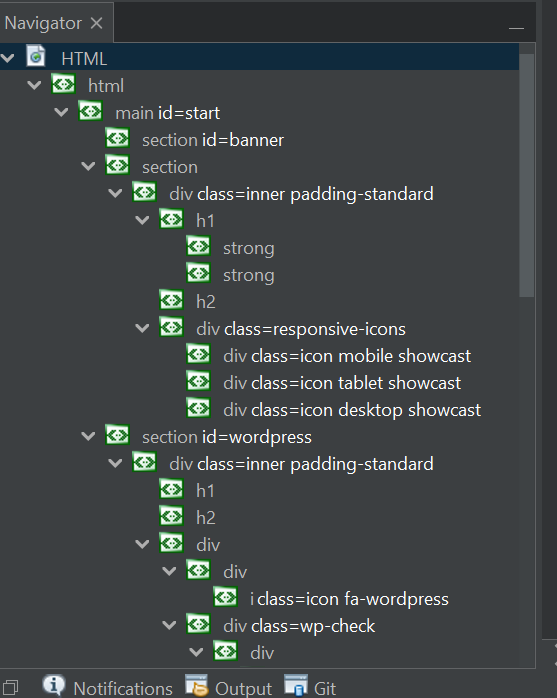
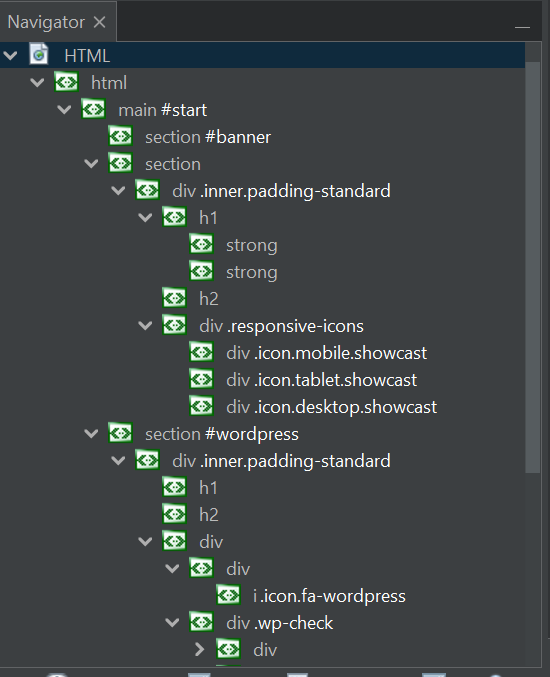
Inside the navigator for HTML files you see the elements with their IDs and Classes. NetBeans showed them as id=... and class=... ... .... We don't need this that long. Web developers just know the CSS selectors which are # for IDs and . for Classes. So I changed those 3 things:
- Changed
div id=myidtodiv #myid - Changed
div class=myclasstodiv .myclass - Changed
div class=my multi classtodiv .my.multi.class
Before:
After:
Also, if you want, I can add an option for this but IMHO we don't need one.
- To see the specific tasks where the Asana app for GitHub is being used, see below:
- https://app.asana.com/0/0/1205374986397084

I prefer div .my .multi .class than div .my.multi.class. (Each class is hard to see...)

The .my.multi.class represents the same CSS selector for this tag with multi classes. Showing .my .multi .class is a whole different selector. I also think about to remove the space between the tag and the classes/id so that we will have div.my.multi.class. I don't want to show developers smth which is not 1to1 representation.
Ah, I see. OK :) You should write the URL for the documentation about it. Thanks!
Ah, I see. OK :) You should write the URL for the documentation about it. Thanks!
What do you mean with the URL for documentation? You mean I should update a documentation in NetBeans somewhere?
You mean I should update a documentation in NetBeans somewhere?
No. I meant the documentation of CSS/HTML. e.g. somewhere on https://developer.mozilla.org/en-US/docs/Web/CSS Maybe, class selector part?
All of these examples could be valid, if NetBeans would handle the parsing and interpreting the languages to know the correct classes. With this example class="myclass <?php echo 'test'; ?>" the navigator shows this: div.myclass.@@@ old one: div class=myclass @@@ so guess this will also be the thing for JSF and JSP. So dynamically added classes/ids are always a problem but this shouldn't be part of the navigator at all. Should it?
Yes I agree, that it already looks broken. That does not change my opinion about the change. I suspect somewhere in the HTML Support some intelligence detects external languages and replaces them with a filler. But what happens when you switch to an unsupported language (PHP with square brackets instead of curly ones?).

Ok, lemme find a way to handle this. As I tested it with this php example, the output here is @@@ I will check the sources further whether they are differences and if there are no other differences like everything what is not correct is @@@ I can just remove @@@ from the list. What do you think? If this thing is coming, we know that there are unsupported stuff to show, so remove it.
VS Code shows not @@@ it just removes it or not handle it. How PHPStorm or WebStorm handles it, I don't know it yet, but can check this to get an idea what they do. If the @@@ is an generic way of what NetBeans already does, I can use this.
@matthiasblaesing I added a method to remove the generic @@@ pattern, add . and join them all together.
I tested with this tags:
<div style="height:50px" aria-hidden="true" class="wp-block-spacer   "></div> <!-- Output: div.wp-block-spacer -->
<div style="height:50px" aria-hidden="true" class="     wp-block-spacer   "></div> <!-- Output: div.wp-block-spacer -->
<h1 class="<?=$headerclass?> <?=$additionalclasses?>"></h1> <!-- Output: h1 - only in a PHP file -->
<h1 class="<?=$headerclass?> <?=$additionalclasses?>"></h1> <!-- Output: h1 - only in a PHP file -->
<h1 class="test <?=$additionalclasses?> tester"></h1> <!-- Output: h1.test.tester - only in a PHP file -->
<h1 class="test {{smth}} tester"></h1> <!-- Output: h1.test.{{smth}}.tester -->
<h1 class="test <whatever> tester"></h1> <!-- Output: h1.test.<whatever>.tester -->
Yes there probably more syntaxes as you already mentioned. I also tested JSF and JSP but the result seems okish for me. It was not ideal before and this is not what I wanted to change. This should be another topic IMHO. In case of using streams, I need to change the source to 1.8.
Please lemme know what you think.
Here is a sample that might come from reality (we have several similar examples in our codebase):
Before:

After:

While I admit, that the original rendering is not optimal, from my perspective we gain little and reduce the usability.
Yeah maybe, so maybe we should change this to a discussion. Will have a look into WebStorm. I know how VS Code does it, and it is similar to my solution: .{{.user.?.user.:.'smth'.}} So yes I aggree that it is not optimal.
What about make the shortening for just simple cases - keyword-like classes and IDs ? This should work OK for web content writer case that does not use templating (that) much

What about make the shortening for just simple cases - keyword-like classes and IDs ? This should work OK for web content writer case that does not use templating (that) much
What do you think how the solution will look like? Just remove all what is not simple string?