

 apache
Request to fix editor frozen issue to improve the performance of〈Go to Declaration〉feature
Apache NetBeans version
Apache NetBeans 13
What happened
Hi
I work as a web developer using html.css.javascript and php. I would like you to request to fix this issue to improve the performance of netbeans13.
When i use〈Go to Declaration〉feature that Netbenas13 is often frozen and editor is incapable of operation, the performance of netbeans 13 is much lower than that of netbeans 12.6.
Netbeans13 and 12.6 all i use default settings, and no installed any extra plugins, these are the videos I made:
- netbeans13 frozen: (https://user-images.githubusercontent.com/137764/161173612-29881d36-369b-43fe-9412-7be27b64d404.mp4)
- netbeans12.6 no frozen: (https://user-images.githubusercontent.com/137764/161171064-f133e2df-5834-4ad3-8511-7f362724acfa.mp4)
Tks.
How to reproduce
step1. Use ctrl+mouse click to go Category_model declaration.
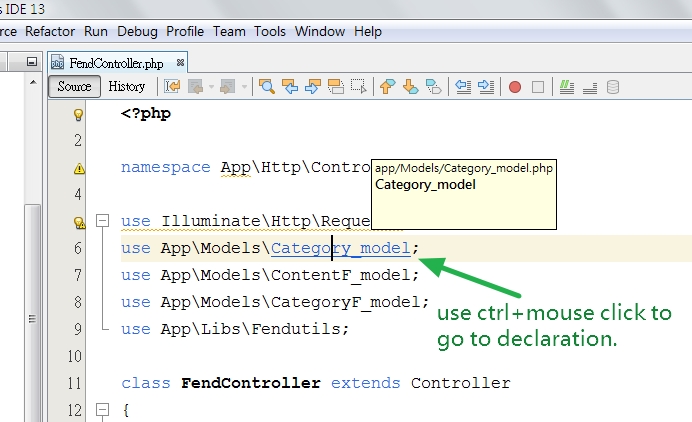
step2. It will change to Category_model
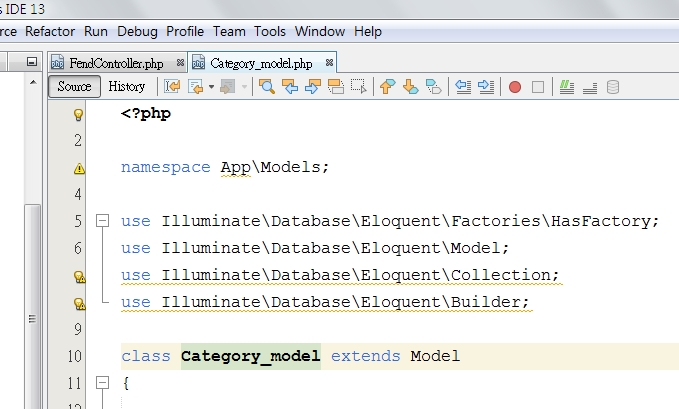
step3. After Category_model opening , go back FendController from there immediately. Then using ctrl+mouse click to go Controller declaration, but editor is often frozen and incapable of operation until 10s later.

Did this work correctly in an earlier version?
Apache NetBeans 12.6
Operating System
windows10
JDK
java 8
Apache NetBeans packaging
Apache NetBeans binary zip
Anything else
No response
Are you willing to submit a pull request?
No
Code of Conduct
Yes


This is an example : https://github.com/oceanfish567/oceanfish0416/tree/master
@rfrkk Umm, I can't reproduce it in my PC (although it's Ubuntu). Please try deleting your cache directory.
@junichi11 I delete netbeans 13 cache (C:\Users\XXXX\AppData\Local\NetBeans\Cache\13), and also delete netbeans 12.6. But the problem still exists, neabenas forzen that cpu just usage 20%.
I just use the old version 12.6, that's ok. tks.
I see you still using JDK 8. Is it possible for you that you can try out JDK 11 or maybe 17? I have Win 10, NB 13 and JDK 14. Didn't test your project with my WordPress project, I also can't reproduce it. Please test it with a newer JDK and let us know whether it sill exists or not :)

@Chris2011 Thank you for your assistance. First, I re-downloaded nb13 (Binaries: netbeans-13-bin.zip (SHA-512, PGP ASC).
Second, I removed all nb cache and java sdk 8.
Third, I installed java jdk 17 and started nb13, but the test result still freezes in "Go to Declaration".
Finally, I started nb12.6, and the test results all worked smoothly. I guess it may be that the specifications of my laptop are old computers in 2015, or the architecture of nb13 is very different from nb12.6, which is the result? :)
I also noticed a considerable slowdown since NB13, but I tried it with a large project (close to 40k classes). NB12.6 handled it a little better, but still quite slowly. "Go to Declaration" is generally not usable in this situation, it works sometimes, but more often it takes a lot of time to respond (sometimes freezing the UI) or shows 'Cannot refactor' message box right away. Upgrading JDK (currently OpenJDK 18 on Win10) didn't seem to make any difference 😥

I agree, NetBeans is very slow at this and similar tasks, like autocomplete for classes (probably same reason, takes too long to resolve it).
If your project contains symlinks that could cause loops make sure to add them to ignored paths in your project config. Otherwise a temporary solution would be to increase your cache size (it makes the IDE usable, but still slow): https://stackoverflow.com/questions/28811246/netbeans-background-scanning-projects-takes-too-long/31869064#31869064
I think there are 2 problems here:
- Big projects don't fit in cache
- The code responsible for resolving classes is slow and needs refactoring

Otherwise a temporary solution would be to increase your cache size (it makes the IDE usable, but still slow): https://stackoverflow.com/questions/28811246/netbeans-background-scanning-projects-takes-too-long/31869064#31869064
I would like to point out that the linked post is from year 2015 and the example provided sets max heap size to 2 GB, which nowadays may be actually lower than default. This post here describes how to find out the default settings on your system: https://stackoverflow.com/a/13871564
Huh. You're right. In my case 4GB is the default max size.
That means increasing the InitialHeapSize must be helping in my case (default 256mb).
Please check what is actually causing the freezing.
Because 〈Go to Declaration〉 is a part of the mouse-right-click drop down menu, and it is also can be called with 〈Ctrl+B〉. Neither of these ever frozen my system. Only 〈Ctrl + hover〉 causing the freezing. The〈ctrl + mouse click〉is difficult to separate from 〈Ctrl + hover〉 but I'm convinced that 〈ctrl+mouse click〉 is not causing it either.
I believe that the methods header definition in a form of a tooltip is a cause for freezing.
It may be a reason why @junichi11 could not reproduce it.
So there may be a few ways to go from this point
a) this particular bug is about 〈Go to Declaration〉 , it is different from 〈Ctrl + hover〉
in this case
a.1) it can be fixed already at some point - then it can be closed now
a.2) it still exists but neither me no @junichi11 can reproduce it - then it needs more details
b) This bug was never about the 〈Go to Declaration〉 but was always about the 〈Ctrl + hover〉 in this case: This ticket does not describe the problem well so some description can be take from my new ticket https://github.com/apache/netbeans/issues/6634 however, my new ticket is about the missing configuration while this ticket is about the improving performance, slowness and freezing. So, they are not duplicates.

I suspect it has to do primarily with the project size, the system performance and possibly OS (they say, NTFS on Windows is very slow).
In my experience,〈ctrl + mouse click〉,〈Go to Declaration〉and 〈Ctrl+B〉are often unstable. I suspect PHP parser may be involved, because if I make a change, even in a file that is not large, almost always navigating becomes unstable, but after a while it's working again. Also a lot of consequent navigation (clicking back and forth, like OP described) causes similar problems.
I've come up with a quick way to initialize a large project for testing. Essentially, first clone Magento (the largest PHP open source project I'm aware of), initialize its Composer dependencies and then beef it up even more by adding additional dependencies known to be large:
git clone https://github.com/magento/magento2.git .

composer install

composer require aws/aws-php-sns-message-validator:* facebook/graph-sdk:* facebook/php-business-sdk:* google/apiclient:* nikic/php-parser:* phing/phing:* php-coord/php-coord:* phpoffice/phpspreadsheet:*
I suspect it has to do primarily with the project size, the system performance and possibly OS (they say, NTFS on Windows is very slow).
In my experience,〈ctrl + mouse click〉,〈Go to Declaration〉and 〈Ctrl+B〉are often unstable. I suspect PHP parser may be involved, because if I make a change, even in a file that is not large, almost always navigating becomes unstable, but after a while it's working again. Also a lot of consequent navigation (clicking back and forth, like OP described) causes similar problems.
I've come up with a quick way to initialize a large project for testing. Essentially, first clone Magento (the largest PHP open source project I'm aware of), initialize its Composer dependencies and then beef it up even more by adding additional dependencies known to be large:
git clone https://github.com/magento/magento2.git .

composer install

composer require aws/aws-php-sns-message-validator:* facebook/graph-sdk:* facebook/php-business-sdk:* google/apiclient:* nikic/php-parser:* phing/phing:* php-coord/php-coord:* phpoffice/phpspreadsheet:*
I suspect the project size is mnot the problem, I just had a quick look and it has not that much stuff inside. Also the developer sad, that there is a difference between 12.6 where it worked well to 13. I also encountered a Problem with performance with PHP with one version accidentally but I didn't check further what the problem was, because it was not that pain for me to investigate. But I think I will check it too.
I've fixed in #6712 Could someone test it? ~~zip dev version is available: https://github.com/apache/netbeans/suites/18271218545/artifacts/1056392947~~ deleted
I'm going to merge #6712 tomorrow. Then, I will
- close this
- delete dev build
Thanks!