
flink-cdc

flink-cdc copied to clipboard
 apache
[Mysql]coding problem lead to chinese garbled
Describe the bug(Please use English) A clear and concise description of what the bug is.
Environment :
- Flink version : 1.13.6
- Flink CDC version: 2.1.1
- Database and version: 5.7.30
To Reproduce Steps to reproduce the behavior:
Thes test data :
CREATE TABLE `test` (
  `id` varchar(255) NOT NULL,
  `name` varchar(255) CHARACTER SET gbk NOT NULL,
  PRIMARY KEY (`id`)
) ENGINE=InnoDB DEFAULT CHARSET=utf8;

INSERT INTO `test` VALUES ('1', '中国');
INSERT INTO `test` VALUES ('2', '美国');
encoding of the table is utf-8, the field 'name' encoding is gbk. The test code :
    tEnv.executeSql(
      """
        | CREATE TABLE source (
        |  `id` STRING,
        |  `name` STRING,
        |  PRIMARY KEY (`dev_id`) NOT ENFORCED
        |   ) WITH (
        |    'connector' = 'mysql-cdc',
        |    'hostname' = 'localhost',
        |    'port' = '3306',
        |    'username' = 'test',
        |    'password' = 'test',
        |    'database-name' = 'test',
        |    'table-name' = 'test'
        |   )
      """.stripMargin)

    tEnv.executeSql(
      """
        | select * from source
        |""".stripMargin).print()
print data directly
The error :
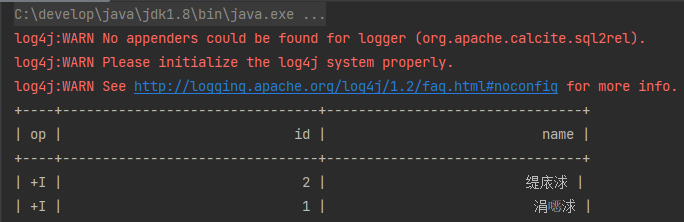
Add new data
INSERT INTO `test` VALUES ('3', '中国');
INSERT INTO `test` VALUES ('4', '美国');

Existing data will generate garbled characters. After the program starts, The new data will not be garbled.
How to ensure that it will not be garbled together? Additional Description If applicable, add screenshots to help explain your problem.

This issue is duplicate to #1166. Maybe we could discuss this problem at #1166.
