

 apache
[Bug] 制作任意3D图都会出现警告geo3D exists
Version
5.4.1
Link to Minimal Reproduction
https://echarts.apache.org/examples/zh/editor.html?c=line3d-orthographic&gl=1
Steps to Reproduce
1.vite创建vue+ts项目 2.npm安装"echarts": "^5.4.1","echarts-gl": "^2.0.9" 3.引入你们的3D折线图示例代码
Current Behavior

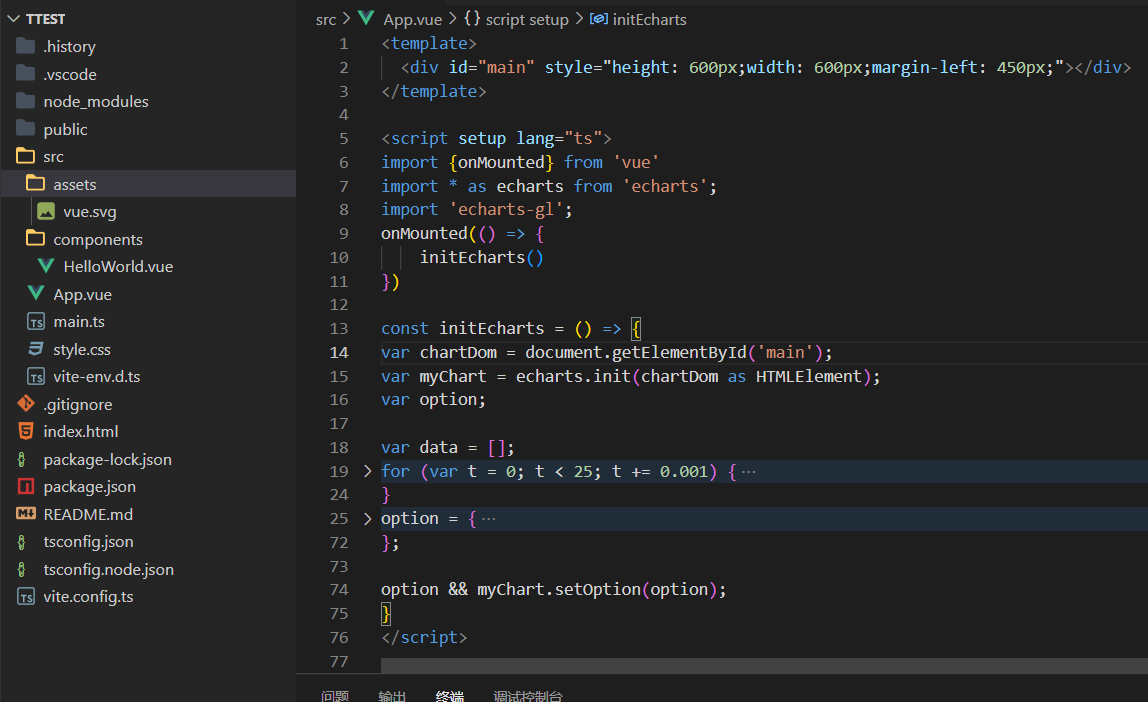
折叠部分的代码与你们示例的代码一致,结果出现警告geo3D exists
Expected Behavior
不要出现警告
Environment
- OS:window10
- Browser:Chrome 91.0.4472.77
- Framework:Vue@3
Any additional comments?
只要是3D图都会出现这个警告

@konipabai It seems you are not using English, I've helped translate the content automatically. To make your issue understood by more people and get helped, we'd like to suggest using English next time. 🤗
TRANSLATED
TITLE
[Bug] Making any 3D image will have a warning geo3D exists
BODY
Version
5.4.1
Link to Minimal Reproduction
https://echarts.apache.org/examples/zh/editor.html?c=line3d-orthographic&gl=1
Steps to Reproduce
- VITE creates the VUE+TS project 2.npm installation "echarts": "^5.4.1","echarts-gl": "^2.0.9"
- Introduce your 3D line chart sample code
Current Behavior
The code for the collapsed section matches the code in your example, and the warning geo3D exists appears
Expected Behavior
Do not appear warnings
Environment
- OS:window10
- Browser:Chrome 91.0.4472.77
- Framework:Vue@3
Any additional comments?
This warning will appear whenever it is a 3D image
![echarts-bot[bot] avatar](https://avatars.githubusercontent.com/in/20872?v=4 "Published by a pub.dev verified publisher")
The ECharts example you mention work correctly. It will be more appropriate to post your question about Vue issues on a Vue board.

The ECharts example you mention work correctly. It will be more appropriate to post your question about Vue issues on a Vue board.
但我不使用vue,使用原生js写3D图也会出现同样的警告 But I don't use vue, and the same warning appears when writing 3D images with native js


bro, do you have solved this warning? I also meet this problem.
没,只能暂时忽略了,他也仅仅只是个警告,图还是正常的


@konipabai 找到问题了,如果是全局引用就会存在这个问题,如果是按需加载就没有这个问题。初步猜测是这个包有些组件依赖了 geo3D,就自己引用了。
存在警告:
import 'echarts-gl'
解决问题:
import { init, registerMap, use } from 'echarts'
import { Lines3DChart, Map3DChart } from 'echarts-gl/charts'
import { Grid3DComponent } from 'echarts-gl/components'

use([Map3DChart, Lines3DChart, Grid3DComponent])

@konipabai 找到问题了,如果是全局引用就会存在这个问题,如果是按需加载就没有这个问题。初步猜测是这个包有些组件依赖了 geo3D,就自己引用了。
存在警告:
import 'echarts-gl'解决问题:
import { init, registerMap, use } from 'echarts'
import { Lines3DChart, Map3DChart } from 'echarts-gl/charts'
import { Grid3DComponent } from 'echarts-gl/components'

use([Map3DChart, Lines3DChart, Grid3DComponent])
好,谢谢老哥,等后续再用到的时候我也试试