

 apache
[Bug] Issue with bootstrap + echarts!
Version
5.3.2
Link to Minimal Reproduction
No response
Steps to Reproduce
- Create a chart inside a bootstrap application
- Add the tooltip element
Current Behavior
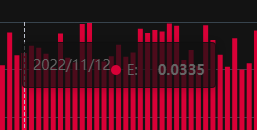
My second day playing with echarts for my own application, and i use bootstrap css to help create my app's UI, however, when i add echarts, the tooltip class is the same as the tooltip class in bootstrap, therefor bootstrap overrides echart's class.
The result of this is the tooltip looking a little wonky, looking for a fix because my application is set to release soon and the chart is a main part of the app, other than that i love echarts!
Expected Behavior
It should have different class names so it doesn't get overridden.
Environment
- OS:
- Browser:
- Framework:
Any additional comments?
No response


The class name of the tooltip can be set with tooltip.className.
I also read this in the docs earlier and i attempted to add it into my code, but the problem still persists. Heres a snippet of my code:
option = { tooltip: { shadowColor: "rgba(17,17,17,0)", borderColor: 'rgba(17,17,17,0)', backgroundColor: 'rgb(17,17,17)', trigger: 'axis', position: function (pt) { return [pt[0], '0%']; }, className: "echarts-tooltip1 echarts-tooltip-dark1", renderMode: "html", },
This issue has been automatically marked as stale because it did not have recent activity. It will be closed in 7 days if no further activity occurs. If you wish not to mark it as stale, please leave a comment in this issue.
![github-actions[bot] avatar](https://avatars.githubusercontent.com/in/15368?v=4 "Published by a pub.dev verified publisher")
This issue has been automatically closed because it did not have recent activity. If this remains to be a problem with the latest version of Apache ECharts, please open a new issue and link this to it. Thanks!