
echarts
 echarts copied to clipboard
 apache
[Bug] Text Outline not changeable
Version
5.3.0
Link to Minimal Reproduction
No response
Steps to Reproduce
On the theme builder select the dark theme, you'll notice on the pie chart that the legends (the ones circled in red on my screenshot), are outlined in white which renders poorly on dark theme

Current Behavior
The legend of the pie chart is outlined in white
Expected Behavior
The legend of the pie chart should be either outlined with a color that's configurable or not be outlined at all.
Environment
- OS: Archlinux 5.16.14-arch1-1
- Browser: Firefox Developer Edition 99.0b3
- Framework: React@17
Any additional comments?
No response

You can try to set darkMode to false. And sorry for missing this option in the English documentation. Just added it in commit https://github.com/apache/echarts-doc/commit/301f2158cc8fb7f0ff5735fdbc577698170743c9

It partially fixes it, but it's not as versatile as I'd hope
Here is a screenshot of my use case:

have this been solved? I have same problem when using theme-builder, Label.color would'nt work


we had the same issue and realized that I need to specify the background color of the chart. Please take a look at the screenshots. If I don't specify the background color then it seems the background of the chart color is transparent. So, explicitly specifying the color for the light and dark modes could be a solution for this issue.

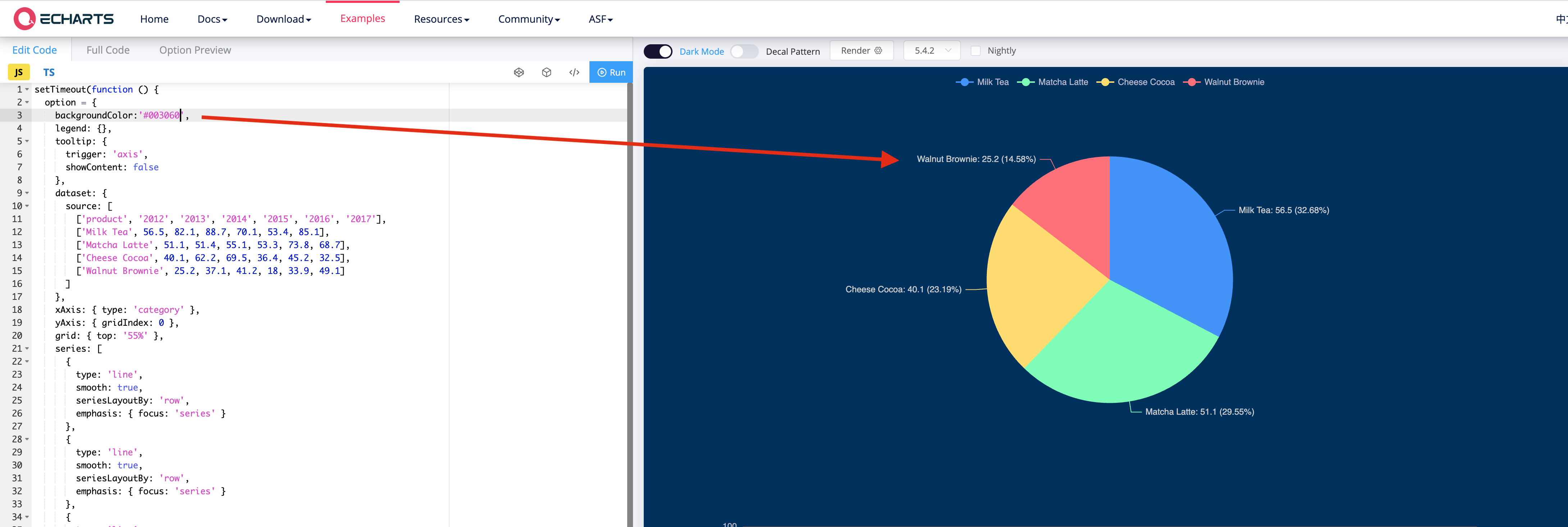

Is this considered a bug? I have a standard template I am using which uses a background color of transparent, which seems to make this problem happen.

I don't know if this is relevant to these labels (though this setting is a label one). I was able to control the text outline width & color by the respective label properties: textBorderWidth and textBorderColor

After trying by trial and error, I managed to modify it, since it has a hidden property... which is not included in the JSON that the theme gives you, the configuration is this
"pie": { "itemStyle": { "borderWidth": 0, "borderColor": "transparent" }, "label": { // by assigning a color the border disappears. "color": "#cbd2c8" } },
