
apisix-helm-chart
 apisix-helm-chart copied to clipboard
 apache
Request help: how to setup the gateway variables to enable HTTPS?
Hi all, I need to enable the https protocol on the apisisx ingress gateway. I don't know how to setup the variables in the helm chart values.yaml to enable HTTPS.
My framework:
- 3 node kubernetes cluster
- Istio installed with the "minimal" profile
- apisix installed with helm chart (enabling ingress controller and dashboard)
- a working route and upstream for a site (eg "http://www.m01.net")
Now I want to setup apisix so that it responds to "https://www.m01.net"
What I have:
- a private Certificatiion Authority certificate
- key and certificate for www.m01.net signed by the private CA
The "gateway" part of values.yaml (modified as per #851 bug) is:
gateway:
  type: NodePort
  # If you want to keep the client source IP, you can set this to Local.
  # ref: https://kubernetes.io/docs/tasks/access-application-cluster/create-external-load-balancer/#preserving-the-client-source-ip
  externalTrafficPolicy: Cluster
  # type: LoadBalancer
  # annotations:
  #   service.beta.kubernetes.io/aws-load-balancer-type: nlb
  externalIPs: []
  http:
    enabled: true
    servicePort: 80
    containerPort: 9080
  tls:
    enabled: false
    servicePort: 443
    containerPort: 9443
    existingCASecret: ""
    certCAFilename: ""
    http2:
      enabled: true
  stream:  # L4 proxy (TCP/UDP)
    enabled: true
    only: false
    tcp: # TCP proxy address list
      - 9100
      - "127.0.0.1:9101"
    udp: # UDP proxy address list
      - 9200
      - "127.0.0.1:9211"
  ingress:
    enabled: false
    annotations: {}
      # kubernetes.io/ingress.class: nginx
      # kubernetes.io/tls-acme: "true"
    hosts:
      - host: apisix.local
        paths: []
    tls: []
  #  - secretName: apisix-tls
  #    hosts:
  #      - chart-example.local
As far as I understand, I have to set "tls: enabled: true" but I don't know:
- what is tthe existingCASecret ?
- if the certCAFilename refers to the CA cert file, where have I to put that file so the helm cart find it?
- have I to enable "ingress"
There is any documentation / tutorial about this topic?

Hey @MirtoBusico, in order to secure your gateway, there are many methods out there, this is one of them:
- Enable TLS with
gateway.tls.enabledset totrue, this will add a443port for your service. - In order to expose your gateway, you must set the service to
LoadBalancertype (alternative to Ingress). - As soon as your service set up, it'll have a public address with two ports
80and443. - In order to have a TLS/SSL certificate there are many ways to do that but Let's Encrypt might do that Job for you, in this case we're using cert-manager.
- You must set up an
Issuer/ClusterIssuerwith cert-manager and aCertificate, thatCertificatewill generate a secret including the keys within your namespace (I don't remember if it must be the same as Apisix). - Once you have a
Certificateresource created, you must create anApisixTlsresource referencing the same DNS you set on yourCertificateand the secret name generated. - Finally you must change your domain DNS with the one generated trough your
LoadBalancer.
Overall, this is a simple guide to secure your exposed gateway (I may missed something)

Hi @gardun0, I was able to do steps 1, 2, 3, and 7
Then I created an SSL resource using apisix dashboard giving the crt and key for www.m01.net
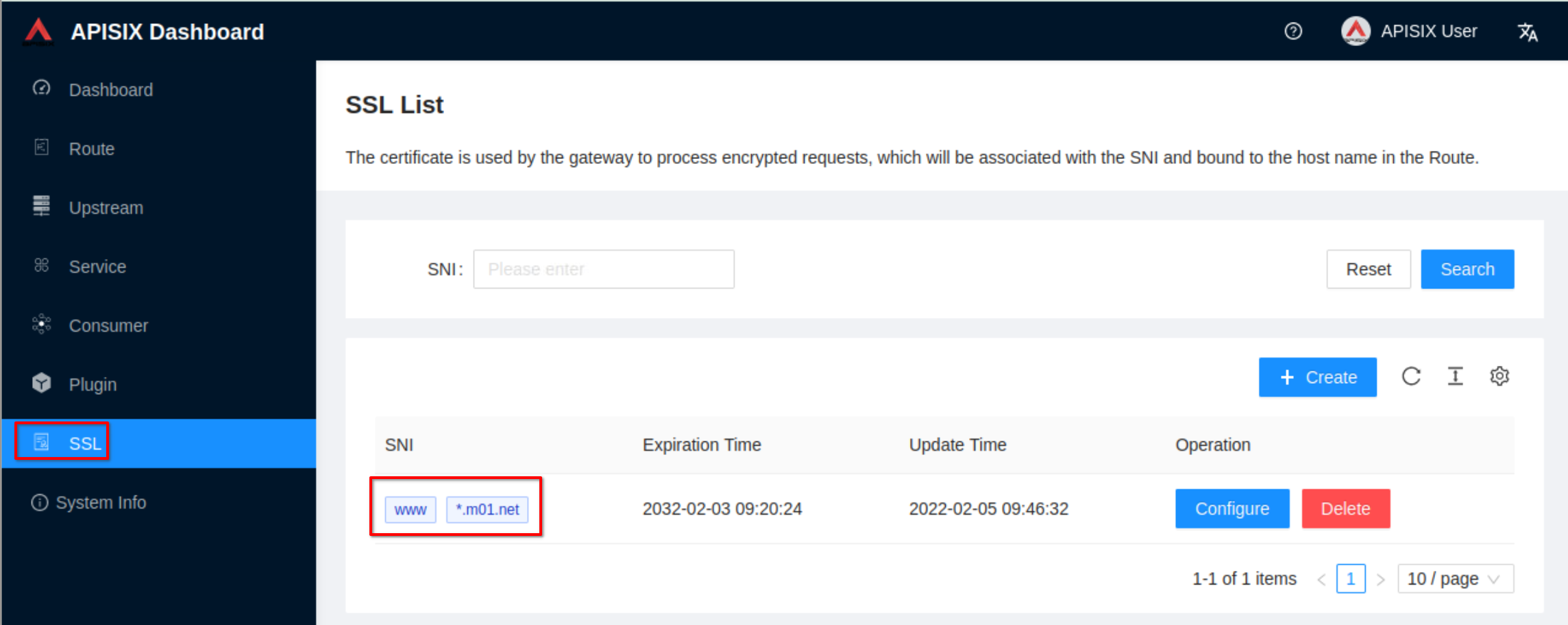
It seems to work. I'm missing something?