

 ap--
ap--
FLAME-T Hangs when switching back from trigger modes
spectrometer and system information
- model: FLAME-T
- operating system: Windows 10, and Debian Linux
- python version: 3.7 and 3.5
- python-seabreeze version: 1.3.0
- installed-via:
pip install seabreeze==1.3.0 - backend: cseabreeze
- pyusb version: 1.0.2
current problem
I am attempting to use external triggering on the FLAME-T spectrometer, however I've noticed that even switching to external triggering and then back to normal/free-running still results in a bug.
I am aware that the FLAME-T is not fully supported yet, and work has just recently been done on the FLAME-S (#97).
steps to reproduce
- Connect spectrometer
- Get intensities
- Switch to an external trigger mode (can be anything, sync, level, or edge, just anything that's not free-running)
- Switch back to normal mode
- Get intensities (hangs)
Example code
import seabreeze
seabreeze.use("cseabreeze")
from seabreeze.spectrometers import list_devices, Spectrometer
spec = seabreeze.spectrometers.from_first_available()
spec.intensities() # This works
spec.trigger_mode(2)
spec.trigger_mode(0) # Sets right back to normal mode
spec.intensities() # This hangs indefinitely
Notes
I've run the above code on my Windows 10 machine as well as Debian Linux laptop; both have the same results.
Interesting to also note that the settings query (USB command code 0xFE) shows the trigger mode going from 0->2->0, which means that the spectrometer trigger mode is certainly changing.
The hang continues even after you hard-kill the program (Task Manager in Windows or killall in Linux). What I mean by this:
- Run example code, hangs
- Kill python thread using Task Manager or
sudo killall - Re-run example code, but now it hangs on the first call to intensities
Also interesting to note, on the second run of the example code when its hungup, you can still query the spectrometer (it still responds to a settings query 0xFE). So it is responsive, but once you call intensities() again it hangs. To "un-hang" the spectrometer I have to physically disconnect and reconnect it.
I wonder if this is something to do with data transfer? I have no clue where to start. Although I could properly implement the correct external triggering codes (like what was done in #97 for the FLAME-S), there's no use setting those codes if we hang indefinitely anyways.

Hi @ExpandingDev,
interesting 🤔 ... I don't have a Flame-T, and I can't locally reproduce the bug with a USB2000+. So let's try debugging this on your side.
To allow us to modify the internals of the communication layer more easily, can you try reproducing this bug with the pyseabreeze backend?
import seabreeze
seabreeze.use("pyseabreeze")
from seabreeze.spectrometers import Spectrometer
spec = seabreeze.spectrometers.from_first_available()
spec.intensities()
spec.trigger_mode(2)
spec.trigger_mode(0)
spec.intensities()
If you try on windows make sure that you have pyusb and libusb installed (should be easiest to do by just using a conda environment to setup seabreeze).
Cheers, Andreas 😃

I ran the above code on my Debian Linux box to avoid the mess of installing the pyseabreeze backend on windows, and I got the same results (hangs on the second call to intensities).
I will update you once I get pyseabreeze backend installed onto my Windows machine.
If you can reproduce it on debian then we're good to go 👍
For debugging purposes I'm working under the assumption that there's no external circuitry connected to your spectrometer (i.e. circuitry for pulling the trigger line high or low). If that assumption is wrong, please disconnect the circuitry and try to reproduce the issue again.
If the assumption is correct, please do:
import seabreeze
seabreeze.use("pyseabreeze")
from seabreeze.spectrometers import Spectrometer
spec = seabreeze.spectrometers.from_first_available()
spec.intensities()
spec.trigger_mode(2)
spec.trigger_mode(0)
# hack: force the usb read timeout to be only the default usb timeout
spec.f.spectrometer._integration_time_max = 0
# this call should now hopefully timeout
spec.intensities()

# maybe it'll work after the above timed out?
spec.intensities()
And then report back with the traceback and try if calls to spec.intensities() now work after the one timed out.
Yes, all external circuitry is disconnected :)
Ran on Linux box again, still hung on the second call to intensities() as well as on the first call to intensities() when run a second time. Both eventually timed out with the following traceback (same trace in both cases):
Traceback (most recent call last):
  File "seabreeze_test.py", line 16, in <module>
    spec.intensities()
  File "/home/rectangle/.local/lib/python3.7/site-packages/seabreeze/spectrometers.py", line 189, in intensities
    out = self._dev.f.spectrometer.get_intensities()
  File "/home/rectangle/.local/lib/python3.7/site-packages/seabreeze/pyseabreeze/features/spectrometer.py", line 135, in get_intensities
    tmp = self._get_spectrum_raw()
  File "/home/rectangle/.local/lib/python3.7/site-packages/seabreeze/pyseabreeze/features/spectrometer.py", line 219, in _get_spectrum_raw
    size=2048, timeout_ms=timeout, mode="high_speed_alt"
  File "/home/rectangle/.local/lib/python3.7/site-packages/seabreeze/pyseabreeze/protocol.py", line 121, in receive
    size=size, timeout_ms=timeout_ms, mode=mode, **kwargs
  File "/home/rectangle/.local/lib/python3.7/site-packages/seabreeze/pyseabreeze/transport.py", line 250, in read
    return self._device.pyusb_device.read(endpoint, size, timeout=timeout_ms)
  File "/home/rectangle/.local/lib/python3.7/site-packages/usb/core.py", line 988, in read
    self.__get_timeout(timeout))
  File "/home/rectangle/.local/lib/python3.7/site-packages/usb/backend/libusb1.py", line 833, in bulk_read
    timeout)
  File "/home/rectangle/.local/lib/python3.7/site-packages/usb/backend/libusb1.py", line 936, in __read
    _check(retval)
  File "/home/rectangle/.local/lib/python3.7/site-packages/usb/backend/libusb1.py", line 595, in _check
    raise USBError(_strerror(ret), ret, _libusb_errno[ret])
usb.core.USBError: [Errno 110] Operation timed out
I really wrestled with GitHub to format that text block nicer but it wouldn't budge, attached is a text file with the same contents and formatted nicer. Also, the user manual I am using the for FLAME-T is here: https://www.egr.msu.edu/psp/sites/default/files/content/Flame-Manual.pdf trace.txt
You think this might be related to: https://github.com/ap--/python-seabreeze/issues/87#issuecomment-641921697 ?
I think it's unlikely that it's related to the above issue... (because you can reproduce this on windows and debian, and it occurs with both the cseabreeze and the pyseabreeze backend)
Without being able to reproduce this here, I recommend trying the following things and report back: (Make sure that the spectrometer is operating normally before each new test so that we can be sure that individual tests dont interfere with each other. Best way to do this is probably to physically disconnect and reconnect.)
I would try the following with the pyseabreeze backend to be consistent:
- try the same code as above for triggermodes 1,2,3,4
- try setting triggermode 2 and see if spec.intensities() returns if the spectrometer is externally triggered (I assume you have the hardware for that, because you want to use that triggermode)
- try inserting
time.sleep(0.1)after changing trigger modes - try calling
spec.f.spectrometer.protocol.send(0x01)after changing trigger modes
Let's hope that one of these gives some more insight into why it's not working.
Cheers, Andreas 😃
Ok, I finally got some time to do more testing, and WOW is this weird.
Sending the reset 0x01 seemed to have no effect, however this code works:
import seabreeze
seabreeze.use("pyseabreeze")
from seabreeze.spectrometers import Spectrometer
spec = seabreeze.spectrometers.from_first_available()

spec.integration_time_micros(100000)

spec.intensities()

spec.trigger_mode(2)
spec.trigger_mode(0)

spec.intensities()
BUT this code hangs:
import seabreeze
import time

seabreeze.use("pyseabreeze")
from seabreeze.spectrometers import Spectrometer
spec = seabreeze.spectrometers.from_first_available()

spec.integration_time_micros(100000) # This is the only line I added!

spec.intensities()

spec.trigger_mode(2)
time.sleep(1)  # This causes it to hang on the second call to intensities()
spec.trigger_mode(0)

spec.intensities() # Hangs here
This weird timing "glitch" seems like this probably is not a problem with the pyseabreeze implementation and might be something odd with the hardware... I will continue testing.
Another update, lengthening the integration time also hangs it. Setting integration time to 1000000 us (which is 1 second) causes it to hang on the second call.
import seabreeze
seabreeze.use("pyseabreeze")
from seabreeze.spectrometers import Spectrometer
spec = seabreeze.spectrometers.from_first_available()

spec.integration_time_micros(1000000) #Set integration time to 1 second

spec.intensities()

spec.trigger_mode(2)
spec.trigger_mode(0)

spec.intensities()
Update: Now it's not hanging when integration time is set to 1 second.... This is quite a ride
Interesting! I would now try and check if the spectrometer behaves identical with the cseabreeze backend. If yes: then maybe it really is an issue with the hardware/firmware? We could then readout the firmware version and you could ask Ocean if there's a firmware update available.
Cheers, Andreas
I downloaded a trial version of OceanView and got the following firmware version:
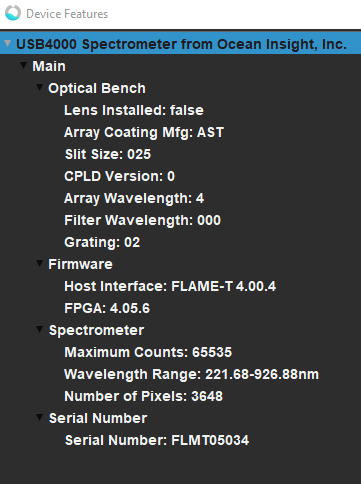
Host Interface: FLAME-T 4.00.4 FPGA: 4.05.6
Also interesting to note, I think I run into the same bug when switching between trigger modes while using the Ocean View software, which further convinces me that it's a bug in the spectrometer itself...
Edit: Can confirm, while using OceanView software switching to Level or Edge and then back to "On Demand" (aka free-running mode) results in the spectrometer not responding. It even gives a little warning bubble saying "A device is taking a long time to respond"
I am fairly confident that this is a bug/misunderstood-feature in the spectrometer. Thank you for your help, I'll let you know if I make any progress past this.
Great job @ExpandingDev!
Edit: Can confirm, while using OceanView software switching to Level or Edge and then back to "On Demand" (aka free-running mode) results in the spectrometer not responding. It even gives a little warning bubble saying "A device is taking a long time to respond"
I am fairly confident that this is a bug/misunderstood-feature in the spectrometer.
I totally agree. I'm pretty sure Ocean technical support will be able to sort this out or recommend a different approach. There's not much that can be done on the python-seabreeze side if OceanView shows the same behavior...
In case you manage to get the trigger mode switch working with other software we could always log and analyze the USB communication to understand what needs to be done different on the low level communication layer.
Cheers, Andreas 😃
I had timeout issues with another spectrometer model with pyseabreeze when using a cheap and long USB cable. Switching to a higher quality USB cable fixed it for me.
