

 aonez
aonez
Function do not work on the File Access tab: customize the access
Configuration
- Keka version: 1.2.18 (4662)
- macOS version: 12.0.1 (21A559)
Describe the bug
Unable to add drive or folder to: You can also customize the access below
Screenshots
https://user-images.githubusercontent.com/62497891/142244675-662f1db2-8975-4ea9-82df-edc1063c39c9.mov

@Oleg-Chashko since you already have full Mac access any other folder will not be added because it’s already supported. Try removing full Mac access if you want more granular access.

@Oleg-Chashko since you already have full Mac access any other folder will not be added because it’s already supported. Try removing full Mac access if you want more granular access.
Maybe add to the description: network drives and folders?
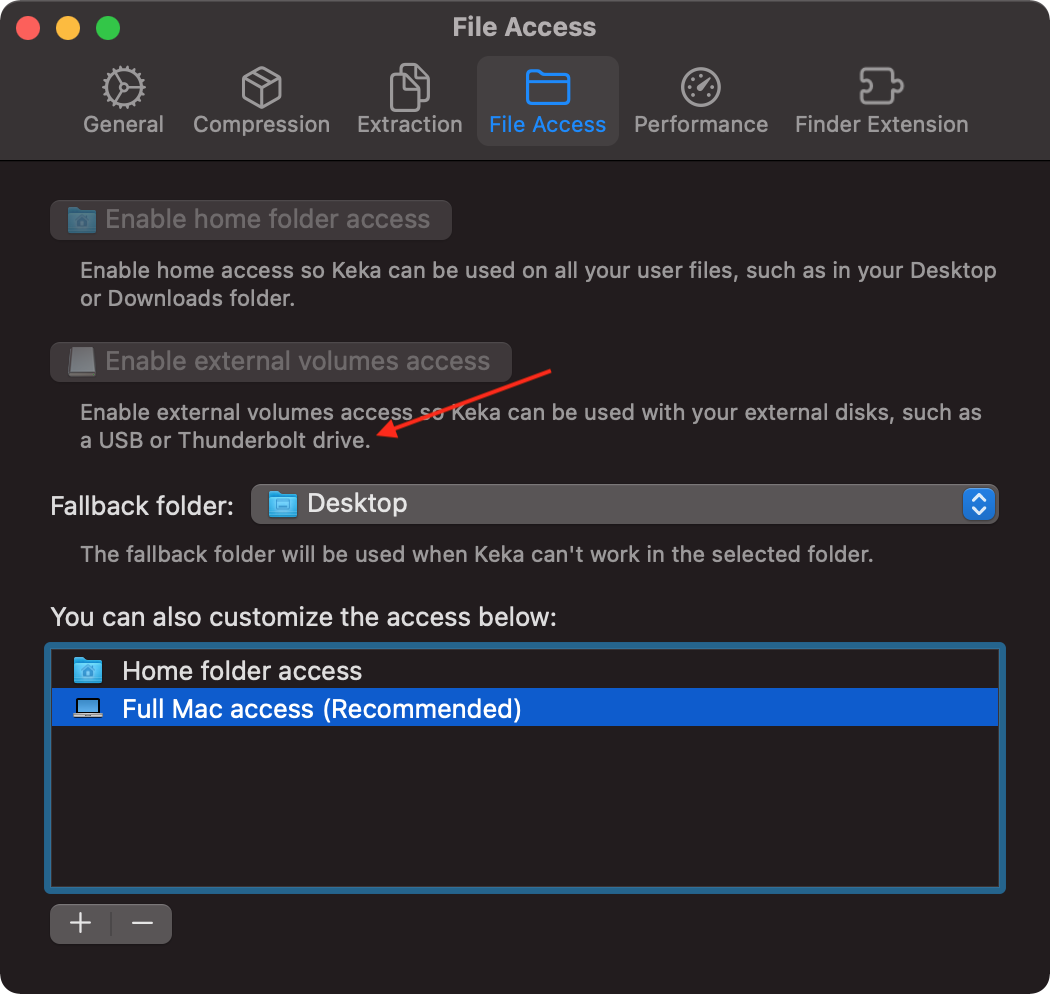
@aonez, maybe add to the description: Since you already have full Mac access any other folder will not be added because it’s already supported.
Apple made me remove any reference to full Mac access in the interface. I can disable the + button if full Mac access is enabled :)
I can disable the + button if full Mac access is enabled :)
After that, users will create an "issue" that the button (+) does not work. It is desirable to add in the description why the (+) button does not work.
This issue has been automatically marked as stale because it has not had recent activity. It will be closed if no further activity occurs. Thank you for your contributions.
![stale[bot] avatar](https://avatars.githubusercontent.com/in/1724?v=4 "Published by a pub.dev verified publisher")