
al-code-outline
 al-code-outline copied to clipboard
 anzwdev
Improvements in AL Outline panel
-
The reload action would also need to work... it doesn't seem to do anything when the panel stops working.
-
It would be very useful too to have an action to be able to collapse the entire panel tree and be able to manually display what you need...
In fact, I think the tree could be shown collapsed at a certain level by default, for greater readability or simply to be able to show/hide non-existent blocks in the current object...
Sometimes there is too much information like non-existent blocks in the current object that the standard VSCode panel doesn't shows and that's why it's more readable sometimes...

My wish list:
- Do never expand the (global) var section by default, especially not in test codeunits.
- Save the fold/unfold status per object. Meaning: I folded the var section for an object A. Then I switched to another object B. When I return to A, the var section is unfolded again. I'd expect it to be folded.
- Display regions, support fold/unfold
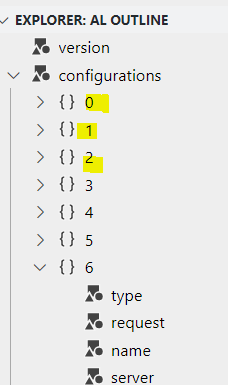
- For launch.json files, do not show configuration index numbers, but the configuration name:
 Maybe fold configurations by default, as you list the configuration names below:
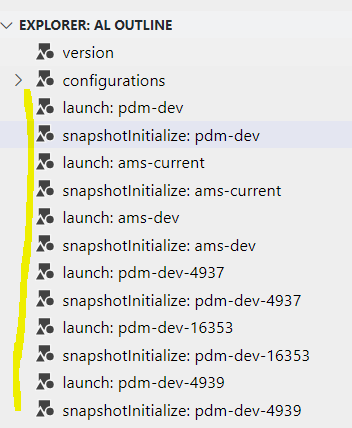 Per configuration in this list, support a delete command.

Thank you for the ideas, I've released a new version of the extension with some of these changes:
- less nodes are expanded by default,
- new action to collapse all nodes
- region support,
- saving fold/unfold state
I cannot change the extension to support configuration files as al outline panel uses standard VS Code symbols api for all non-al files. To change it I would have to implement separate json language server with ability to parse incomplete (incorrect) configuration json files (to show symbols during typing)
Reload function is another interesting case. If panel stops responding, then it means that something has happened to the language server running in the background and reload won't help.
