
Anycodes





Anycodes
1. - `pre-${mathod}` : 执行前执行什么功能 - `success-${mathod}` : 执行后执行什么功能(如果失败了就不会被执行) - `complete-${mathod}` : 执行完成执行什么功能(无论成功失败都会执行) - `failed-${mathod}` : 执行出错执行什么功能 2. 增加全局的actions 3. 单个服务下的actions - post进行兼容性变更 4. ${mathod}需要支持一个list的形式,例如`pre-[deploy, invoke, local start]` > 待讨论
传递一个list: 0. Service 名称 1. 执行时间 2. 失败时间 3. 执行状态 4. 入参 5. 出参 6. 密钥信息
# 需求总结 Serverless Devs 的 Yaml 规范,目前支持单 Service 下的 Actions 能力,但是随着时间的发展,这个能力已经没办法逐渐的满足更多的需求,所以: 1. 增加全局 Actions 能力 2. 细化 Actions 能力 ## 增加全局 Actions 能力 在 yaml 中可以声明以下内容: ``` actions: complete-deploy: -...
注意同步更新文档: https://github.com/Serverless-Devs/Serverless-Devs/blob/master/spec/zh/0.0.2/serverless_package_model/package_model.md#%E6%8F%92%E4%BB%B6%E6%A8%A1%E5%9E%8B%E8%A7%84%E8%8C%83 https://github.com/Serverless-Devs/Serverless-Devs/blob/master/spec/en/0.0.2/serverless_package_model/package_model.md#plugin-model-code-specification https://github.com/devsapp/start-devs-packages/blob/master/readme.md#%E6%8F%92%E4%BB%B6%E5%BC%80%E5%8F%91%E8%AF%B4%E6%98%8E https://github.com/devsapp/start-devs-packages/blob/master/readme_en.md#Plugin-development-instructions https://github.com/devsapp/start-devs-packages/blob/master/start-plugin/readme.md https://github.com/devsapp/start-devs-packages/blob/master/start-plugin/readme_en.md https://github.com/devsapp/start-devs-packages/blob/master/start-plugin/src/readme.md https://github.com/devsapp/start-devs-packages/blob/master/start-plugin/src/readme_en.md

经过了一定的考虑,总结如下: --------- # Desc 命令 `desc`命令是清理 Serverless Devs 的资源描述/行为描述文档的相关操作(例如`s.yaml`/`s.yml`等)。 - [命令解析](#命令解析) - [desc edit 命令](#desc-edit-命令) - [desc verify 命令](#desc-verify-命令) ## 命令解析 当我们执行`s desc -h`之后,可以进行相关帮助信息的查看: ```shell script $ s desc -h...
> 为啥选择 desc 这个命令呢?desc 代表描述,不容易想到是和 yaml 有关。在我们的语境下,yaml 精确的语义是 definition(定义),而不是 description(描述)。描述是一个非常宽泛的词,一般不会指形式化的定义。就像 function meta 中的 description 属性,或者 K8S pod 中的 description 属性,都是用来记录一段 human redable 的信息。所以用 desc 来描述 yaml 是不合适的。 > > 我觉得封崇的那个建议是比较好的,s...
这个命令改成app怎么样? - s app desc:描述整个应用的情况,部署情况,本地的操作情况 - s app edit:对资源描述/行为描述文件进行编辑,对应用编辑 - s app verify:对资源描述/行为描述文件进行校验,对应用校验 - s app plan:对应用更新/部署进行diff判定
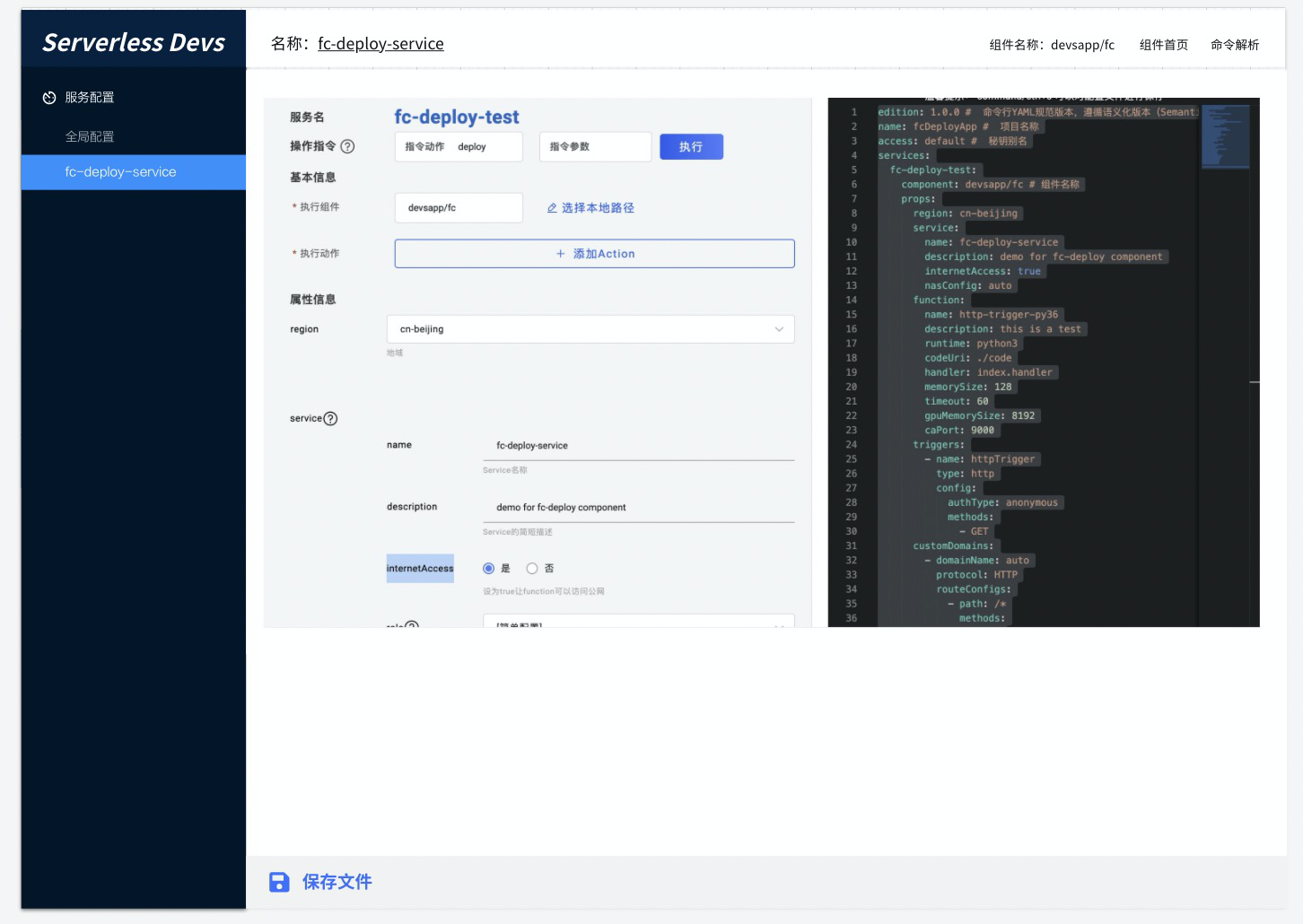
# App 命令 `app`命令是清理 Serverless Devs 的资源描述/行为描述文档的相关操作(例如`s.yaml`/`s.yml`等)。 - [命令解析](#命令解析) - [app edit 命令](#app-edit-命令) - [app verify 命令](#app-verify-命令) ## 命令解析 当我们执行`s app -h`之后,可以进行相关帮助信息的查看: ```shell script $ s app -h Usage: s...