
X6
 X6 copied to clipboard
 antvis
在版本1.32.7发现,snapline的sharp参数配置失效
Describe the bug
在版本1.32.7发现,snapline的sharp参数配置失效
Your Example Website or App
no
Steps to Reproduce the Bug or Issue
在版本1.32.7发现,snapline的sharp参数配置失效
Expected behavior
在版本1.32.7发现,snapline的sharp参数配置生效
Screenshots or Videos
No response
Platform
- OS:Windows
- Browser:Chrome
- Version: 1.32.11
Additional context
No response

👋 @zycfighting
Thanks for opening your first issue here! If you're reporting a 🐞 bug, please make sure you include steps to reproduce it.
To help make it easier for us to investigate your issue, please follow the contributing guidelines.
We get a lot of issues on this repo, so please be patient and we will get back to you as soon as we can.
![x6-bot[bot] avatar](https://avatars.githubusercontent.com/in/81133?v=4 "Published by a pub.dev verified publisher")
Hello! Snapline 的 sharp 选项计划在未来的一个版本中会被去除,届时 sharp: true 将会成为默认的行为,也就是说对齐线将会默认对齐各个节点;

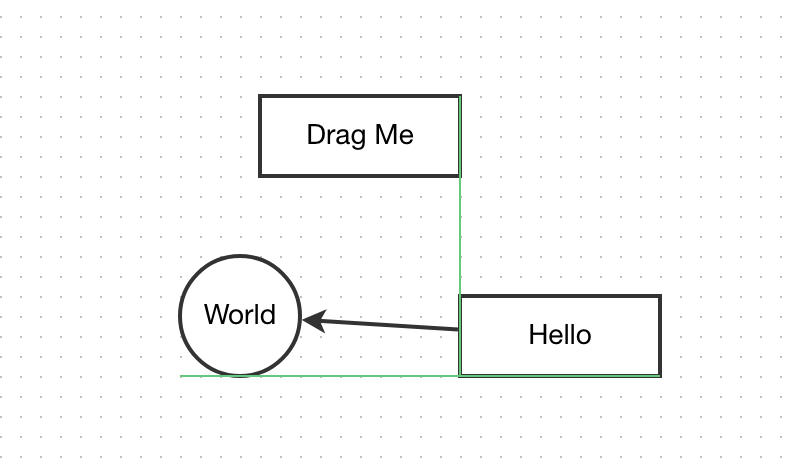
这样做的原因是 Snapline 在 1.32.7 引入了新的渲染方式,去除了 jQuery 的使用并解决了之前的一个性能问题,其中默认 sharp: true 的做法反而在代码设计及性能上比复原 sharp: false 更占优势,加之我们认为 sharp: true 在 UI 上也更加友好,因为此时可以看出某个节点具体是和哪些其他的节点对齐的,因此我们采取了弃用的策略。
具体的 PR 内容可见 #2195
这个变化在文档上没有体现,这一点我们会尽快完善。同时这个变化是在一个 patch 版本中引入的,这违背了 semver 的原则,这一点我们表示抱歉。
如果对之前 sharp: false 的行为有强烈的需求,可以提供一个更详细的解释(最好有 demo),我们可能会恢复这一选项
EDIT: typos

This thread has been automatically locked because it has not had recent activity.
Please open a new issue for related bugs and link to relevant comments in this thread.