

 antvis
画布滚动和框选同时开启时时会有问题
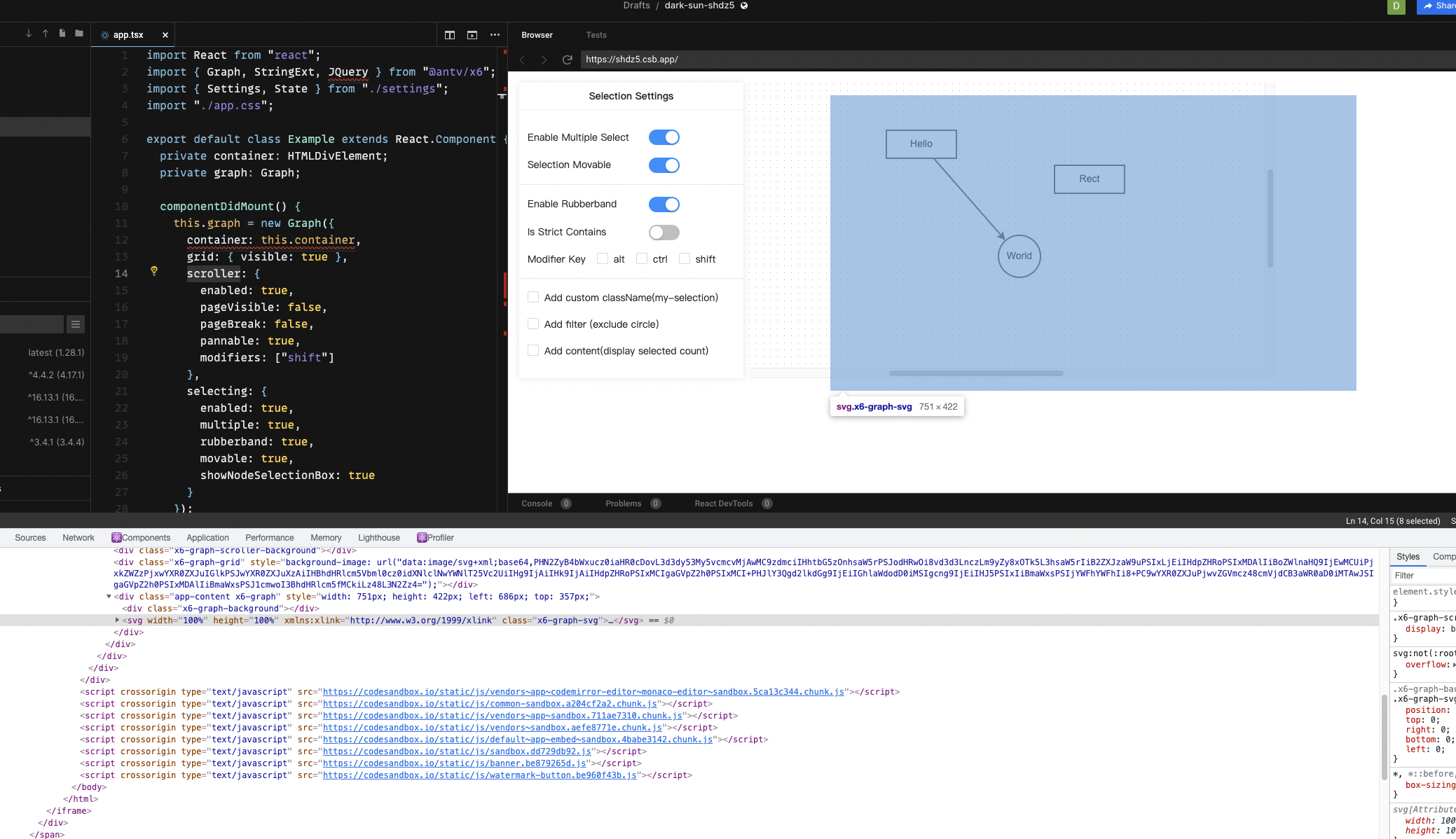 当滚动和框选同时开启时,只有框选的鼠标起点在svg内点击才有效,一旦起点在外则无效,如果不开启滚动,整个画布都可以为起点框选
那么能否在开启滚动的情况下,也让svg能够占满整个画布呢?或者说有什么解决的办法?
目前来看滚动和框选共用,交互是有问题的,因为很容易起点在svg外导致无法触发框选
代码如下,就是官方框选的代码加上滚动
import React from "react";
import { Graph, StringExt, JQuery } from "@antv/x6";
import { Settings, State } from "./settings";
import "./app.css";

export default class Example extends React.Component {
  private container: HTMLDivElement;
  private graph: Graph;

  componentDidMount() {
    this.graph = new Graph({
      container: this.container,
      grid: { visible: true },
      scroller: {
        enabled: true,
        pageVisible: false,
        pageBreak: false,
        pannable: true,
        modifiers: ["shift"]
      },
      selecting: {
        enabled: true,
        multiple: true,
        rubberband: true,
        movable: true,
        showNodeSelectionBox: true
      }
    });

    this.graph.addNode({
      x: 320,
      y: 100,
      width: 100,
      height: 40,
      label: "Rect"
    });

    const source = this.graph.addNode({
      x: 80,
      y: 50,
      width: 100,
      height: 40,
      label: "Hello"
    });

    const target = this.graph.addNode({
      shape: "circle",
      x: 240,
      y: 200,
      width: 60,
      height: 60,
      label: "World"
    });

    this.graph.addEdge({
      source,
      target
    });
  }

  onSettingChanged = (options: State) => {
    this.graph.toggleMultipleSelection(options.multiple);
    this.graph.toggleSelectionMovable(options.movable);
    this.graph.toggleRubberband(options.rubberband);
    this.graph.toggleStrictRubberband(options.strict);
    this.graph.setSelectionFilter(options.filter);
    this.graph.setRubberbandModifiers(options.modifiers as any);
    this.graph.setSelectionDisplayContent(
      options.content
        ? (selection) => {
            return StringExt.template(
              '<%= length %> node<%= length > 1 ? "s":"" %> selected.'
            )({ length: selection.length });
          }
        : null
    );

    JQuery(this.graph.selection.widget.container).toggleClass(
      "my-selection",
      options.className
    );
  };

  refContainer = (container: HTMLDivElement) => {
    this.container = container;
  };

  render() {
    return (
      <div className="app">
        <div className="app-side">
          <Settings onChange={this.onSettingChanged} />
        </div>
        <div className="app-content" ref={this.refContainer} />
      </div>
    );
  }
}

👋 @include-all
Thanks for opening your first issue here! If you're reporting a 🐞 bug, please make sure you include steps to reproduce it.
To help make it easier for us to investigate your issue, please follow the contributing guidelines.
We get a lot of issues on this repo, so please be patient and we will get back to you as soon as we can.
![x6-bot[bot] avatar](https://avatars.githubusercontent.com/in/81133?v=4 "Published by a pub.dev verified publisher")
Hiya!
This issue has gone quiet. Spooky quiet. 👻
We get a lot of issues, so we currently close issues after 60 days of inactivity. It’s been at least 20 days since the last update here. If we missed this issue or if you want to keep it open, please reply here. You can also add the label "not-stale" to keep this issue open!
As a friendly reminder: the best way to see this issue, or any other, fixed is to open a Pull Request. Check out contribute for more information about opening PRs, triaging issues, and contributing!
Thanks for being a part of the AntV community! 💪💯

Hiya!
This issue has gone quiet. Spooky quiet. 👻
We get a lot of issues, so we currently close issues after 60 days of inactivity. It’s been at least 20 days since the last update here. If we missed this issue or if you want to keep it open, please reply here. You can also add the label "not-stale" to keep this issue open!
As a friendly reminder: the best way to see this issue, or any other, fixed is to open a Pull Request. Check out contribute for more information about opening PRs, triaging issues, and contributing!
Thanks for being a part of the AntV community! 💪💯
not-stale
Same or similar problem here. My X6 graph has scroller and selection enabled, concretely:
    scroller: {
        className: "x6-scroller",
        enabled: true,
        pannable: true,
        pageVisible: false,
    },
    mousewheel: {
        enabled: true,
        minScale: 0.2,
        maxScale: 1.5,
    },
    keyboard: { enabled: true, global: true },
    selecting: {
        enabled: true,
        multiple: true,
        rubberband: true,
        movable: true,
        showNodeSelectionBox: true,
        modifiers: ["shift", "ctrl", "meta", "alt"] as ModifierKey[],
    },
When pressing the modifier keys for selection, and then left-click and drag to select, this works only for clicks inside the svg.x6--graph-svg element. Clicking outside, the area of selection is not showing as expected, but if we continue dragging/selecting as if it was visible, nodes are usually selected too.

Hiya!
This issue has gone quiet. Spooky quiet. 👻
We get a lot of issues, so we currently close issues after 60 days of inactivity. It’s been at least 20 days since the last update here. If we missed this issue or if you want to keep it open, please reply here. You can also add the label "not-stale" to keep this issue open!
As a friendly reminder: the best way to see this issue, or any other, fixed is to open a Pull Request. Check out contribute for more information about opening PRs, triaging issues, and contributing!
Thanks for being a part of the AntV community! 💪💯

 同时开启框选和滚动,在v-show变化的时候边界会产生这样的异常


