

 antvis
Combos -- nodes with a specific comboId is rendering inside another combo
Describe the bug
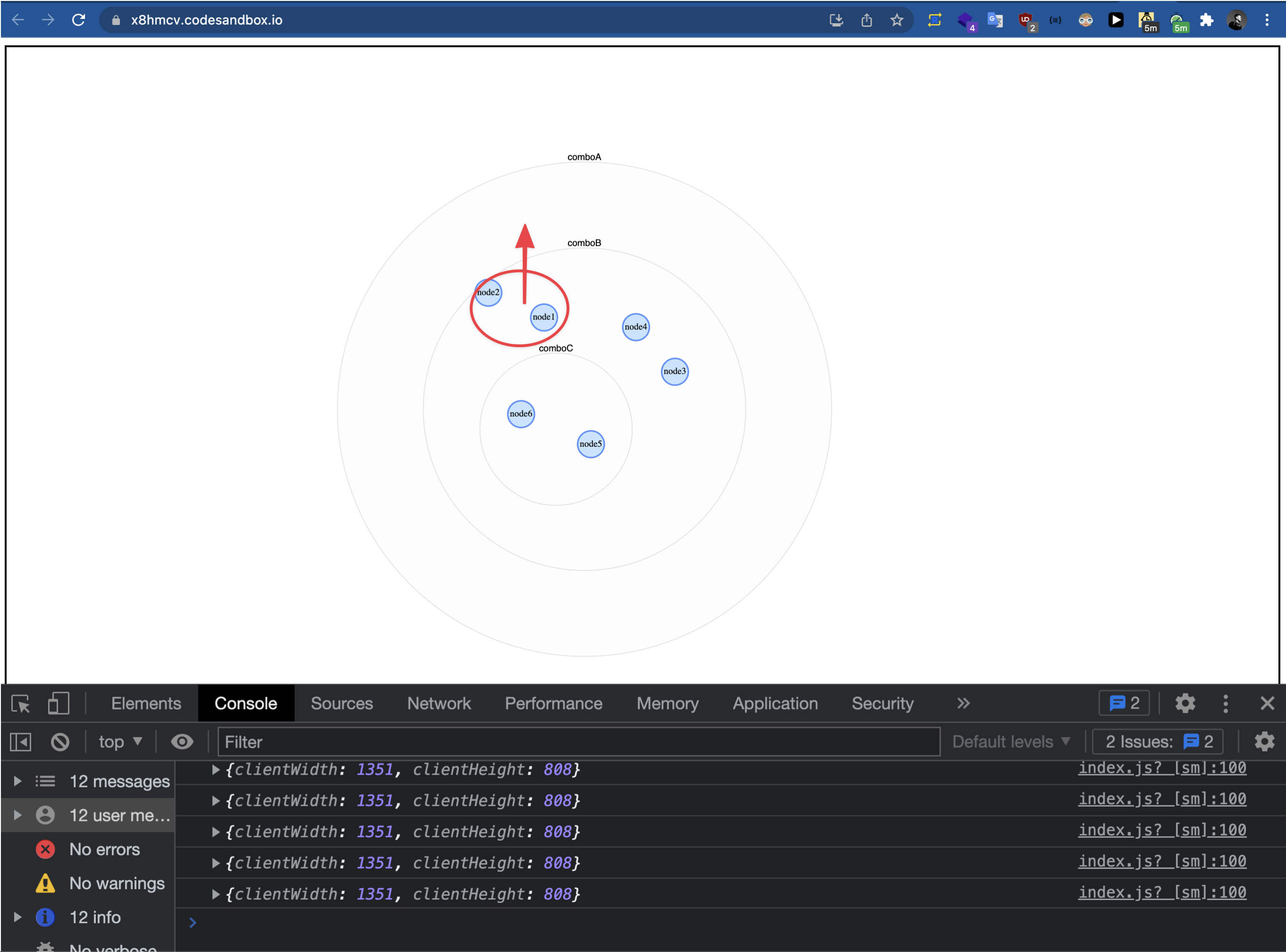
As a user, I have specified a comboId value to a particular node, however the node is appearing inside another combo, which is confusing from a user perspective.
Your Example Website or App
- G6 version: <= 4.5.5 OR 4.6.0-beta
- https://codesandbox.io/s/strange-gagarin-x8hmcv
Steps to Reproduce the Bug or Issue
- specify a
comboIdvalue on a node object
Expected behavior
1️⃣ As a user who has specified a particular comboId on a particular node, I expect this node to not overlap or be inside another combo, which I have not specified on the node. This behavior devalues the concept of specifying a comboId on a node because it does not work alway
Demo (Bug): Codesandbox, Video & Image
In the codesandbox example (image of behavior below), node1 and node2 should never render inside comboB (or any other combo I did not specify), since node1 and node2 in my code have comboId: 'comboA as their value.
Demo (proposed solution): The ideal default scenario for G6 combos would be like this (expand details) ❔
As the combo opens, the other nodes and combos around it move, in order to prevent overlap

@Blakko's recent G6 pull request demo (https://github.com/antvis/G6/pull/3519) shows this idea in practice?
Before the combo is expanded, it would perhaps be a good idea do recalculation of all the combos levels up to the root combo to this:
https://user-images.githubusercontent.com/2861371/154107324-8521c75f-2f12-4e42-a964-9f84a00debe5.mp4
2️⃣ Regardless of browser viewport size, a comboId specified on a node should always be respected, regardless of whether we or not we use "comboForce" or "dagre" layout
Demo (Bug): Codesandbox of overlap at different browser viewport sizes
Sometimes the overlap does not occur at certain viewport lengths on page load, but ideally there should never be overlap I think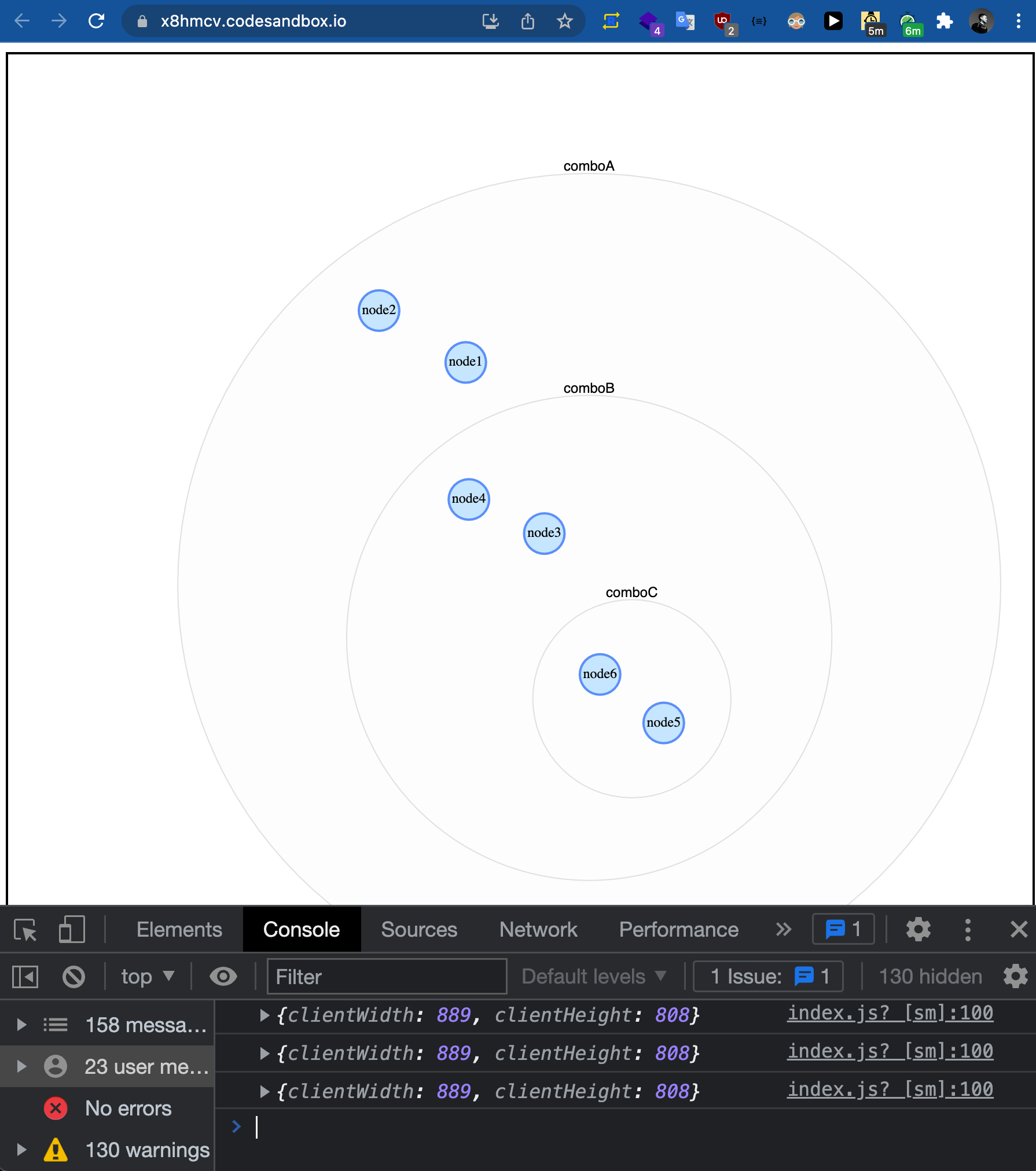
https://user-images.githubusercontent.com/6743796/154588236-73afceef-7b67-40e6-893b-782874f3235a.mp4
3️⃣ Regardless of the combo layout type: comboForce | comboCombined | dagre .., there should be no overlap,
otherwise it devalues the concept of specifying a comboId on a node.
- Hi @Yanyan-Wang, @Blakko, @mxz96102 - is there a valid use case for having nodes overlap with other combos❔
- I've taken a look at other implementations by other graph libraries & it seems like having nodes with a specific comboID overlap with other combos (which user has not specified) is not a common use case. Examples:
4️⃣ Nodes should not overlap even when a user does not (or forgets) to specify a x and y value on their combo
↓ Currently, I can solve the overlap issue by initially specifying a x and y value on my combo's ↓
Demo (bug): Codesanbox & Video
In this demo, I am adding and removing `x` and `y` values from a combo demonstrating that if you specify a position upfront before rendering, the overlap problem does not occur.https://user-images.githubusercontent.com/6743796/155890591-eb85d6a2-a21b-4997-aeff-3955951c4ef3.mp4
Platform
- G6 version: 4.6.0-beta4 (happening for non-beta versions as well)
- OS: MacOS
- Browser: Chrome
- Version: 98.0.4758.102
Related
- https://github.com/antvis/G6/issues/3588

The comboForce layout could not completely solve the overlapping problems. Maybe try the new layout 'comboCombined' with the beta version?

Hi @Yanyan-Wang
I created a new example using the new beta version with comboCombined layout
Unfortunately, there is still overlap even with comboCombined set for the layout.
I also updated the original description of this Github Issue, hopefully its more organized
Example 1: comboCombined
Demo (bug): codesandbox & video
https://codesandbox.io/s/confident-glitter-q0jisv?file=/index.js
https://user-images.githubusercontent.com/6743796/155870766-238f1b76-038a-4722-921f-8546da74cb8f.mp4
and if I try to load the example with the combo's with collapsed: true, its not working. Below is a video of switching between comboForce to comboCombined, this issue still persists
- https://codesandbox.io/s/relaxed-mopsa-42ppn4
Example 2: comboCombined
Demo (bug): codesandbox & video
V4.6.0-beta3: https://codesandbox.io/s/relaxed-mopsa-42ppn4?file=/index.js V4.6.3: https://codesandbox.io/s/gifted-almeida-h71ekf
https://user-images.githubusercontent.com/6743796/155871018-639de9a8-e0ea-4db8-9fe0-37713a5ac5e9.mp4
NOTE about demo above ↑:
Though this is not related to the overlap bug, but I did notice that when the page loads when I have not specified any x or y positions on any node or combo in my graph, the combo initially loads very large, then shrinks significantly once I open it**
Example 3 (Solution? 🚧): specifying x & y value on combo before rendering
I think I found a non-intuitive solution (from user perspective). I say non-intuitive because it took lots of trial and error to stumble upon this: The overlap issue seems to be solved by initially specifying a x and y value on my combo's
Demo (bug): Codesanbox & Video
In this demo, I am adding and removing `x` and `y` values from a combo demonstrating that if you specify a position upfront before rendering, the overlap problem does not occur.https://codesandbox.io/s/determined-curie-56rmir?file=/data.js
https://user-images.githubusercontent.com/6743796/155890591-eb85d6a2-a21b-4997-aeff-3955951c4ef3.mp4
Example 1: comboCombined
Adjust the comboPadding for comboCombined, the overlapping problem will be alleviated. The initial size of the combos are wrong, try call this after graph.render
setTimeout(() => {
  graph.updateCombos()
})
Example 2: comboCombined
Same as above.
For the size problem, I will try to fix it ASAP.
@Yanyan-Wang - initial combo size incorrectly rendering seems fixed now thanks to your commit https://github.com/antvis/G6/pull/3575 🙌
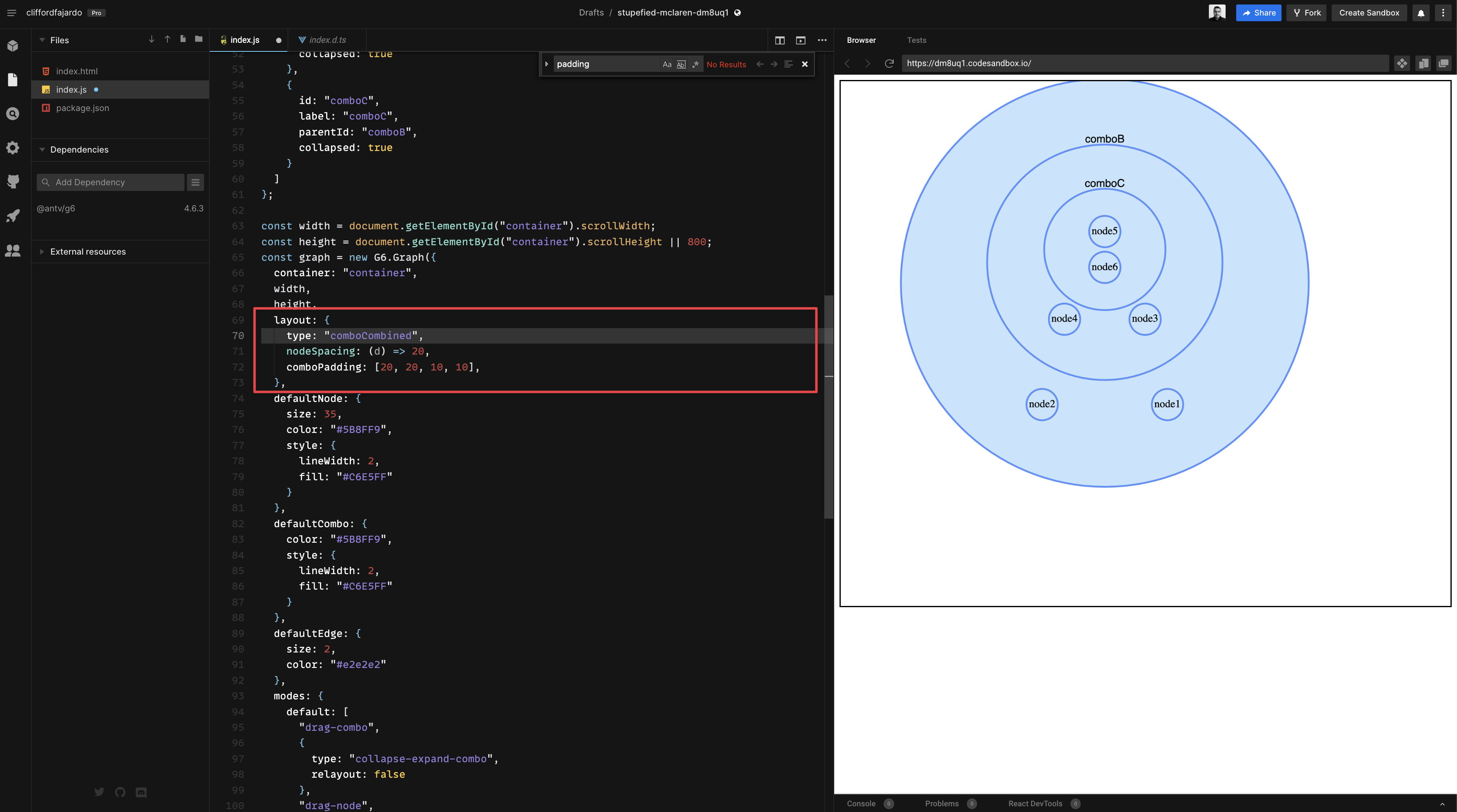
Regarding "nodes with a specific comboId is rendering inside another combo", adding comboPadding using does seem to alleviate the issue, but only if I'm using comboCombined ✅
✅ using `comboPadding` with `comboCombined` codesanbox
https://codesandbox.io/s/stupefied-mclaren-dm8uq1
Other Question(s)
Most people would never want a node and combo to overlap in my experience (but also practically speaking) having experimented with other combo libraries like Keylines/Regraph. Unless there is a good use case I'm not considering for wanting combo and nodes to overlap?
I have the same issue about combo overlap https://codesandbox.io/s/withered-grass-8flyf1?file=/index.js

I have the same issue about combo overlap https://codesandbox.io/s/withered-grass-8flyf1?file=/index.js
You used comboCombined layout with G6 v4.6.0-beta.3, but it is supported after v4.6.10. Upgrade to the latest version, and the graph will be layout as expected.
@Yanyan-Wang - initial combo size incorrectly rendering seems fixed now thanks to your commit #3575 🙌
Regarding "nodes with a specific comboId is rendering inside another combo", adding
comboPaddingusing does seem to alleviate the issue, but only if I'm usingcomboCombined✅✅ using
comboPaddingwithcomboCombinedcodesanbox https://codesandbox.io/s/stupefied-mclaren-dm8uq1
Other Question(s)
Most people would never want a node and combo to overlap in my experience (but also practically speaking) having experimented with other combo libraries like Keylines/Regraph. Unless there is a good use case I'm not considering for wanting combo and nodes to overlap?
comboCombined is now better at avoiding overlapping (@antv/[email protected]): https://codesandbox.io/s/friendly-fog-utvdhe?file=/package.json
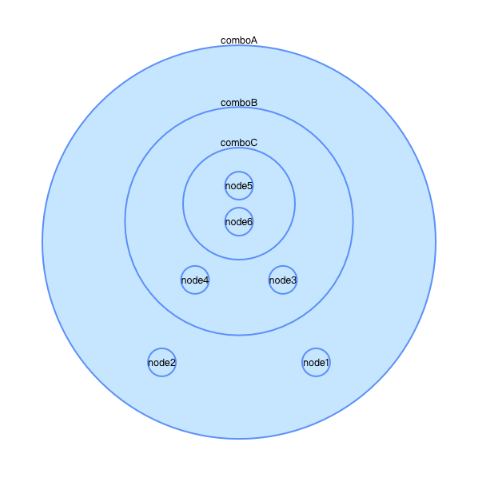
and comboForce is not suggested anymore since the algorithm does not perform well on most real cases.
Example 1: comboCombined
Adjust the comboPadding for comboCombined, the overlapping problem will be alleviated. The initial size of the combos are wrong, try call this after graph.render
setTimeout(() => {
  graph.updateCombos()
})
Example 2: comboCombined
Same as above.
For the size problem, I will try to fix it ASAP.
No need to do so with latest version now.