fretboardgtr

fretboardgtr copied to clipboard
 antscloud
Allow finger indices to be specified for chords
Allow the finger indices to be specified for chords, either inside the circles or below the fretboard like this (or both):
https://upload.wikimedia.org/wikipedia/commons/thumb/3/32/G_major_chord_for_guitar_%28open%29.svg/198px-G_major_chord_for_guitar_%28open%29.svg.png
If there is already a way to do that, it isn't obvious to me.

I couldn't find a way to specify a custom text inside the circles, at least not without modifying the library.
It's not too hard to replace the tuning text with finger indices, though.
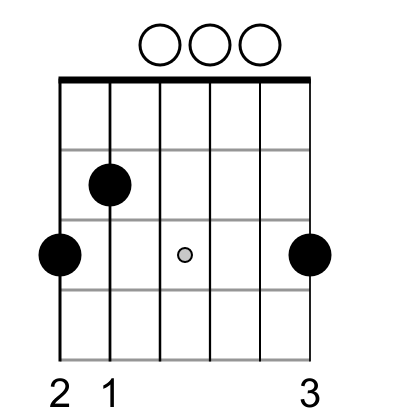
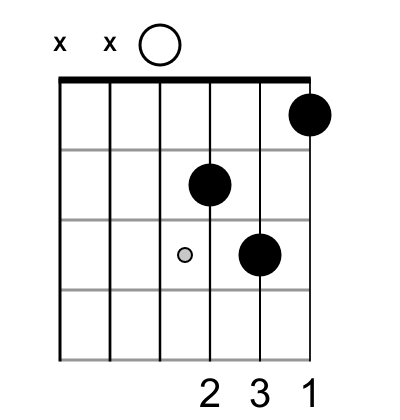
Here's a working example, which should create G, Am, B7 and Dm chords:
from fretboardgtr import ChordGtr

"""Display the finger indices for chord, instead of the tuning"""

def chord_with_finger_indices(which_frets, which_fingers, pathname, extension='png'):
    ## Draw the chord, without showing tuning
    F=ChordGtr(fingering=which_frets)
    F.theme(show_note_name=False,
            show_degree_name=False,
            color_chord=False,
            open_color_chord=False,
            show_tun=False,
            fontsize_bottom_tuning=40  # Will be used for finger indices
            )
    F.pathname(pathname + '.svg')
    F.draw()

    ## Hack: Display the finger indices instead of the tuning.
    F.tuning = which_fingers
    #NOTE: Don't draw again, it would break the logic. Only show_tuning()
    F.show_tuning()

    F.save(extension=extension)

chord_with_finger_indices([3, 2, 0, 0, 0, 3], # Which frets are played?
                          ['2', '1', ' ', ' ', ' ', '3'], # With which fingers?
                          'g_chord', 'png')

chord_with_finger_indices([None, 0, 2, 2, 1, 0],
                          [' ', ' ', '2', '3', '1', ' '],
                          'am_chord', 'png')

chord_with_finger_indices([None, 2, 1, 2, 0, 2],
                          [' ', '2', '1', '3', ' ', '4'],
                          'b7_chord', 'png')

chord_with_finger_indices([None, None, 0, 2, 3, 1],
                          [' ', ' ', ' ', '2', '3', '1'],
                          'dm_chord', 'png')
Here's the output for G and Dm: