
UINavigationItem-Loading
 UINavigationItem-Loading copied to clipboard
 antongaenko
Simple category to show a loading status in a navigation bar in place of left/right items or title.
UINavigationItem-Loading

Easy way to show loading/uploading status for user in a navigation bar.
Introduction
With needing of this pattern again I decide to make this category. So here it is, with just few methods and fully customized in color.
Demo
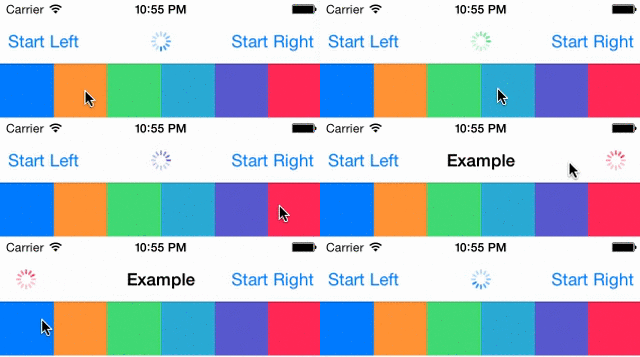
or build it yourself
pod try UINavigationItem+Loading
Usage
Just import this category in your view controller (which is embed in UINavigationController).
#import <UINavigationItem+Loading.h>
When you need to show loading status just call
[self.navigationItem startAnimatingAt:ANNavBarLoaderPositionCenter];
Left, right and center position are available. So you can also use ANNavBarLoaderPositionLeft or ANNavBarLoaderPositionRight for loader position.
When you need to stop it nothing can be more simple as
[self.navigationItem stopAnimating];
That’s all!
To customize color for loader just set it with appearance proxy like this
[UIActivityIndicatorView appearanceWhenContainedIn:[UINavigationBar class], nil].color = [UIColor blackColor];
Installation
Add the following to your CocoaPods Podfile
pod 'UINavigationItem+Loading', '~> 1.1'
or clone it as a git submodule,
or just copy files
License
All this code is available under the MIT license.
Contact
Follow me on Twitter or Github
More sources
You can be also interested to simplify your work with iOS keyboard UIViewController-KeyboardAnimation
Metadata
Owner
 antongaenko
Metadata
Simple category to show a loading status in a navigation bar in place of left/right items or title.