
claude-code
 claude-code copied to clipboard
 anthropics
[FEATURE] `--permission-prompt-tool ` needs minimal, working example and documentation for MCP integration with Claude Code CLI
Environment
- Platform (select one):
- Anthropic API
- Claude CLI version:
0.2.120 (Claude Code) - Operating System: Linux Desktops and Servers (ArchLinux, Ubuntu, Alpine, NixOS, etc)
Bug Description
There is currently no minimal, working, documented example for implementing an MCP server to handle permission prompts via the --permission-prompt-tool flag in the Claude Code CLI. Attempts to create such a server (see e.g. CLIAI/mcp_permission_server_claude_code) using either the official mcp Python SDK or community examples have failed due to a lack of clear documentation and up-to-date, tested code.
Documentation here and here does not provide a step-by-step, runnable MCP server that can handle permission prompts in the way Claude Code expects.
Steps to Reproduce
-
Try to create a minimal Python MCP server exposing a tool (e.g.
mcp_auth_tool) that accepts a prompt and returns"allow"/"yes"or"deny"/"no". -
Start the server and run Claude Code with the flag:
claude -p --permission-prompt-tool mcp_auth_tool "write a file" -
Observe that there are no working, end-to-end, documented examples in the official documentation or Python SDK for this flow.
Expected Behavior
There should be available a minimal, copy-pasteable, actually working example in the official documentation or SDK that demonstrates:
- How to implement a permission-prompt MCP tool in Python.
- How to start the server (ideally with a shebang for `uv run` or similar).
- How to configure and invoke the Claude CLI to use the tool.
- That the example works out-of-the-box (e.g. with text file with regex rules or hardcoded regex rules) and is suitable for extension (e.g., for integrating with a security policy server).
Actual Behavior
- No working minimal example is available in the docs or SDK.
- Existing attempts (see https://github.com/CLIAI/mcp_permission_server_claude_code ) fail to establish a working connection, are out-of-date, or lack necessary configuration details.
- This makes it difficult to extend Claude Code with organization-specific security or policy checks, and prevents adoption of the
--permission-prompt-toolfeature.
Additional Context
- Repository with failed and partial attempts
- See also: Anthropic docs on CLI usage, MCP protocol docs, and modelcontextprotocol/python-sdk.
- Please provide a minimal, self-contained “Hello World” MCP server for permissions that works with Claude Code CLI (e.g., with a
uvshebang for Python 3).
Related WIP repositories:
💡 Related repo/effort: for running Claude Code with --dangerously-skip-permissions in isolated (without internet except Claude servers) docker container: https://github.com/CLIAI/isolated-docker-claude-code
💡 Related repo/effort: MCP Permission server for Claude Code tools/commands Security Policies: https://github.com/CLIAI/mcp_permission_server_claude_code .

+1
Would be lovely to gain an understanding of how this flag is expected to be used. I tried multiple hundreds of response formats (raw text string like mentioned above, json formatted in the returned text content, and the draft outputParams structured output MCP definitions as well) and couldn't get the claude code sdk to accept any tool execution with any of them. This looks like it has the potential to be a really powerful use case for the sdk to dynamically handle safely executing tools while developers integrate the sdk into existing applications/pipelines.

Very curious to hear if/when this might be documented. @anthropics team - if it would be helpful to have another minimal reproduction example I am happy to share ours as well - basically no idea what to return here
https://github.com/humanlayer/humanlayer/blob/main/humanlayer-mcp/src/index.ts#L134-L146

It seems the returned data must be:
Allow response:
{
  "behavior": "allow",
  "updatedInput": { /* Original or modified input parameters */ }
}
Deny response:
{
  "behavior": "deny",
  "message": "Reason for denial"
}
Test:
https://github.com/mmarcen/test_permission-prompt-tool

@mmarcen thank you so much! where did you find it? can we also reply with "always-allow" or what it should be then?

+1 yeah this worked but yes, curious to hear from Claude code team what the expectation is for storing updates to persistent per-directory permissions- is it the expectation that the permission prompt tool (PPT) manages Claude/settings.local.json ? Or is there a planned way for PPt to communicate persistent allows to the agent?
@dexhorthy I don't think we need to update local settings via PPT ever
MCP can be defined in the user scope, so it doesn't even have enough information about what directory claude is requesting permission in
should be something like allow-always, as in interactive mode, which itself modifies the appropriate file
yeah but there's some nuance there, e.g. the claude behavior is "allow grep commands in X directory" which translates to Bash(grep:*) but sometimes claude code wants to do npm run test and the prompt translates to
npm run:*or sometimes itsnpm:*which are very different scopes
option 1 - claude scope selection and maangement
perhaps if claude code selects the scope of the "always-allow" command as it does today with interactive mode, that scope should be conveyed to the prompt-tool MCP so that it can present the "always-allow" behavior to the user accurately. That is, claude would pass both COMMAND and COMMAND_PREFIX to the MCP tool, and then the PPT could ask
Claude wants to run
$COMMANDDo you want to Allow once Allow all$COMMAND_PREFIXfor this directory Deny and provide feedback
based on reply always-allow - claude code would apply a stored approval for the COMMAND_PREFIX scope, very similar to how interactive CLI works
option 2: PPT ownership
an alternative would be to allow the PPT to completely and independently manage its own set of stored user preferences - command, specificity, scope, etc. Then when claude asks PPT for permission, that tool might just immediately approve because an upstream human has already said "allow all XYZ commands"
option 2 can be implemented pretty easily right now - manage your own list (with as much complex logic as you want) stored anywhere you want it to be check the stored list on every request -> automatically approve if the tool (and/or associated approval logic) is already in the approved list
https://www.youtube.com/shorts/ikB7jyLpQYI
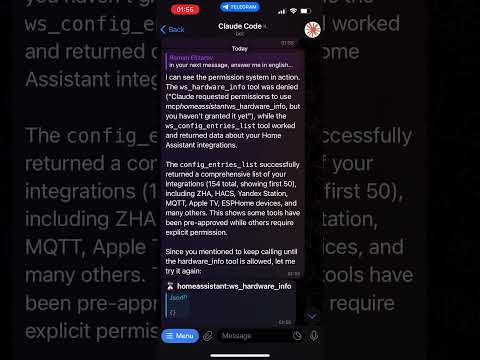
option 1 is better, but needs clarification from the Claude code team
Yeah agreed 2 is possible but 1 is better if correct abstractions/interfaces are figured out
On Sun, Jun 1, 2025 at 4:19 PM, Roman Elizarov < @.*** > wrote:
notabene00 left a comment (anthropics/claude-code#1175) ( https://github.com/anthropics/claude-code/issues/1175#issuecomment-2928091334 )
option 2 can be implemented pretty easily right now - manage your own list (with as much complex logic as you want) stored anywhere you want it to be check the stored list on every request -> automatically approve if the tool (and/or associated approval logic) is already in the approved list
https://www.youtube.com/shorts/ikB7jyLpQYI Claude code PPT via Telegram bot ( https://camo.githubusercontent.com/2b3c90d2d83eff3c2a4845b0857ffb969da0c77078e8f394404048cfe91be00a/687474703a2f2f696d672e796f75747562652e636f6d2f76692f696b42376a794c705159492f302e6a7067 )
option 1 is better, but needs clarification from the Claude code team
— Reply to this email directly, view it on GitHub ( https://github.com/anthropics/claude-code/issues/1175#issuecomment-2928091334 ) , or unsubscribe ( https://github.com/notifications/unsubscribe-auth/AA4OZLOFL5EKLUSDKX35W533BOC7JAVCNFSM6AAAAAB5OQQG3KVHI2DSMVQWIX3LMV43OSLTON2WKQ3PNVWWK3TUHMZDSMRYGA4TCMZTGQ ). You are receiving this because you were mentioned. Message ID: <anthropics/claude-code/issues/1175/2928091334 @ github. com>
I've developed a MVP Python wrapper for the Claude Code CLI. It includes support for specifying approved tools for automation workflows. I'm refactoring the codebase and expect to publish an updated release within the next week. You can find more details and usage examples here: ask-claude → MCP Integration → Auto Approval

published a small demo of some work in progress around this 🙂 https://x.com/dexhorthy/status/1929646564848570432
Is there a simple zenity/yad/osascript tool that could be used? I tried something along the lines of --permission-prompt-tool "Bash(osascript -e 'display dialog \"Do you want to continue?\" buttons {\"no\", \"yes\"} default button \"yes\"' 2>/dev/null | grep -o 'button returned:.*' | cut -d: -f2)" but no luck.
Would be nice to have a permission solution for non-interactive mode when multiple Claude workers are running (I am follow this guide)
Alternatively a native MCP tool that ships with Claude Code like "permission" would be super useful

Hi! Example here: https://docs.anthropic.com/en/docs/claude-code/sdk#custom-permission-prompt-tool
Will add an e2e Python example.

@bcherny That is very helpful, but I'd also like to understand what the format of that argument is. It doesn't seem to be purely the 'tool name' as is described in the docs now.
Something like mcp_{server name}_{tool name}?

Something like
mcp_{server name}_{tool name}?
I believe its with a double-underscore, e.g. mcp__servername__toolname
Any plans on either exposing the command line prefixes that are calculated by haiku for the settings.local.json file when a bash command comes in (used for writing to file when clicking yes and in interactive claude code and used for matching against file to see if prefix already exists before permission prompt) Or any plans on modifying permission prompt tool to support the abstracted handling of this? (yes and, automatically add back)
Hi all, we'd suggest using Hooks for this use-case now as the more general-purpose mechanism for interacting with permissions: https://github.com/anthropics/claude-code/issues/1175

@rboyce-ant hooks seem to have a hard-coded limit timing out at 60 seconds, after which claude proceeds. what is the hooks-based solution to have claude wait indefinitely for a user to respond to a permissions prompt?

This issue has been automatically locked since it was closed and has not had any activity for 7 days. If you're experiencing a similar issue, please file a new issue and reference this one if it's relevant.
![github-actions[bot] avatar](https://avatars.githubusercontent.com/in/15368?v=4 "Published by a pub.dev verified publisher")