
zsgx1hacks
 zsgx1hacks copied to clipboard
 ant-thomas
Device is not booting (bootloop)
Hi There,
Do you have maybe a description to get in the old boot? Because i flashed it to zsgx1hacks-v0.3 wit the the SD-Card and after that the whole device is not responding anymore. Device type is the following: gk7102s_ytj_A0
I can hear the device booting and booting, so its stuck in a bootloop


Hope you get back to me with a solution! Thanks :)

Are you connecting via WiFi or Ethernet? If WiFi try connecting through Ethernet. I had an issue with a slightly different VOICE.tgz. Its possible the IP cam is trying to play a file that doesn't exists. If not this probably wont help.

Hi i tried via Wi-Fi and via Ethernet. But i hear the speaker ploping when its rebooting and that is time after time. Thanks!
Can you provide photos of the camera in case someone else has a similar one? I'll upload a script to put on an SD card and revert any changes.

Try downloading this and putting the contents (1 file) on an SD card https://github.com/ant-thomas/zsgx1hacks/raw/master/sdcardrestore-v0.3.zip
Let me know if it works
Hi ant-thomas,
You are my hero, he is working again after running the script! Here is a photo of my camera, is it possible to get the 0.3 firmware on it? Because your changes in your own made firmware are nice :)
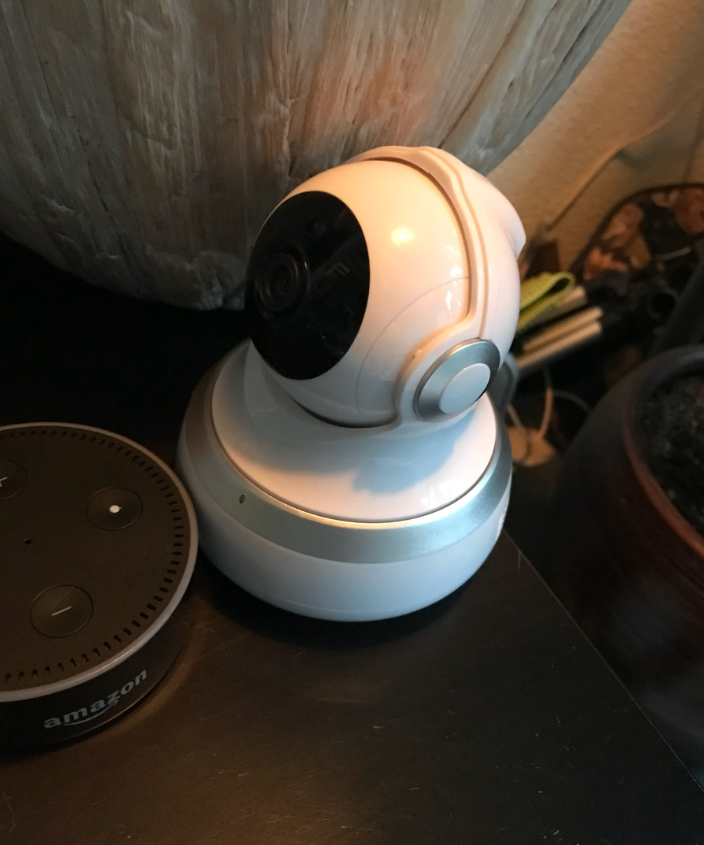
@thoompje Are you able to access via telnet or serial to dump your /home/start.sh file?
I "bootlooped" my guudgo sc-02. I have tried to use sdcard restore but with no luck. I'm not able to connect through wifi nor ethernet. But I have a new sc-02 camera. Is there a way to "copy" all content from one to another?

@frankja2 Do you have telnet access to the spare SC-02 camera?
If so, it might be possible to fix the other one.
@ant-thomas yes, I have. I installed the latest hack, so ssh/telnet is possible on the "working" camera. Can you advise me what should I do to bring the old camera back to life?
@frankja2
First thing I'd try is copying /home/start.sh.orig and VOICE-orig.tgz off the working camera.
Copy those 2 files to an SD card.
Create another file on the SD card called debug_cmd.sh
Edit the file and add the following
#!/bin/sh
#

cp /mnt/start.sh.orig /home/start.sh
cp /mnt/VOICE-orig.tgz /home/VOICE.tgz

mv /mnt/debug_cmd.sh /mnt/debug_cmd.sh.hack

reboot
Once you have the 3 files on the SD card, insert it into the other camera, plug in the power and see if that helps.
@ant-thomas I think I bricked it before I wrote post here :(
Because after plugging in the power camera was rotating and probably resetting after 3-5 minutes because after that time rotation moves were repeating.
So I ... did some change in debug_cmd.sh and put there command
copy -r /mnt/home/* /home/
I took "home" directory from hacked-working camera.
After my very smart move camera is not rotating anymore... and even simple command echo "test" >> /mnt/test.log is not working as it was before. I did what you wrote and still no change. Anyway, Thanks :) I will keep it in mind with my second camera if something happens
@ant-thomas after few hours I finally managed what happened to my sc02. I connected camera via UART to USB and was able too see why I couldn't connect via wifi to my camera. Seems like realtek chipset stopped working and it's not longer recognizable to kernel. That's why p2pcam script was crashing and restarting cam after few minutes. Seems like the only way to use my damaged cam is with the eth0 interface.
# lsusb for the damaged camera Bus 001 Device 001: ID 1d6b:0002
# lsusb for the working camera Bus 001 Device 002: ID 0bda:f179 Bus 001 Device 001: ID 1d6b:0002
hi how are you i was wondering if you can help me i have that same camera and the 8 pin chip on the bad popped its located on the bottom side is there any way i could get you to send me the numbers on that 8 pin chip my email is [email protected] i would really appreciate that. Thank you
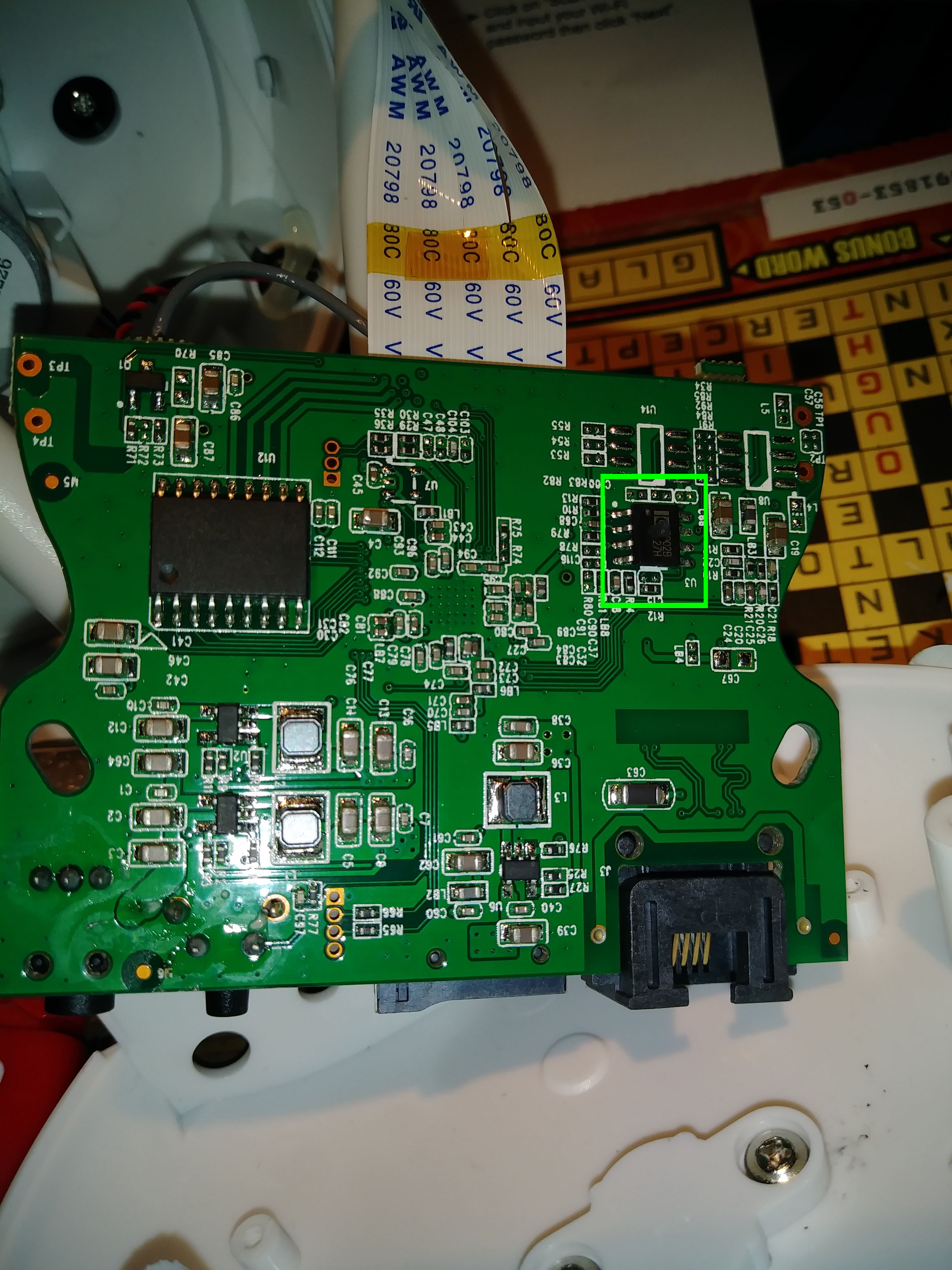
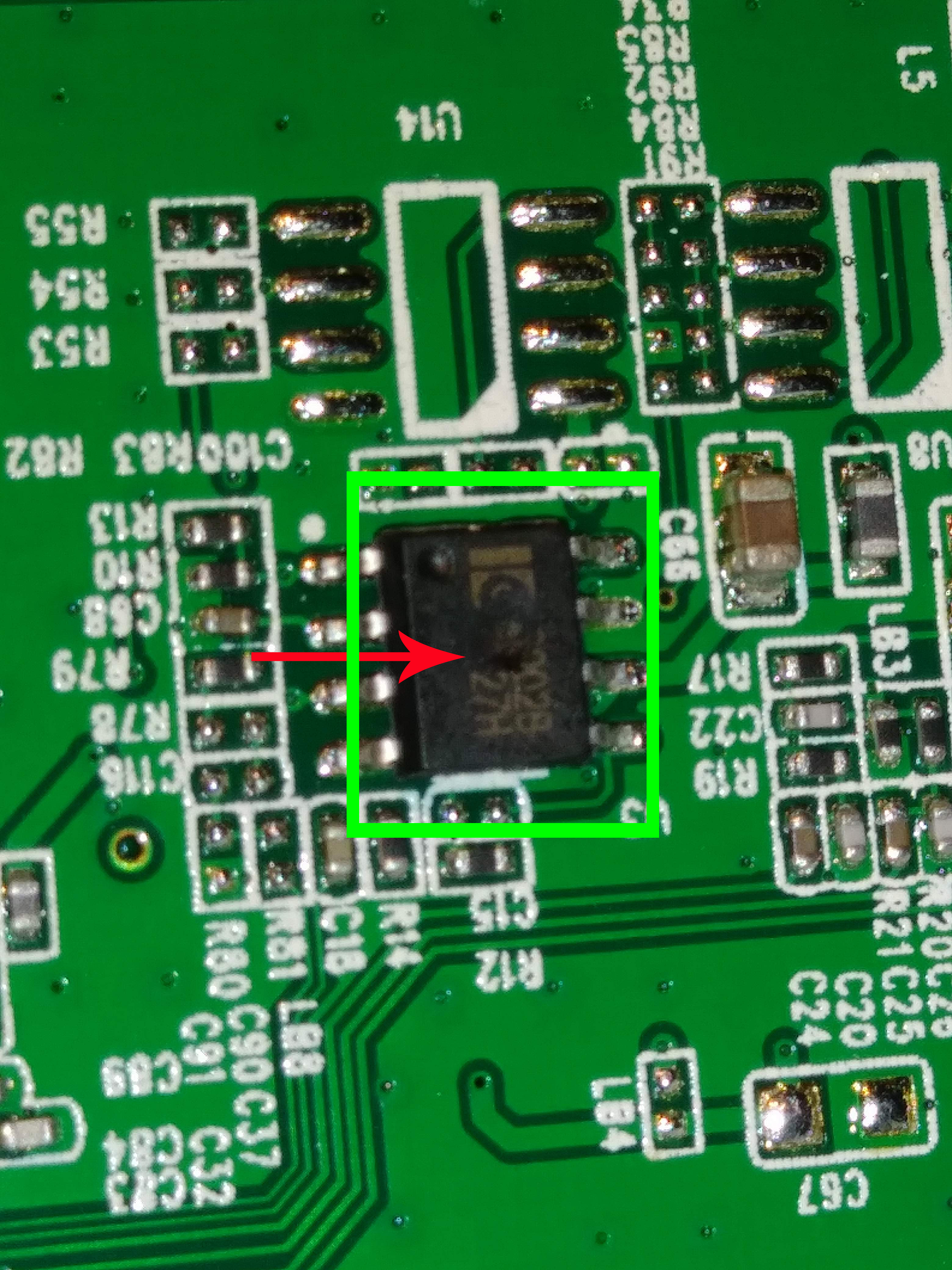

Why should you need that?
On 17 Jun 2018, at 08:45, Rudegit23 <[email protected]mailto:[email protected]> wrote:
hi how are you i was wondering if you can help me i have that same camera and the 8 pin chip on the bad popped its located on the bottom side is there any way i could get you to send me the numbers on that 8 pin chip my email is [email protected]mailto:[email protected] i would really appreciate that. Thank you [20180613_202318]https://user-images.githubusercontent.com/40331326/41505450-1ff61aac-71f9-11e8-92cc-91c36b60fb6d.jpg [20180613_202246]https://user-images.githubusercontent.com/40331326/41505452-24003542-71f9-11e8-85bd-6cfbd10d2c87.jpg
— You are receiving this because you were mentioned. Reply to this email directly, view it on GitHubhttps://github.com/ant-thomas/zsgx1hacks/issues/44#issuecomment-397858517, or mute the threadhttps://github.com/notifications/unsubscribe-auth/AkHJPaOT-bHOryRkWECrMrVy7GfBDbdFks5t9fsFgaJpZM4S-SLz.
so i can see if i can find one and replace it please just the numbers you can see is all I'm asking
Hi all , i need your help , i own this ip camera like in the post that thoompje and rudy posted . The camera stopped working it doesnt want to boot . I need the firmware so that i can put it in eprom with eprom proggrammer

I renamed start.sh via FTP and after reboot the DG-MYQ seems to be bricked. Already tried reset button and several ways by using persitent hack or debug_cmd.sh to revert to original naming. Seems like nothing is working.
Anbody solved this issue?

hi there. I know this is old, my original post is mentioned above (Bricked my ZSGX1...) from 2018. Today I found this old camera, half open. I remember i let it this way awainting for a UART/USB cable. Well.. This cable arrives in 2018 but i had other priorities and forgot about it. well, Today I was giving a try, i connect the UART cable to USB on my computer, try to list the device (using "lsusb"and it shows up as "Prolific Technology, INC PL2303 serial port" but i couldnt found any /dev/tty* linked to it. Im very rusty on this kind of hack as you all can see, its literally 5 years i dont touch anything like this and I lost half of day searching on internet some good soul that try to acess root by telnet, minicon, or watever, or burn firmware.bin via serial, any hint i could use. If someone knows any next step I should try, i will be gratefull.

Yeah! Hi Again. Sorry about the flood (if this could be considered flood). i was about to give up when i manage to see some improvment. when i put commando "screen /dev/ttyUSB0 115200" I see a lots of unrecognized characteres... and it doest stop. just keeping coming.
I've already try to change to UTF8 or something, but it doesnt help at all
HI there,
Since your path delimiter is /, I presume you are on Linux. You just need to go get a driver for your device and one of the easier places for that is Prolific's website although if I remember there are many other places too. You will need to reboot after installing it. If your on Mac then type ls -l /dev/tty.* and you'll see all (real) serial interfaces, on Linux it shows up as /dev/ttyAM0 or similar but I'm sure someone will correct me if I am wrong.
I hope that helps.

If you can't find 'em, I have some old ones:
Windows 6.9M Nov 27 2017 PL2303_MacOSX_1_6_1_20170620.zip
Mac     3.1M Jun 21 2013 PL2303_Prolific_DriverInstaller_v1.8.0.exe
Linux    11M Jul 25 2021 PL23XX_Prolific_DriverInstaller_v206.zip
They used to be very hard to find and I haven't used them in a while :-) but I have the macOS one installed for a few years along with FTDI & SI CP102 drivers so I can use any USB Serial interface
Huh.. I've tought it was a general driver, and ive assume that linux was recognized with some standard module compiled with kernel. Iwill try to find it, but if you dont mind in share the linux (and windows) version with me, i'll be gratefull. my email address is [email protected] Thanks in advanced
I've found the section in manufactures website where the drivers are. There some new versions than yours (v405) for this chipset. But theres no driver for linux (only Windows, Mac and even SDK for Android). In a parallel search I've found a comment in stackoverflow, saying that linux kernel are indeed capable to talk with this chipset (USB to Serial in PL2303). But its not compiled by default. I think I have to download kernel source and compile it (last time I did this i think it was abtou 10 years ago). Well I apologise to bring the discussion a little bit off topic, but I also think it could be usefull for those ones who really had bricked the ZSGX1 on the steps to recover it in the hard way (if theres no other way). Well I will still glad if you (@bitfarmer) can share your drivers (even that old ones) with me. I remember that for soe times, old drivesr work better than new ones (for old hardware).
"The just enable USB_SERIAL_PL2303 (USB Prolific 2303 Single Port Serial Driver). It's under the Device Drivers -> USB support -> USB Serial Converter support menu where you can easily find it using the menuconfig search feature."
the "hard(ware) part solve it. thanks for kindly provide the drivers @bitfarmer , but I was right. linux kernel already have pl2303 on it. i was doing 2 things wrong (for future references of anyone need to connecte via uart port in the future).
- make sure the gnd pin (the midle one) its well solded on the board.
- the right speed of the uart for this board is 115200 (any other speeed you'll get the seme odds characters i got.
now i will work in the software part of the trouble.. probably i`ill have to put some files on SD and see why it doest accept the restore with start.sh on it automaticly
