

 ankidroid
Feature: Import CSV/TSV files
Anki Desktop allows the import of CSV/TSV, and makes use of the auto-detection of CSV files which is built into Python.
Splintering off this task from #3517 as this is close to complete locally.
There will likely be follow up support tickets which would best be associated with a specific ticket rather than an 'Epic'. This is a significant port of Python and C code, and there is a large likelihood for bugs.

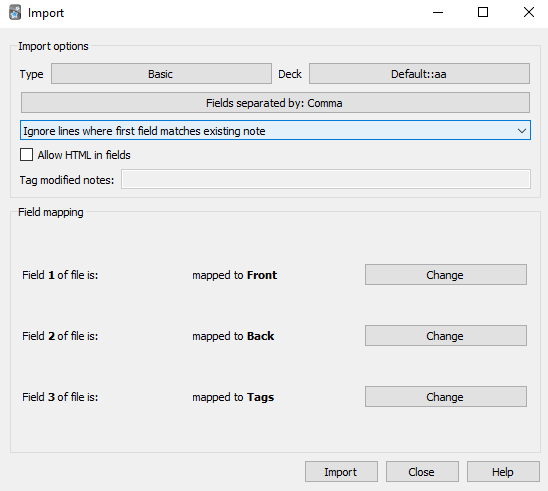
Planned UI Design [DRAFT] - going to list ideals, then see what we can take and what to shelve
Current Anki UI
AnkiDroid
- Wizard with 3 screens: "File", "Map & Preview", "Import"
- File
- Explanation, "load file" button and "Help" button
- Responsible for file selection, basic parsing, and pre-warning about unsolvable issues.
- Empty first field
- Field appears twice in input
- Incorrect Field Counts
- Errors will be displayed to the user, along with the line number where they occurred. User will have a chance to refresh if they change the file, or select another file.
- Line numbers in errors must ensure to map to actual line numbers (for example, comments, and the header of the CSV are ignored).
- Users will be informed that any issues will be ignored if they continue.
- Map & Preview
- Mapping the note type is the most important thing. This should be first, and likely done in a fragment
- We should highlight good note types (with more or equal amounts of fields)
- The number of fields should be displayed to the user when selecting a Note Type
- It should be recommended to create a new Note Type if there are no suitable options
- Add transition to "Manage Note Types"/Automate the adding of a New Note Type
- Once a note type is selected, a row should be read from the CSV and used to allow the user to make informed decisions for the field to map to the fields of the note type
- TODO: UI to perform mapping?
- As in Anki, "Map to [field]" may only be set once per note-type field.
- Back button on this screen should prompt before leaving
- TODO - other controls on Mapping
- Fields separated by
- The sniffing algorithm is typically very good - low priority
- Fields separated by
- TODO: Warn users about first field conflicts before they import
- Preview - Self explanatory - Preview Window allowing user to skip through cards to see an active preview.
- Mapping the note type is the most important thing. This should be first, and likely done in a fragment
- Import
- Progress bar of some kind
Rough functional plan:
(* Inputs: Path, SizeCheckConfirmation, AcceptWarnings *)

LoadPath = Path -> File | IOException
ReloadFile = File -> File | IOException
FileSizeStatus = Ok | TooLarge of bytes: long
SizeWarning = File -> FileSizeStatus
SizeCheckConfirmation = FileSizeConfirmation -> Ok | Cancel
SizeCheck = File -> SizeCheckConfirmation -> Result<File, UserCancelled>
EncodingIssue = File -> Result<File, CSVEncodingException>
ReadError = IOException | UserCancelled | CSVEncodingException
ParseAsCsv = File -> SizeWarning >> EncodingIssue -> CsvFile | ReadError
ObtainWarnings = CsvFile -> [Warning]
ValidCsv = { fieldCount : int ; lines: [Field[fieldCount]] ;  tags: Option<[String]> }
AcknowledgeWarnings = CsvFile >> ObtainWarnings -> ValidCsv | UserCancelled

(* We ignore the field separator character for now
Python autodetection should be sufficient and it increases complexity *)
----
(* Inputs:
SelectRecommendedNoteType
SelectFieldMapping
Deck
IncludeHtml
ImportType
AcceptWarnings
*)

GetRecommendedNoteTypes = ValidCsv -> [NoteType]
FieldMappingResult = FieldName | Tags | None
FieldMapping = { field:index ; mappedTo: FieldMappingResult }
FieldMappings = { FieldMapping[ValidCsv.fieldCount]; NoteType }
SelectNoteType = ValidCsv -> NoteType
SelectFieldMappings = ValidCsv -> NoteType -> FieldMappings
Preview = ValidCsv -> line -> FieldMapping -> IncludeHtml -> Option<Deck> -> CardPreview

ImportType = Update of [Tags] | Ignore | Add

ImportData = { ValidCsv; FieldMappingResult; IncludeHtml; ImportType; NoteType; Deck; }

Warning = Conflict | CardNotGenerated
DuplicateCheck = ImportData -> Warning[]

----

Import = ImportData -> Completed
Hello 👋, this issue has been opened for more than 2 months with no activity on it. If the issue is still here, please keep in mind that we need community support and help to fix it! Just comment something like still searching for solutions and if you found one, please open a pull request! You have 7 days until this gets closed automatically
![github-actions[bot] avatar](https://avatars.githubusercontent.com/in/15368?v=4 "Published by a pub.dev verified publisher")
Needs a GUI - open for contributions, I'll be spending the next while getting the Rust conversion through, so won't have the time to get this through.
Hello 👋, this issue has been opened for more than 2 months with no activity on it. If the issue is still here, please keep in mind that we need community support and help to fix it! Just comment something like still searching for solutions and if you found one, please open a pull request! You have 7 days until this gets closed automatically
Hello 👋, this issue has been opened for more than 2 months with no activity on it. If the issue is still here, please keep in mind that we need community support and help to fix it! Just comment something like still searching for solutions and if you found one, please open a pull request! You have 7 days until this gets closed automatically
Can I work on this? this seems to be a useful feature @david-allison-1

Can I work on this? this seems to be a useful feature @david-allison-1
This was part of a GSOC project - https://github.com/ankidroid/Anki-Android/wiki/GSOC-proposal-2021#csv-import
Let me check with the other maintainers - ideally it's an enthusiastic yes, but I'd want to make sure it's okay, as it may get in the way of other people's proposals.
@VamsiKrishnaCommits - Result of the discussion: absolutely! Since we're not open for proposals yet. I'll note this on the GSoC page
Thanks!
Hi @VamsiKrishnaCommits are you working on this @david-allison-1 this idea is struck in GSoC idea list , If this is still available I would like to submit proposal on this

Waited a long time for this function, but it hasn't been released yet 🤣

Just needs a GUI!
it's not on my radar right now as I'll spend most of 2.16 catching up with Anki Desktop functionality, but it's open to contributions
Me too! Eagerly awaiting anyone that wants to contribute their time to develop the feature. Patience is a virtue :lotus_position: :laughing:

Guess that'll be me.
Working on a functional prototype using the Anki Desktop UI, then will improve UX via suggestions in my above comments

Guess that'll be me.
Working on a functional prototype using the Anki Desktop UI, then will improve UX via suggestions in my above comments
It's amazing, the most attractive function of Ankidroid
Hello 👋, this issue has been opened for more than 2 months with no activity on it. If the issue is still here, please keep in mind that we need community support and help to fix it! Just comment something like still searching for solutions and if you found one, please open a pull request! You have 7 days until this gets closed automatically
Most likely not - 2.16 already has the most incredible backlog of features and fixes and changes going in, and putting anything else in it would be a bad idea from a release management / stability perspective. 2.16 will go as soon as #9249 scoped storage is done, to get all the current work out
Hello 👋, this issue has been opened for more than 2 months with no activity on it. If the issue is still here, please keep in mind that we need community support and help to fix it! Just comment something like still searching for solutions and if you found one, please open a pull request! You have 7 days until this gets closed automatically
Hello 👋, this issue has been opened for more than 2 months with no activity on it. If the issue is still here, please keep in mind that we need community support and help to fix it! Just comment something like still searching for solutions and if you found one, please open a pull request! You have 7 days until this gets closed automatically
Guess that'll be me.
Working on a functional prototype using the Anki Desktop UI, then will improve UX via suggestions in my above comments
Does this image comes from an implementation you actually did? I don't see link to any related code in this thread.

Does this image comes from an implementation you actually did? I don't see link to any related code in this thread.
https://github.com/ankidroid/Anki-Android/pull/9437 is the latest code. Screenshots are in a <details> element
Just a heads up that @rumovz's work on a new CSV importer/exporter was merged into Anki's main branch yesterday. The actual importing/exporting is handled in Rust, and there is a web UI for the field mapping. It includes some new functionality like per-row notetypes that the old Python implementation did not have.
While AnkiDroid won't be able to take advantage of it until AnkiDroid's Rust backend migration work is further along, I thought I'd let you know in case you wished to redirect efforts on this separate implementation to something else.

Thank you extremely much @dae for the information. Thanks also @ FYI, AnkiDroid accepted 4 Google Summer of Code mentees this year. One being CSV import. Good news is that the mentee, @BrayanDSO, also planned to do other work, so the other task can be prioritized. But clairly it requires to adapt the project.
I just did a git pull and ./run on anki's main, and still see the importer. Is there anything special to do to see the web UI?
Also, do you know whether the back-end API is stable or do you intend for it to potentially change soon. Because, as @krmanik states on discord, we can make our UI so that it works with your back-end, having a common interface. But ideally, we'd do so if we expect it not to change soon
The new code can be enabled in the first tab of the preferences screen.
The backend interface is strongly typed, so if it does happen to change in the future, you'd find out at compile time. But I'd recommend you consider making use of the Svelte frontend as well, as that way you get the interface mostly for free, instead of having to implement all the UI logic like field mapping. This is a common pattern in the desktop code - other screens like the deck options, card info, notetype changing and so on also have both backend and frontend components that are intended to be used across all clients.
The UI using Svelte can be used but we have to consider following
- Responsive so it can adapt different screen size, css can be used
- Localisation, it is already provided but some new language may not added
- It will not be native so may be we get issues for it
- It needs to load in webview along with implementation of localhost to serve file (because loading from
file:///may give errors)
But the Svelte UI and rust backend will be true cross platform implementation.
I have tried to implement for stats but didn't understand what should be next step. https://github.com/ankidroid/Anki-Android/issues/10751#issuecomment-1114994683
I have tried this for generating
graphs.html,graphs.jsandgraphs.css. I have clone the anki repository and run the bazel build in web directory in qt/aqt/data/web and ts. I get the generated.jsand.htmlfile in .bazel/bin folder.But how the data related to stats will be sent to graphs page when request sent from the graphs page? I think JavaScript interface will be used or local http server like nanohttpd will be used to get stats data from java/kotlin class.

Hmm - ideally we could avoid running a local server for the android implementation and use JSI, getting data to and from the webview seems to be our last big question to adopt big chunks of the new Rust<->svelte AnkiDesktop style. Perhaps if there was the ability to swap whatever the conduit is - in svelte - then on android we could codegen a webview<->javascript/JSI<->Rust binding while on Desktop it would remain what it is now (I think, but am not certain: webview<->nanohttpd/something?<->Rust)
So, the implementation idea for webview will be similar to Reviewer. A centralized webview class for loading new Svelte related pages. Also a JSI should be used to get required data (stats, card info etc.) and passed to webview class when the pages send get/post request (needs to handle). It can be done but it needs to test first.
1-2 should already be handled, and these pages are working in AnkiMobile. If there are Android-specific issues, patches are welcome :-)
The frontend sends and receives binary protobuf payloads in POST requests. The desktop uses a built-in webserver, and AnkiMobile uses a custom URL scheme. You may be able to use the latter approach in AnkiDroid as well, by intercepting requests for ankischeme://something with https://developer.android.com/reference/android/webkit/WebViewClient#shouldInterceptRequest(android.webkit.WebView,%20android.webkit.WebResourceRequest), and returning the relevant data. This might be the contents of the requested .html/.js file, or for dynamic requests, it would take the received data, feed it to the relevant backend function, and then return the resulting blob in the response body.