

 ankidroid
Delete deck after download and import successfully
Is your feature request related to a problem? Please describe.
The deck remains in Download folder after download and import using Get Shared Deck. So it needs to clear the downloaded deck file to free up some space.
Describe the solution you'd like Clear the successfully downloaded and imported deck from Download folder
Describe alternatives you've considered
Although the folder Android/data/com.ichi2.anki/files/Download is not accessible in normal File Explorer, so used Files to access and delete file.
Additional context

@krmanik I would like to work on this one! One thing I am confused about is when I download any deck from Shared Decks, it's downloaded in the public 'Download' Directory and not Android/data/com.ichi2.anki/files/Download. From where exactly do you suggest clearing the deck?
Also, doubt on similar lines, when you uninstall and re-install the AnkiDroid, all the decks downloaded previously are restored magically. Do you think clearing out the downloaded decks as suggested would affect this behavior?

@krmanik / @Kshitij09 are you testing with the result of this PR that internalized shared deck downloading? (https://github.com/ankidroid/Anki-Android/commit/ab4a40536ab066da2492d72cfca34b2c5f1875b0)
I just want to make sure, because that one should be downloading to our app-scoped external downloads dir I think? But I haven't checked. We should know - and be the owner of - the actual file though meaning we know where it is and we can delete it, I think.

For me it is downloaded in Android/data/com.ichi2.anki/files/Download directory. @Kshitij09 Which version you are using? Also clearing Android/data/com.ichi2.anki/files/Download folder does not affect because the decks and its file imported in collection.anki2 and collection.media.
I have latest alpha version. I can confirm that app has this commit (https://github.com/ankidroid/Anki-Android/commit/ab4a40536ab066da2492d72cfca34b2c5f1875b0).
In this function, the file opened but there is no clean up when imported successfully. https://github.com/ankidroid/Anki-Android/blob/8866c910b1083fd0a9a8974e8c7f32405da52e02/AnkiDroid/src/main/java/com/ichi2/anki/SharedDecksDownloadFragment.kt#L374-L395
This is the image of temp deck file downloaded in Android/data/com.ichi2.anki/files/Download.
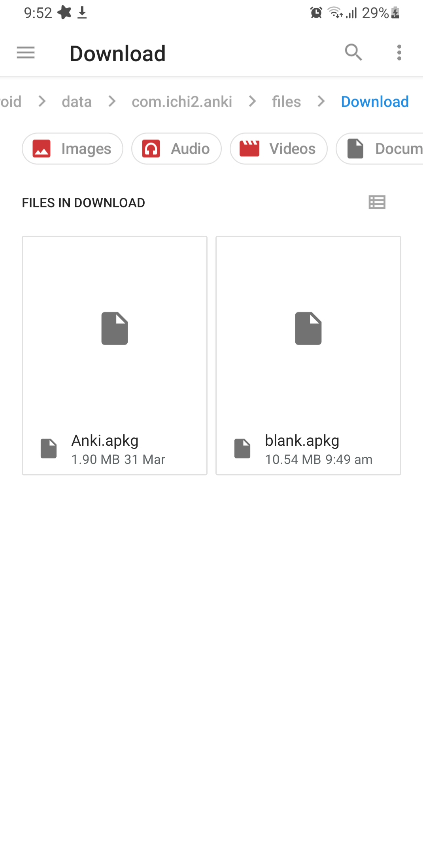
@krmanik my bad, maybe I was not using the latest alpha. I can confirm the same behavior you mentioned. Files are getting downloaded to Android/data/com.ichi2.anki/files/Download directory and the app was able to load all the downloaded apkg files with re-installation. Let me know what change should be made.
cc: @mikehardy
It needs to remove the deck when decks imported successfully. I have linked the code snippets in previous comments. It start the activity to import using Intent so may be the IntentHandler needs modify and check when the Intent Actitvity started from
SharedDecksDownloadFragment.kt, then remove the deck on finishing import.
Implementation idea may be different
Alright, will try to come up with a draft PR with this change. Could you assign this issue to me?
Alright, will try to come up with a draft PR with this change. Could you assign this issue to me? Sure!
@krmanik While working on this task, I noticed one behavior that seemed could be handled in a better way.
Let's say you opened SharedDeck WebView and Downloaded a deck from it. You will be prompted with an import dialog where you choose 'cancel', so the deck (*.apkg file) is there in the Download directory but was not imported. Now you try to download the same deck and despite having it downloaded previously, we download that again and name it '*-1.apkg'.
Is there any way we could intercept download requests from WebView, check for the potential filename, and look out for the same in the 'Download' directory first? Should we perform this check before re-downloading the exact same file? Maybe we could compare the md5 hash of them to check whether the content is same.
The download is already intercepted in webview. I think re-download of same name file is overwritten. View this PR. https://github.com/ankidroid/Anki-Android/pull/9229
The filename can be checked here. https://github.com/ankidroid/Anki-Android/blob/b72d9cca2c6c6390e21c3bc1cd8d45f5095aed22/AnkiDroid/src/main/java/com/ichi2/anki/SharedDecksDownloadFragment.kt#L141-L144
The md5 will be good if we want to keep the files in download folder but we don't want that. As the download/import complete we remove the files.
Hello 👋, this issue has been opened for more than 2 months with no activity on it. If the issue is still here, please keep in mind that we need community support and help to fix it! Just comment something like still searching for solutions and if you found one, please open a pull request! You have 7 days until this gets closed automatically
![github-actions[bot] avatar](https://avatars.githubusercontent.com/in/15368?v=4 "Published by a pub.dev verified publisher")
Hello 👋, this issue has been opened for more than 2 months with no activity on it. If the issue is still here, please keep in mind that we need community support and help to fix it! Just comment something like still searching for solutions and if you found one, please open a pull request! You have 7 days until this gets closed automatically
Hello 👋, this issue has been opened for more than 2 months with no activity on it. If the issue is still here, please keep in mind that we need community support and help to fix it! Just comment something like still searching for solutions and if you found one, please open a pull request! You have 7 days until this gets closed automatically