

 ampproject
View Non-Amp Verison return root url instead of subdirectory
Bug Description
In the Admin mode - View Non-Amp Verison return root url instead of subdirectory
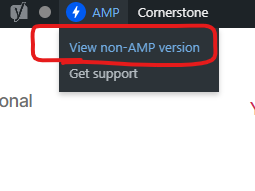
IT looks like there is an issue in this part of code under the file amp-helper-functions.php: function amp_remove_paired_endpoint that returns the url without the subdirectory
Example:
in the admin, when clicking the view non-amp version, it will redirect to https://www.investagrams.com/ instead of https://www.investagrams.com/daily/ (with subdirectory /daily)
Expected Behaviour
in the admin, when clicking the view non-amp version, it will redirect to https://www.investagrams.com/ instead of https://www.investagrams.com/daily/ (with subdirectory /daily)
Screenshots
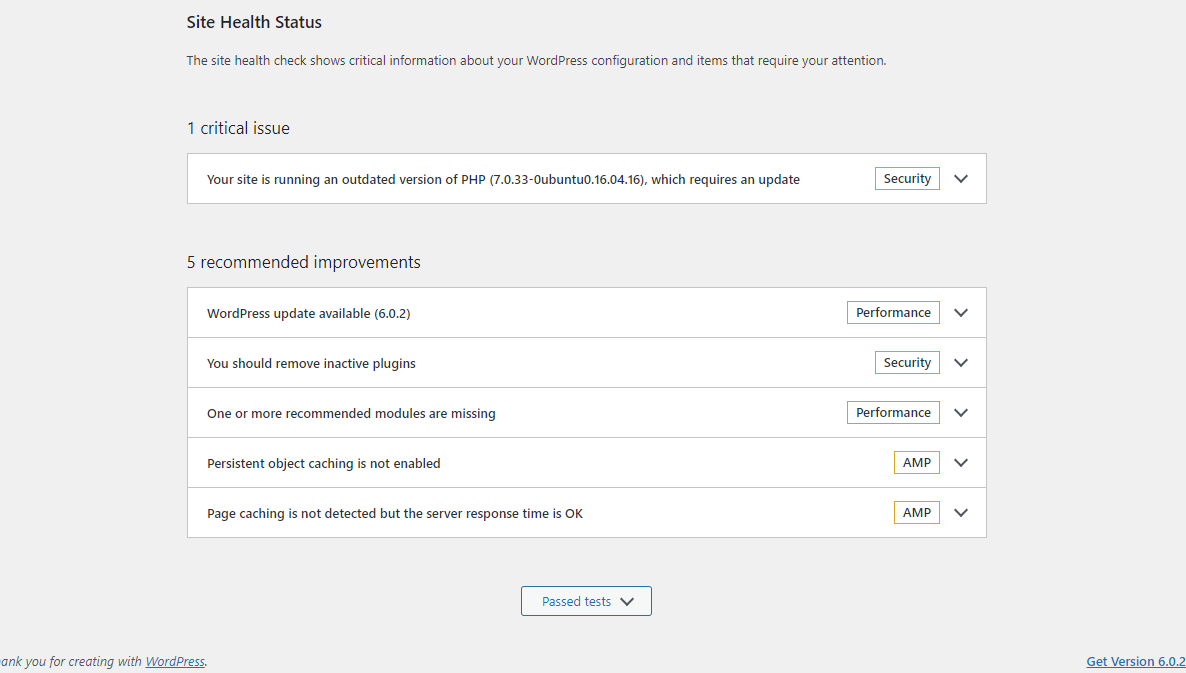
PHP Version
7.0
Plugin Version
2.2.1
AMP plugin template mode
Reader
WordPress Version
5.9.4
Site Health
Gutenberg Version
No response
OS(s) Affected
All
Browser(s) Affected
All
Device(s) Affected
All
Acceptance Criteria
Implementation Brief
QA Testing Instructions
Demo
Changelog Entry

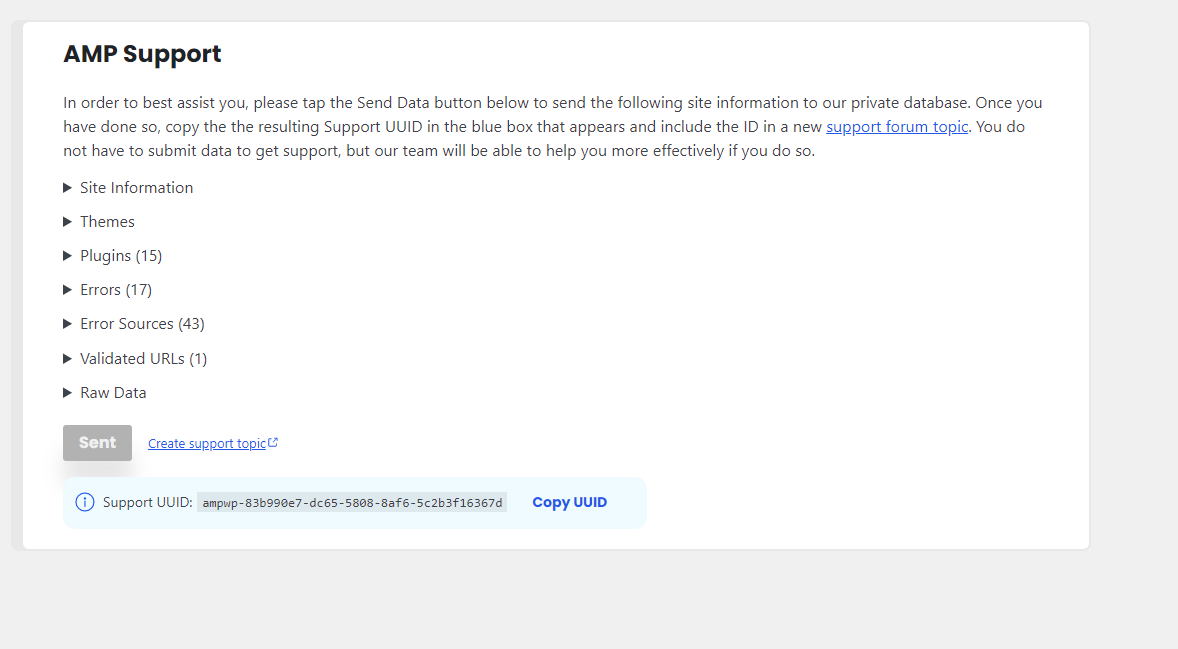
Could you go to the AMP > Support screen and generate a support UUID which our team can use to better understand your system?

@westonruter yes we set our REQUEST_URI in this approach in the wp-config to properly handle reverse proxy:
$_SERVER['REQUEST_URI'] = '/daily' . $_SERVER['REQUEST_URI']; $_SERVER['SCRIPT_NAME'] = '/daily' . $_SERVER['SCRIPT_NAME']; $_SERVER['PHP_SELF'] = '/daily' . $_SERVER['PHP_SELF'];
if ($_SERVER['HTTP_X_FORWARDED_PROTO'] == 'https') $_SERVER['HTTPS']='on';
if (isset($_SERVER['HTTP_X_FORWARDED_HOST'])) { $_SERVER['HTTP_HOST'] = $_SERVER['HTTP_X_FORWARDED_HOST'];}
Could you go to the AMP > Support screen and generate a support UUID which our team can use to better understand your system?
Done. We have submitted the support already. Here is the UUID: ampwp-83b990e7-dc65-5808-8af6-5c2b3f16367d
If I can understand it properly then modifying the REQUEST_URI is the culprit here. When the plugin removes the paired URL it seems it goes back to the original state of $_SERVER['REQUEST_URI'].
@westonruter Just out of curiosity is this best practice to modify the $_SERVER global here? I think reverse proxy should be handled from a web server(Nginx or Apache).

Modifying the $_SERVER global is the only way to achieve paired URLs for all possible URLs on a WordPress frontend since wordPress's rewrite rules are not expressive enough to do so.
Since the REQUEST_URI is being modified in wp-config.php then this should be the variable value that the PairedRouting service is working with. I don't see why it would be undoing it. There may be something else going on with the manipulation of the REQUEST_URI related to $wp->request.
@westonruter do you have any suggestions on how should we fix or handle this issue? Btw clicking the View Amp version from non-amp version works, however the switching back to non-amp version has some issue.
I think the plugin has some issue related to --- when switching from amp version to non-amp verison in the admin mode
I think the plugin has some issue related to --- when switching from amp version to non-amp verison in the admin mode
@firephantomassasin I have tested it out locally on single and multisite setups. So far it's working as expected on my end.
If I am not mistaken here then it is a multisite setup. Right?
@thelovekesh it is not a multisite setup. It is a reverse proxy setup. The front facing server www.investagrams.com is using different server and setup with a reverse proxy to point the /daily (subdirectory) going to this wordpress server which contains everything via private IP connection.
https://github.com/ampproject/amp-wp/issues/6399#issuecomment-1306260432
This is still a issue.
We still got to do :
    //$current_url .= '/';
    $current_url .= '/blog/';
in function amp_get_current_url() (includes/amp-helper-functions.php)

I attempted to replicate it by manipulating $_SERVER['REQUEST URI'], but on my end, everything is functioning as it should.
@firephantomassasin Could you please confirm if your WordPress is behind a web server(Nginx/Apache)? If yes could you share the configs so that I can try to replicate it?
Also, could you try to proxy the traffic for the WordPress server on /daily location using a web server(For Nginx here is how to do it.)? In that case, you will not require to proxy it like this:
$_SERVER['REQUEST_URI'] = '/daily' . $_SERVER['REQUEST_URI'];
$_SERVER['SCRIPT_NAME'] = '/daily' . $_SERVER['SCRIPT_NAME'];
$_SERVER['PHP_SELF'] = '/daily' . $_SERVER['PHP_SELF'];
wordpress is behind a web server apache.
This is the config of apache:
Apache config
# This is the main Apache server configuration file.  It contains the
# configuration directives that give the server its instructions.
# See http://httpd.apache.org/docs/2.4/ for detailed information about
# the directives and /usr/share/doc/apache2/README.Debian about Debian specific
# hints.
#
#
# Summary of how the Apache 2 configuration works in Debian:
# The Apache 2 web server configuration in Debian is quite different to
# upstream's suggested way to configure the web server. This is because Debian's
# default Apache2 installation attempts to make adding and removing modules,
# virtual hosts, and extra configuration directives as flexible as possible, in
# order to make automating the changes and administering the server as easy as
# possible.

# It is split into several files forming the configuration hierarchy outlined
# below, all located in the /etc/apache2/ directory:
#
#	/etc/apache2/
#	|-- apache2.conf
#	|	`--  ports.conf
#	|-- mods-enabled
#	|	|-- *.load
#	|	`-- *.conf
#	|-- conf-enabled
#	|	`-- *.conf
# 	`-- sites-enabled
#	 	`-- *.conf
#
#
# * apache2.conf is the main configuration file (this file). It puts the pieces
#   together by including all remaining configuration files when starting up the
#   web server.
#
# * ports.conf is always included from the main configuration file. It is
#   supposed to determine listening ports for incoming connections which can be
#   customized anytime.
#
# * Configuration files in the mods-enabled/, conf-enabled/ and sites-enabled/
#   directories contain particular configuration snippets which manage modules,
#   global configuration fragments, or virtual host configurations,
#   respectively.
#
#   They are activated by symlinking available configuration files from their
#   respective *-available/ counterparts. These should be managed by using our
#   helpers a2enmod/a2dismod, a2ensite/a2dissite and a2enconf/a2disconf. See
#   their respective man pages for detailed information.
#
# * The binary is called apache2. Due to the use of environment variables, in
#   the default configuration, apache2 needs to be started/stopped with
#   /etc/init.d/apache2 or apache2ctl. Calling /usr/bin/apache2 directly will not
#   work with the default configuration.


# Global configuration
#

#
# ServerRoot: The top of the directory tree under which the server's
# configuration, error, and log files are kept.
#
# NOTE!  If you intend to place this on an NFS (or otherwise network)
# mounted filesystem then please read the Mutex documentation (available
# at <URL:http://httpd.apache.org/docs/2.4/mod/core.html#mutex>);
# you will save yourself a lot of trouble.
#
# Do NOT add a slash at the end of the directory path.
#
#ServerRoot "/etc/apache2"

#
# The accept serialization lock file MUST BE STORED ON A LOCAL DISK.
#
#Mutex file:${APACHE_LOCK_DIR} default

#
# The directory where shm and other runtime files will be stored.
#

DefaultRuntimeDir ${APACHE_RUN_DIR}

#
# PidFile: The file in which the server should record its process
# identification number when it starts.
# This needs to be set in /etc/apache2/envvars
#
PidFile ${APACHE_PID_FILE}

#
# Timeout: The number of seconds before receives and sends time out.
#
Timeout 300

#
# KeepAlive: Whether or not to allow persistent connections (more than
# one request per connection). Set to "Off" to deactivate.
#
KeepAlive On

#
# MaxKeepAliveRequests: The maximum number of requests to allow
# during a persistent connection. Set to 0 to allow an unlimited amount.
# We recommend you leave this number high, for maximum performance.
#
MaxKeepAliveRequests 100

#
# KeepAliveTimeout: Number of seconds to wait for the next request from the
# same client on the same connection.
#
KeepAliveTimeout 5


# These need to be set in /etc/apache2/envvars
User ${APACHE_RUN_USER}
Group ${APACHE_RUN_GROUP}

#
# HostnameLookups: Log the names of clients or just their IP addresses
# e.g., www.apache.org (on) or 204.62.129.132 (off).
# The default is off because it'd be overall better for the net if people
# had to knowingly turn this feature on, since enabling it means that
# each client request will result in AT LEAST one lookup request to the
# nameserver.
#
HostnameLookups Off

# ErrorLog: The location of the error log file.
# If you do not specify an ErrorLog directive within a <VirtualHost>
# container, error messages relating to that virtual host will be
# logged here.  If you *do* define an error logfile for a <VirtualHost>
# container, that host's errors will be logged there and not here.
#
ErrorLog ${APACHE_LOG_DIR}/error.log

#
# LogLevel: Control the severity of messages logged to the error_log.
# Available values: trace8, ..., trace1, debug, info, notice, warn,
# error, crit, alert, emerg.
# It is also possible to configure the log level for particular modules, e.g.
# "LogLevel info ssl:warn"
#
LogLevel warn

# Include module configuration:
IncludeOptional mods-enabled/*.load
IncludeOptional mods-enabled/*.conf

# Include list of ports to listen on
Include ports.conf


# Sets the default security model of the Apache2 HTTPD server. It does
# not allow access to the root filesystem outside of /usr/share and /var/www.
# The former is used by web applications packaged in Debian,
# the latter may be used for local directories served by the web server. If
# your system is serving content from a sub-directory in /srv you must allow
# access here, or in any related virtual host.
<Directory />
	Options FollowSymLinks
	AllowOverride all
	Require all denied
</Directory>

<Directory /usr/share>
	AllowOverride all
	Require all granted
</Directory>

<Directory /var/www/>
	Options Indexes FollowSymLinks
	AllowOverride all
	Require all granted
</Directory>

#<Directory /srv/>
#	Options Indexes FollowSymLinks
#	AllowOverride None
#	Require all granted
#</Directory>


# AccessFileName: The name of the file to look for in each directory
# for additional configuration directives.  See also the AllowOverride
# directive.
#
AccessFileName .htaccess

#
# The following lines prevent .htaccess and .htpasswd files from being
# viewed by Web clients.
#
<FilesMatch "^\.ht">
	Require all denied
</FilesMatch>


#
# The following directives define some format nicknames for use with
# a CustomLog directive.
#
# These deviate from the Common Log Format definitions in that they use %O
# (the actual bytes sent including headers) instead of %b (the size of the
# requested file), because the latter makes it impossible to detect partial
# requests.
#
# Note that the use of %{X-Forwarded-For}i instead of %h is not recommended.
# Use mod_remoteip instead.
#
LogFormat "%v:%p %h %l %u %t \"%r\" %>s %O \"%{Referer}i\" \"%{User-Agent}i\"" vhost_combined
LogFormat "%h %l %u %t \"%r\" %>s %O \"%{Referer}i\" \"%{User-Agent}i\"" combined
LogFormat "%h %l %u %t \"%r\" %>s %O" common
LogFormat "%{Referer}i -> %U" referer
LogFormat "%{User-agent}i" agent

# Include of directories ignores editors' and dpkg's backup files,
# see README.Debian for details.

# Include generic snippets of statements
IncludeOptional conf-enabled/*.conf

# Include the virtual host configurations:
IncludeOptional sites-enabled/*.conf

# vim: syntax=apache ts=4 sw=4 sts=4 sr noet
@firephantomassasin Above shared config looks like the primary config file. Generally, apache has a directory-level config called .htaccess. If it exists, could you please share it?
Note Please double-check for any sensitive information while sharing the config file.
Here is the .htaccess file located in our WordPress site root directory
<IfModule mod_rewrite.c>
RewriteEngine On
RewriteRule ^index\.php$ - [L]
RewriteCond %{REQUEST_FILENAME} !-f
RewriteCond %{REQUEST_FILENAME} !-d
RewriteRule . /index.php [L]
</IfModule>

Options -Indexes

ErrorDocument 401 /wp-content/themes/neel/404.php
ErrorDocument 403 /wp-content/themes/neel/404.php
ErrorDocument 404 /wp-content/themes/neel/404.php
ErrorDocument 500 /wp-content/themes/neel/404.php
ErrorDocument 502 /wp-content/themes/neel/404.php
ErrorDocument 503 /wp-content/themes/neel/404.php
ErrorDocument 504 /wp-content/themes/neel/404.php


<IfModule mod_headers.c>
  Header set x-content-type-Options nosniff
  Header set x-xss-protection "1; mode=block"
</IfModule>


# Prevent browser and search engines to request .log (e.g. WP DEBUG LOG) and .txt (e.g. plugins readme) files.
# Must be placed in /wp-content/.htaccess
<FilesMatch "\.(log|txt)$">
    Order Allow,Deny
    Deny from all
</FilesMatch>

# Hide WordPress, system & sensitive files
<FilesMatch "(^\.|wp-config(-sample)*\.php)">
    Order Deny,Allow
    Deny from all
</FilesMatch>

# Protect some other files
<FilesMatch "(liesmich.html|readme.html|(.*)\.ttf|(.*)\.bak)">
  Order Deny,Allow
  Deny from all
</FilesMatch>
@firephantomassasin Could you try updating your mod_rewrite to something like:
<IfModule mod_rewrite.c>
RewriteEngine On
RewriteBase /daily/
RewriteRule ^index\.php$ - [L]
RewriteCond %{REQUEST_FILENAME} !-f
RewriteCond %{REQUEST_FILENAME} !-d
RewriteRule . /daily/index.php [L]
</IfModule>
and remove the code mentioned in https://github.com/ampproject/amp-wp/issues/7245#issuecomment-1238854626.
Please note the /daily/ location in RewriteBase and RewriteRule.
This is a rough idea to achieve reverse proxy using your web server. I am not very aware of the Apache web server so, could you please try some hit-and-trials based on above idea?
@firephantomassasin Could you try updating your
mod_rewriteto something like:<IfModule mod_rewrite.c> RewriteEngine On RewriteBase /daily/ RewriteRule ^index\.php$ - [L] RewriteCond %{REQUEST_FILENAME} !-f RewriteCond %{REQUEST_FILENAME} !-d RewriteRule . /daily/index.php [L] </IfModule>and remove the code mentioned in #7245 (comment).
Please note the
/daily/location inRewriteBaseandRewriteRule.This is a rough idea to achieve reverse proxy using your web server. I am not very aware of the Apache web server so, could you please try some hit-and-trials based on above idea?
This doesn't work. We are getting an 500 internal error when we access specific article
Our setup is, wordpress is deployed in apache web server, then an azure web app is doing the reverse proxy pointing to the apache web server via private IP address. The public domain (www.investagrams.com/daily) with subdirectory /daily is pointed at the azure web app then the azure web app is the one who is doing the reverse proxy.