
PiP
 PiP copied to clipboard
 amitv87
macOS Picture in Picture and AirPlay Receiver
macOS Picture in Picture
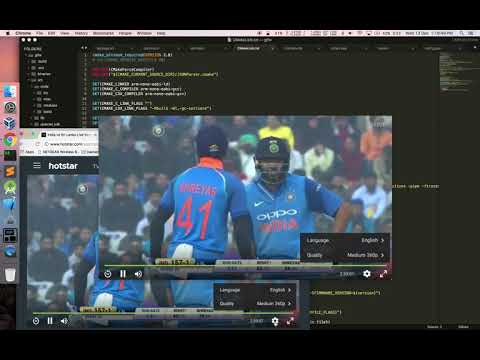
Always on top window preview similar to the popular windows only OnTopReplica
Now with AirPlay receiver support (if on macOS 12+, turn-off built-in AirPlay receiver from system preferences)
Code Info
- Nibless cocoa app
- OpenGL/Metal renderer
- CoreGraphics based capturer (looking for alternative)
- No third party dependency
- Uses private framework for native pip support
- AirPlay backend from https://github.com/FDH2/UxPlay and https://github.com/KqSMea8/AirplayServer
Features
- Clone any visibile window
- Clone multiple active display
- Crop the preview
- Auto and manual resize preserving the aspect ratio
- Multiple window preview from same process,
cmd+nto open andcmd+wto close - Pinch to zoom
- Native picture in picture support
cmd+p - Transparency/opacity control (slider in right click menu)
- Minimal modern UI
- Upto 10 parallel airplay sessions (soft limit)
To do
- Almost all the missing features when compared to OnTopReplica
Installation
Manual download
Download and install via Homebrew
brew install --cask amitv87-pip
Build from source and run
# checkout code
git clone https://github.com/amitv87/PiP.git
cd pip

# build using xcode
xcodebuild -alltargets
open build/Release/PiP.app

# or simply
./run.sh
 amitv87