

 amiaopensource
12bit capture
Hi, I´ve been trying this software for capturing VHS footage on my BlackMagic Intensity Shuttle. I've compared the resulting file specs from MediaExpress and vrecord. Using MediaExpress with Apple Prores 4444 I get a 12 bit file (yuv422p12le) but you software only seems to allow 10 bits (yuv422p10le). As your software has more advanced and archiving features I don't understand why It only offers 10 and 8 bit captures. Is 10bit suitable for archiving? Are Apple Prores "12 bits" real? Thanks in advance.

Ya, the use of 10 bits is a limit of the decklink sdk and the implementation of that within libavdevice, so currently we just use 8 bit yuv and 10 bit yuv although decklink does offer some other formats, see https://github.com/SoylentGraham/SoyDecklink/blob/0e1cb1fcab51fde734b06cface9a79813ced3932/DecklinkSdk/Linux/include/DeckLinkAPIModes.h#L169-L180. There is a 12 bit option in there but it's rgb rather than yuv and libavdevice only offers rgb at 8 and 10 bit for decklink.
So if you wanted 12 bit yuv, the decklink sdk would need extension, if it's even feasible.
If you wanted 12 bit rgb, then first libavdevice's decklink support would need to be extended for that.
I suspect that if somehow you can get 12 bit yuv prores out of Blackmagic that the lower bits are nulled.

I suspect that if somehow you can get 12 bit yuv prores out of Blackmagic that the lower bits are nulled.
Is there any way to prove if those lower bits are nulled or not? (I am just using the latest Blackmagic software/drivers update on a MacOS Mojave MacBook Pro A1502). Thank you very much for the rest of your answer.
Is there any way to prove if those lower bits are nulled or not?
You can check the corresponding bit planes.

@nihelmasell, you can isolate a video's bitplane with the lutyuv filter and bitand function. If the video is 12 bit and yuv422p12le, then try this to play only the 11th bit plane of the y plane:
bitdepth=12 ; bit2play=11 ; ffplay -i hi.mov -vf "lutyuv=y=bitand(val\,pow(2\,${bitdepth}-${bit2play}))*pow(2\,${bit2play}):u=(maxval-minval)/2:v=(maxval-minval)/2"
@nihelmasell, you can isolate a video's bitplane with the lutyuv filter and bitand function. If the video is 12 bit and yuv422p12le, then try this to play only the 11th bit plane of the y plane:
bitdepth=12 ; bit2play=11 ; ffplay -i hi.mov -vf "lutyuv=y=bitand(val\,pow(2\,${bitdepth}-${bit2play}))*pow(2\,${bit2play}):u=(maxval-minval)/2:v=(maxval-minval)/2"
I get this output. How should I interpret it?
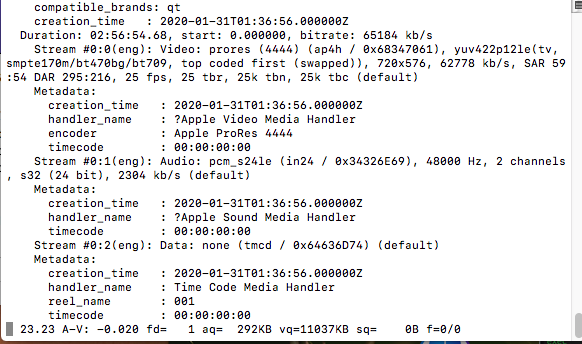

@retokromer @dericed please forgive my ignorance. I'm not an expert on these businesses.
No problem at all, @nihelmasell!
I get this output. How should I interpret it?
It seems to be just noise, no useful information.
So if you wanted 12 bit yuv, the decklink sdk would need extension, if it's even feasible.
If you wanted 12 bit rgb, then first libavdevice's decklink support would need to be extended for that.
@nihelmasell : What @dericed suggested seems feasible, but would need some work on your end. At a first look, the first possibility looks simpler to me.
So if you wanted 12 bit yuv, the decklink sdk would need extension, if it's even feasible. If you wanted 12 bit rgb, then first libavdevice's decklink support would need to be extended for that.
@nihelmasell : What @dericed suggested seems feasible, but would need some work on your end. At a first look, the first possibility looks simpler to me.
I don’t really know how to extend the capabilities, so for me the first one is really the only option. The 40gb/h files I get have a very good quality. And I think the 1 billion (?) color palette is sufficient for me (I’m just an user, not an institution).