

 amendx
in Dialog or Modal the drag maybe cause position offset
Hi @amendx
First, its awesome repo thanks a lot.
But i Found a problem in some need
look my picture
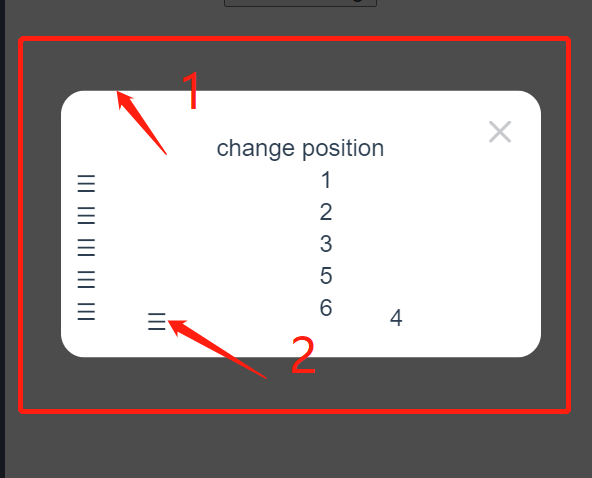
the count 1 is my cursor true position the count 2 is the drag baby position
the positon has offset
this is demo link
i found a repo like your repo vueSlicksort
the vueSlicksort provide a appendto props in his SlickList Component like you Container Component
how can i solve the offset question?
thanks again.

@amendx Excelente contribución, en el futuro seria interesante una versión para angular.

@0xbul1 I've made some changes inside your demo link using :get-ghost-parent="getGhostParent":
getGhostParent() {
      const element = document.querySelector('#dialog').children.item(1);
      return element.children.item(0);
    },
- I tried to just simulate what you could do in this case, since the
getGhostParentdoes pretty much the exact same thing as you wondered about theappendTo. The issue in the example was the positioning of the dialog, wich could be causing thedraggableelement to get positioned "outside" the targeted container. Try that out on your project and see if that still happens.

Hi @amendx, Sorry for the late reply.
emmm, sorry its my fault.
Perhaps the position offset is not caused by appendtoprops?
I change the demo and in my before project i do like this.
and the SlickSortproject will be no position offset.
so now i change the same code use vue-dndrop.
but vue-dndrop still have position offset like this video
you can confirm use Open in New Window LIVE in the demo link page or click there directly ( must do this watch example in big screen, You will find the same problem as in my video)
I've encountered this problem as well, and I've made a bit of progress on finding the cause. It appears to stem from any use of a transform style on a parent of the drag container. I've made a more minimal example with scale(0), which has no impact on the display but still messes up the tracking on the ghost item.

@phislop-sra Nice! I'll take a look at it. I'm repairing some code to fit other issues as well. Hope I'll find your solution!