

 alvr-org
ALVR config UI not appearing [Linux/Arch]
When installing from the AUR (normal and git versions):
- ALVR is successfully installed
- Opens "waiting for server to load" prompt as SteamVR launches
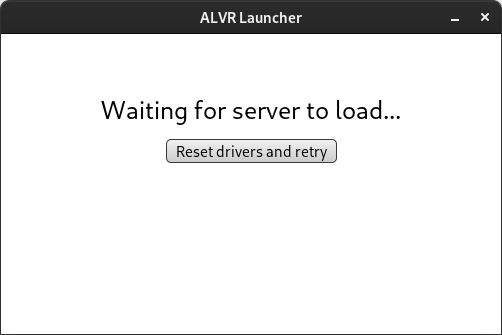 (properly closes when SteamVR loads)
 - SteamVR recognizes ALVR's virtual headset

Problem:
- Unable to open ALVR's UI on desktop
Thus:
-
Unable to trust headset when attempting to connect
-
Headset successfully detects server with both stable and nightly
-
Headset asks for trust prompt
-
Desktop does not display trust prompt
System Details:
- Manjaro (Gnome 41.2)
- Linux 5.15.7-1 kernel
- video-hybrid-amd-nvidia-prime Video Driver
- AMD Ryzen 7 5700G
- Nvidia GTX 970

When ALVR is open, go to localhost:8082 in your browser. ALVR's dashboard window needs a chromium browser installed, and if it can't find one, it just won't open, but localhost:8082 is how you can access it from any browser

localhost:8082 works! Apologies, must have skimmed past it when looking through the documentation
Leaving this open just in case the UI is implemented already, and this is actually a bug
Leaving this open just in case the UI is implemented already, and this is actually a bug
It should've prompted you to install chrome on launch. Maybe you just clicked past that too quickly.

For whatever reason, ALVR does not open the dashboard automatically for me even though I have a chromium browser installed.

I'm a little late to the party but for anyone else still having this issue, the crate that is being used to create the dashboard (alcro) is searching specifically for google-chrome and chromium browsers. You can still open the dashboard with any chromium browser by going to localhost:8082. If you want it to open automatically with a different chromium browser, say Brave, you can simply use a symlink with ln -s /usr/bin/brave /usr/bin/chromium and it will automatically launch with Brave when you start the app. Hope this helps!

This issue has been automatically marked as stale because it has not had recent activity. It will be closed if no further activity occurs. Thank you for your contributions.
![stale[bot] avatar](https://avatars.githubusercontent.com/in/1724?v=4 "Published by a pub.dev verified publisher")