

 alvr-org
Bad visual quality when using hardware encoder
Description
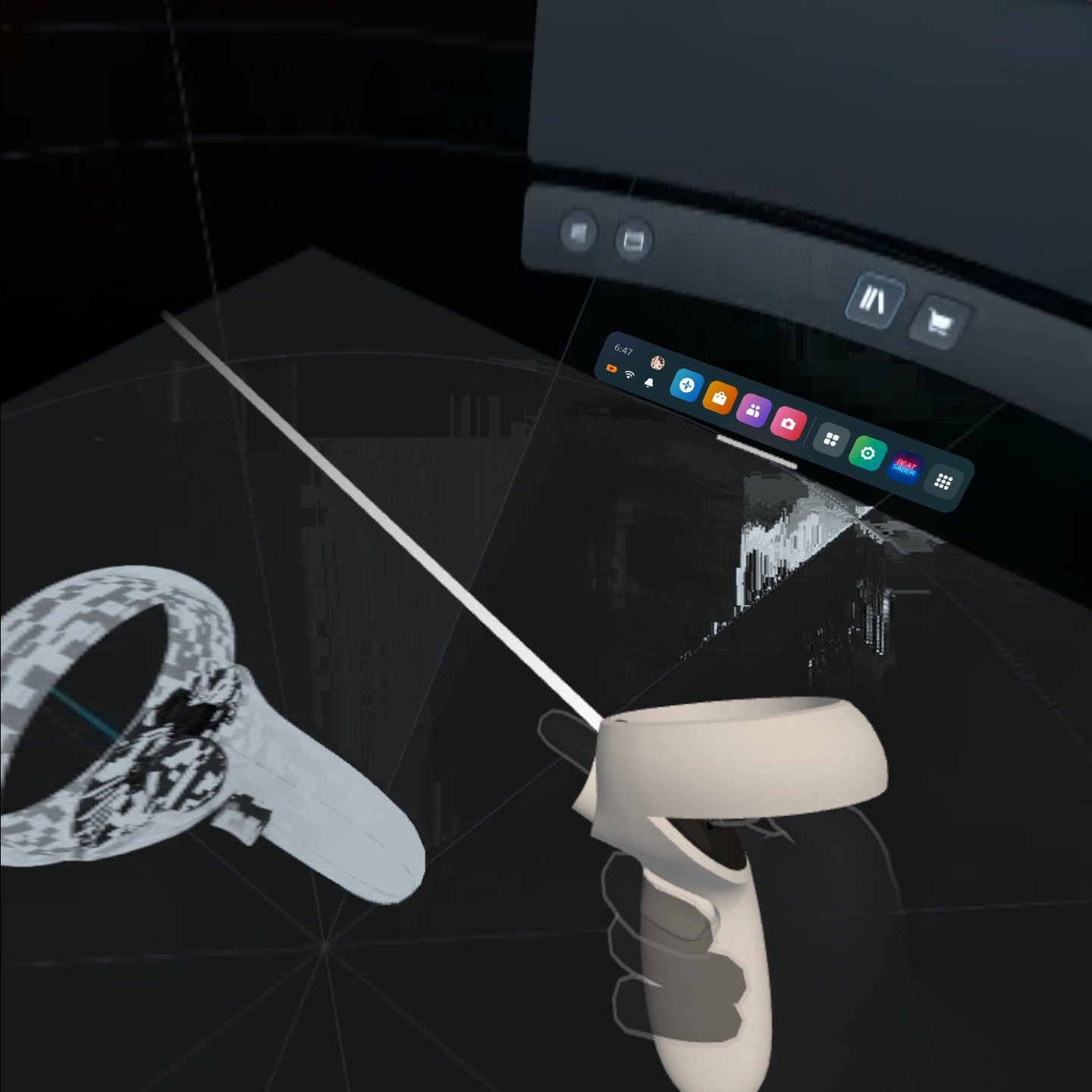
In hardware encoder mode, if you don't move the headset, the color of the screen gradually changes, so after 10 minutes it becomes so pixelated that you can't see anything.
The problem arises in three ways.
- Erroneous color that ripples from left to right, and fades slowly. At this time, it is only in the left eye, and there is no problem in the right eye, but if the left eye is almost completely smeared, the right eye will also gradually develop. Solved by restarting ALVR or use software encoder.
- This occurs when ALVR is turned on for the first time. Bitrate drops to 0.05 ~ 0.003 Mbps and the screen cannot be read properly. (Using CBR 30Mbps) This problem can be solved by using a software encoder.
- If you don't move the headset (example - VR movies), pixelation will gradually progress with the wrong colors, and the screen will turn completely white after about 10 minutes. This problem can be solved by moving the headset over 200 degrees to change what is displayed on the screen or use software encoder.
General Troubleshooting
- [x] I carefully followed the instructions in the README and successfully completed the setup wizard
- [x] I read the ALVR Wikis here and here
Environment
Hardware
https://linux-hardware.org/?probe=d1da7498da
Installation
ALVR Version: v20.0.0-dev07+nightly.2023.3.15
SteamVR Version: 1.25.7
Install Type:
- [ ] Packaged (
exe,deb,rpm, etc) - [ ] Portable (
zip) - [x] Source
OS Name and Version : Ubuntu 22.04.1 LTS


 Doesn't work nightly version
Please try a newer nightly than what is posted here and enable avoid video corruption keep in mind this causes other issues that are known about
It was solved in disable decoder latency fixer But need to let users know about this.
@Vixea Install ALVR and set this options https://github.com/alvr-org/ALVR/issues/1536#issuecomment-1561296250
i'm not touch anything without this screenshot
{
  "server_version": "20.0.0",
  "drivers_backup": null,
  "openvr_config": {
    "eye_resolution_width": 1440,
    "eye_resolution_height": 1568,
    "target_eye_resolution_width": 1440,
    "target_eye_resolution_height": 1568,
    "tracking_ref_only": false,
    "enable_vive_tracker_proxy": false,
    "aggressive_keyframe_resend": false,
    "adapter_index": 0,
    "codec": 0,
    "refresh_rate": 120,
    "use_10bit_encoder": false,
    "enable_vbaq": true,
    "use_preproc": false,
    "preproc_sigma": 4,
    "preproc_tor": 7,
    "amd_encoder_quality_preset": 1,
    "rate_control_mode": 0,
    "filler_data": false,
    "entropy_coding": 1,
    "force_sw_encoding": false,
    "sw_thread_count": 0,
    "controllers_mode_idx": 7,
    "controllers_enabled": true,
    "override_trigger_threshold": true,
    "trigger_threshold": 0.1,
    "override_grip_threshold": false,
    "grip_threshold": 0.0,
    "enable_foveated_rendering": false,
    "foveation_center_size_x": 0.0,
    "foveation_center_size_y": 0.0,
    "foveation_center_shift_x": 0.0,
    "foveation_center_shift_y": 0.0,
    "foveation_edge_ratio_x": 0.0,
    "foveation_edge_ratio_y": 0.0,
    "enable_color_correction": false,
    "brightness": 0.0,
    "contrast": 0.0,
    "saturation": 0.0,
    "gamma": 0.0,
    "sharpening": 0.0,
    "linux_async_reprojection": false,
    "nvenc_quality_preset": 1,
    "nvenc_tuning_preset": 2,
    "nvenc_multi_pass": 1,
    "nvenc_adaptive_quantization_mode": 1,
    "nvenc_low_delay_key_frame_scale": -1,
    "nvenc_refresh_rate": -1,
    "enable_intra_refresh": false,
    "intra_refresh_period": -1,
    "intra_refresh_count": -1,
    "max_num_ref_frames": -1,
    "gop_length": -1,
    "p_frame_strategy": -1,
    "nvenc_rate_control_mode": -1,
    "rc_buffer_size": -1,
    "rc_initial_delay": -1,
    "rc_max_bitrate": -1,
    "rc_average_bitrate": -1,
    "nvenc_enable_weighted_prediction": false,
    "capture_frame_dir": "/tmp"
  },
  "client_connections": {
    "3285.client.alvr": {
      "display_name": "Quest",
      "current_ip": "192.168.137.198",
      "manual_ips": [],
      "trusted": true
    }
  },
  "session_settings": {
    "video": {
      "adapter_index": 0,
      "transcoding_view_resolution": {
        "Scale": 1.0,
        "Absolute": {
          "width": 2592,
          "height": {
            "set": false,
            "content": 1072
          }
        },
        "variant": "Scale"
      },
      "emulated_headset_view_resolution": {
        "Scale": 1.0,
        "Absolute": {
          "width": 2592,
          "height": {
            "set": false,
            "content": 1072
          }
        },
        "variant": "Scale"
      },
      "preferred_fps": 120.0,
      "max_buffering_frames": 1.5,
      "buffering_history_weight": 0.9,
      "bitrate": {
        "mode": {
          "ConstantMbps": 220,
          "Adaptive": {
            "saturation_multiplier": 0.95,
            "max_bitrate_mbps": {
              "enabled": false,
              "content": 100
            },
            "min_bitrate_mbps": {
              "enabled": true,
              "content": 120
            },
            "max_network_latency_ms": {
              "enabled": false,
              "content": 8
            },
            "decoder_latency_fixer": {
              "enabled": false,
              "content": {
                "max_decoder_latency_ms": 20,
                "latency_overstep_frames": 30,
                "latency_overstep_multiplier": 0.99
              }
            }
          },
          "variant": "Adaptive"
        },
        "adapt_to_framerate": {
          "enabled": false,
          "content": {
            "framerate_reset_threshold_multiplier": 2.0
          }
        }
      },
      "preferred_codec": {
        "variant": "H264"
      },
      "encoder_config": {
        "rate_control_mode": {
          "variant": "Cbr"
        },
        "filler_data": false,
        "entropy_coding": {
          "variant": "Cavlc"
        },
        "use_10bit": false,
        "nvenc": {
          "quality_preset": {
            "variant": "P1"
          },
          "tuning_preset": {
            "variant": "LowLatency"
          },
          "multi_pass": {
            "variant": "QuarterResolution"
          },
          "adaptive_quantization_mode": {
            "variant": "Spatial"
          },
          "low_delay_key_frame_scale": -1,
          "refresh_rate": -1,
          "enable_intra_refresh": false,
          "intra_refresh_period": -1,
          "intra_refresh_count": -1,
          "max_num_ref_frames": -1,
          "gop_length": -1,
          "p_frame_strategy": -1,
          "rate_control_mode": -1,
          "rc_buffer_size": -1,
          "rc_initial_delay": -1,
          "rc_max_bitrate": -1,
          "rc_average_bitrate": -1,
          "enable_weighted_prediction": false
        },
        "amf": {
          "quality_preset": {
            "variant": "Balanced"
          },
          "enable_vbaq": true,
          "use_preproc": false,
          "preproc_sigma": 4,
          "preproc_tor": 7
        },
        "software": {
          "force_software_encoding": false,
          "thread_count": 0
        }
      },
      "mediacodec_extra_options": {
        "key": "",
        "value": {
          "Float": 0.0,
          "Int32": 0,
          "Int64": 0,
          "String": "",
          "variant": "Int32"
        },
        "content": [
          [
            "operating-rate",
            {
              "Float": 0.0,
              "Int32": 2147483647,
              "Int64": 0,
              "String": "",
              "variant": "Int32"
            }
          ],
          [
            "priority",
            {
              "Float": 0.0,
              "Int32": 0,
              "Int64": 0,
              "String": "",
              "variant": "Int32"
            }
          ],
          [
            "vendor.qti-ext-dec-low-latency.enable",
            {
              "Float": 0.0,
              "Int32": 1,
              "Int64": 0,
              "String": "",
              "variant": "Int32"
            }
          ]
        ]
      },
      "foveated_rendering": {
        "enabled": false,
        "content": {
          "center_size_x": 0.4,
          "center_size_y": 0.35,
          "center_shift_x": 0.4,
          "center_shift_y": 0.1,
          "edge_ratio_x": 4.0,
          "edge_ratio_y": 5.0
        }
      },
      "clientside_foveation": {
        "enabled": true,
        "content": {
          "mode": {
            "Static": {
              "level": {
                "variant": "High"
              }
            },
            "Dynamic": {
              "max_level": {
                "variant": "High"
              }
            },
            "variant": "Dynamic"
          },
          "vertical_offset_deg": 0.0
        }
      },
      "dynamic_oculus_foveation": true,
      "color_correction": {
        "enabled": false,
        "content": {
          "brightness": 0.0,
          "contrast": 0.0,
          "saturation": 0.5,
          "gamma": 1.0,
          "sharpening": 0.0
        }
      }
    },
    "audio": {
      "linux_backend": {
        "variant": "Alsa"
      },
      "game_audio": {
        "enabled": true,
        "content": {
          "device": {
            "set": false,
            "content": {
              "NameSubstring": "1 - 28E850(2- AMD High Definition Audio Device)",
              "Index": 0,
              "variant": "NameSubstring"
            }
          },
          "mute_when_streaming": true,
          "buffering": {
            "average_buffering_ms": 50,
            "batch_ms": 10
          }
        }
      },
      "microphone": {
        "enabled": true,
        "content": {
          "devices": {
            "Custom": {
              "sink": {
                "NameSubstring": "",
                "Index": 0,
                "variant": "NameSubstring"
              },
              "source": {
                "NameSubstring": "",
                "Index": 0,
                "variant": "NameSubstring"
              }
            },
            "variant": "VBCable"
          },
          "buffering": {
            "average_buffering_ms": 50,
            "batch_ms": 10
          }
        }
      }
    },
    "headset": {
      "emulation_mode": {
        "Custom": {
          "serial_number": "Unknown",
          "props": {
            "element": {
              "key": {
                "variant": "TrackingSystemName"
              },
              "value": {
                "Bool": false,
                "Float": 0.0,
                "Int32": 0,
                "Uint64": 0,
                "Vector3": [
                  0.0,
                  0.0,
                  0.0
                ],
                "Double": 0.0,
                "String": "",
                "variant": "String"
              }
            },
            "content": []
          }
        },
        "variant": "Quest2"
      },
      "extra_openvr_props": {
        "element": {
          "key": {
            "variant": "TrackingSystemName"
          },
          "value": {
            "Bool": false,
            "Float": 0.0,
            "Int32": 0,
            "Uint64": 0,
            "Vector3": [
              0.0,
              0.0,
              0.0
            ],
            "Double": 0.0,
            "String": "",
            "variant": "String"
          }
        },
        "content": []
      },
      "tracking_ref_only": false,
      "enable_vive_tracker_proxy": false,
      "face_tracking": {
        "enabled": false,
        "content": {
          "sources": {
            "eye_tracking_fb": true,
            "face_tracking_fb": true,
            "eye_expressions_htc": true,
            "lip_expressions_htc": true
          },
          "sink": {
            "VrchatEyeOsc": {
              "port": 9000
            },
            "VrcFaceTrackingOsc": {
              "port": 9620
            },
            "variant": "VrchatEyeOsc"
          }
        }
      },
      "controllers": {
        "enabled": true,
        "content": {
          "tracked": true,
          "emulation_mode": {
            "variant": "Quest2Touch"
          },
          "extra_openvr_props": {
            "element": {
              "key": {
                "variant": "TrackingSystemName"
              },
              "value": {
                "Bool": false,
                "Float": 0.0,
                "Int32": 0,
                "Uint64": 0,
                "Vector3": [
                  0.0,
                  0.0,
                  0.0
                ],
                "Double": 0.0,
                "String": "",
                "variant": "String"
              }
            },
            "content": []
          },
          "steamvr_pipeline_frames": 3.0,
          "linear_velocity_cutoff": 0.05,
          "angular_velocity_cutoff": 10.0,
          "left_controller_position_offset": [
            0.0,
            0.0,
            -0.11
          ],
          "left_controller_rotation_offset": [
            -20.0,
            0.0,
            0.0
          ],
          "left_hand_tracking_position_offset": [
            0.04,
            -0.02,
            -0.13
          ],
          "left_hand_tracking_rotation_offset": [
            0.0,
            -45.0,
            -90.0
          ],
          "trigger_threshold_override": {
            "enabled": true,
            "content": 0.1
          },
          "grip_threshold_override": {
            "enabled": false,
            "content": 0.1
          },
          "haptics": {
            "enabled": true,
            "content": {
              "intensity_multiplier": 1.0,
              "amplitude_curve": 1.0,
              "min_duration_s": 0.01
            }
          }
        }
      },
      "position_recentering_mode": {
        "Local": {
          "view_height": 1.5
        },
        "variant": "LocalFloor"
      },
      "rotation_recentering_mode": {
        "variant": "Yaw"
      }
    },
    "connection": {
      "stream_protocol": {
        "variant": "Tcp"
      },
      "client_discovery": {
        "enabled": true,
        "content": {
          "auto_trust_clients": true
        }
      },
      "stream_port": 9944,
      "web_server_port": 8082,
      "osc_local_port": 9942,
      "server_send_buffer_bytes": {
        "Custom": 100000,
        "variant": "Maximum"
      },
      "server_recv_buffer_bytes": {
        "Custom": 100000,
        "variant": "Maximum"
      },
      "client_send_buffer_bytes": {
        "Custom": 100000,
        "variant": "Maximum"
      },
      "client_recv_buffer_bytes": {
        "Custom": 100000,
        "variant": "Maximum"
      },
      "max_queued_server_video_frames": 3,
      "avoid_video_glitching": true,
      "aggressive_keyframe_resend": false,
      "on_connect_script": "",
      "on_disconnect_script": "",
      "packet_size": 1400,
      "statistics_history_size": 256
    },
    "logging": {
      "log_to_disk": false,
      "log_tracking": false,
      "log_button_presses": false,
      "log_haptics": false,
      "notification_level": {
        "variant": "Warning"
      },
      "show_raw_events": false
    },
    "steamvr_launcher": {
      "driver_launch_action": {
        "variant": "NoAction"
      },
      "open_close_steamvr_with_dashboard": false
    },
    "capture": {
      "save_video_stream": false,
      "capture_frame_dir": "/tmp"
    },
    "patches": {
      "linux_async_reprojection": false
    },
    "open_setup_wizard": false
  }
}
Well some things have been flagged as possible issue causers I need to check up with my system which won't happen until at least 3 days from now
try disabling vbaq, max buffering frames is out of date for good streaming performance at 120hz sadly you should be using probably around 1.8 or higher hence why the default in alvr is now 2.0(under video), and since your using amd you may need to set image corruption fix, and you don't seem to have the version that added image corruption fix with avoid video glitching
It didn't work. I did it at CBR 220Mbps, but I tried CBR 300Mbps just in case, but the same problem as the video above occurred when I was still.
OH, your not using adaptive bitrate yea you might want to change that for this config
Both modes have the same problem.
https://github.com/alvr-org/ALVR/issues/1536#issuecomment-1561296250 and above image
using wifi 6, connect speed is 1.2Gbps currently quest v55 firmware file transfer speed is average 95 ~ 105 MB/s it's not a wifi connection speed issue.
The bitrate settings don't seem to be applied properly.
In this setting, the bitrate was transmitted at a constant rate, but the problem of deteriorating picture quality when there was little screen change was the same.
There is some pixelation at this setting, and issues such as the video above appear very slowly.
I can't really use this setting at all.
The bitrate drops to 0.0001 ~ 0.00005 Mbps, and there is serious picture quality degradation.
There's a Minimum bitrate, but alvr completely ignored this setting.
This issue has been automatically marked as stale because it has not had recent activity. It will be closed if no further activity occurs. Thank you for your contributions.
![stale[bot] avatar](https://avatars.githubusercontent.com/in/1724?v=4 "Published by a pub.dev verified publisher")
btw can you reproduce this in the newest commits? (also please reset your settings for good measure)
Currently, i am not using Linux OS due to serious memory leaks in VR games (wine + game bug). I plan to test the v20.5.0 release version on Windows OS within this week.
I set all default settigns. Periodically, glitches occur across the screen, causing the screen to freeze and then recover again. Same bitrate Constant and Adaptive mode
In constant mode, the bitrate is constant, but glitches occur at regular intervals.