
govuk-design-system-backlog
 govuk-design-system-backlog copied to clipboard
 alphagov
Checkboxes

Would it be possible to look at vertical alignment when the option text is longer than a single line? Should alignment be top aligned, in general - would that help?

Hey @torydunn-hmrc – I just want to check what you're asking for. When you say 'would it be possible to look at' do you think there's an issue with the checkbox component that needs looking at, or do you just want to see an example so you know what it does?
We don't currently have any examples of checkboxes with very long option text in the Design System, because we'd generally encourage service teams to keep their option text short. But I can show you what it looks like if you do have a lot of text…
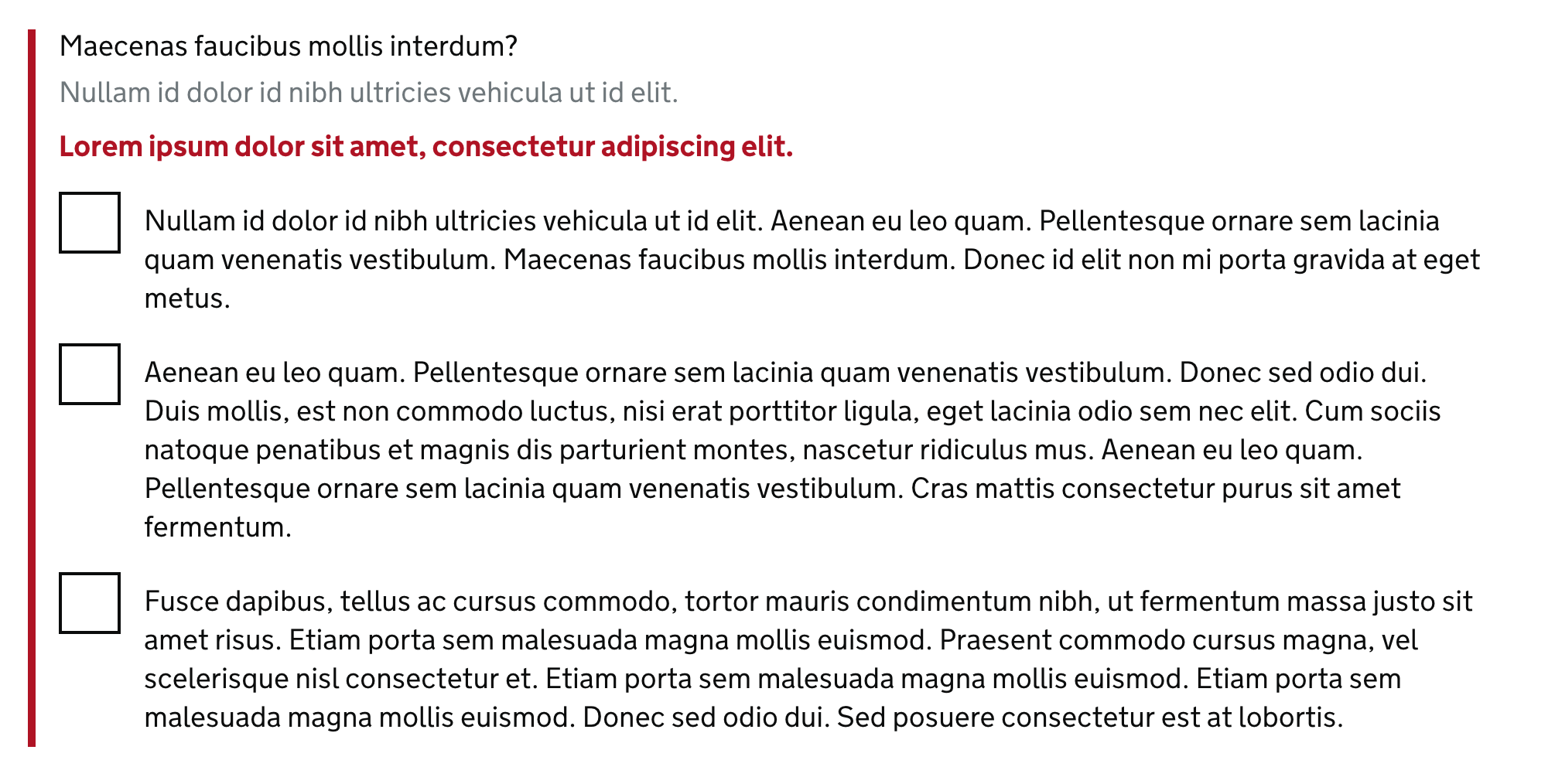
As you can see, the first line of the option text is vertically aligned with the middle of the checkbox, and then any further lines just wrap underneath it.
Does that help?

Hi Oliver
Thanks for the examples.
Yes that's what I mean. We certainly try to avoid long text and options, but there can be some complicated distinctions in tax options that make things wrap. Looking at the design system again: even with 2 lines, it looks unaligned vertically. And when some of our tax options reach 3 lines (the max I have seen), it gets pretty weird.
Could you see what it's like with at top aligning, even when it's a single line? Because I imagine trying to do vertical centring of multiple lines would be a real nightmare!
[image: Screen Shot 2018-10-11 at 13.11.28.png]
Cheers Tory
On Thu, 11 Oct 2018 at 12:16, Oliver Byford [email protected] wrote:
Hey @torydunn-hmrc https://github.com/torydunn-hmrc – I just want to check what you're asking for. When you say 'would it be possible to look at' do you think there's an issue with the checkbox component that needs looking at, or do you just want to see an example so you know what it does?
We don't currently have any examples of checkboxes with very long option text in the Design System, because we'd generally encourage service teams to keep their option text short. But I can show you what it looks like if you do have a lot of text…
[image: screenshot 2018-10-11 at 12 04 59bst] https://user-images.githubusercontent.com/121939/46800310-2f088c80-cd4f-11e8-8c5c-76bd91b4eeb9.png
As you can see, the first line of the option text is vertically aligned with the middle of the checkbox, and then any further lines just wrap underneath it.
Does that help?
— You are receiving this because you were mentioned. Reply to this email directly, view it on GitHub https://github.com/alphagov/govuk-design-system-backlog/issues/37#issuecomment-428917001, or mute the thread https://github.com/notifications/unsubscribe-auth/AildwgLXP_mxrf0CQDuqWXAS-HcnNGu9ks5ujyiIgaJpZM4RcUPt .
-- Tory Dunn
Hi Tory,
I think many people have tried (and failed) to dynamically vertically centre the text next to a checkbox or radio button, however when we put these components together we didn't find any examples where the first line wasn't vertically aligned to the middle of the checkbox, with the content wrapping below that.
In our case this looks slightly more dramatic as our radios and checkboxes are certainly larger than most. Here's a few examples from other design systems.


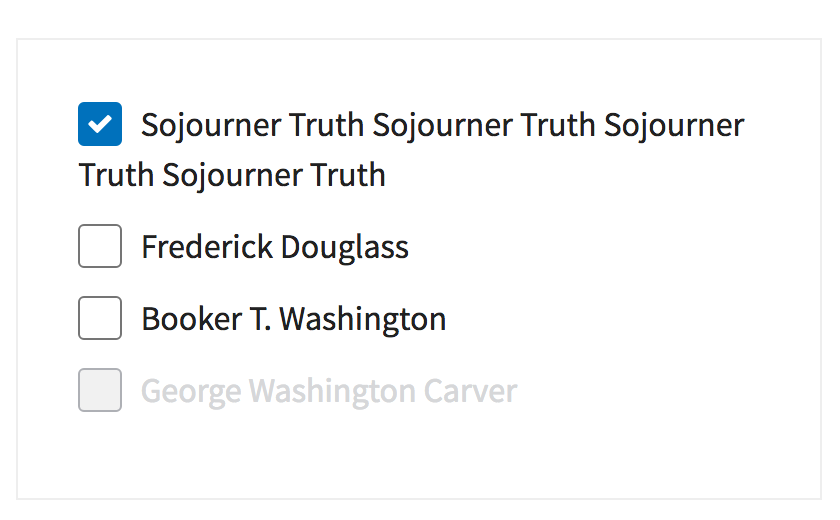
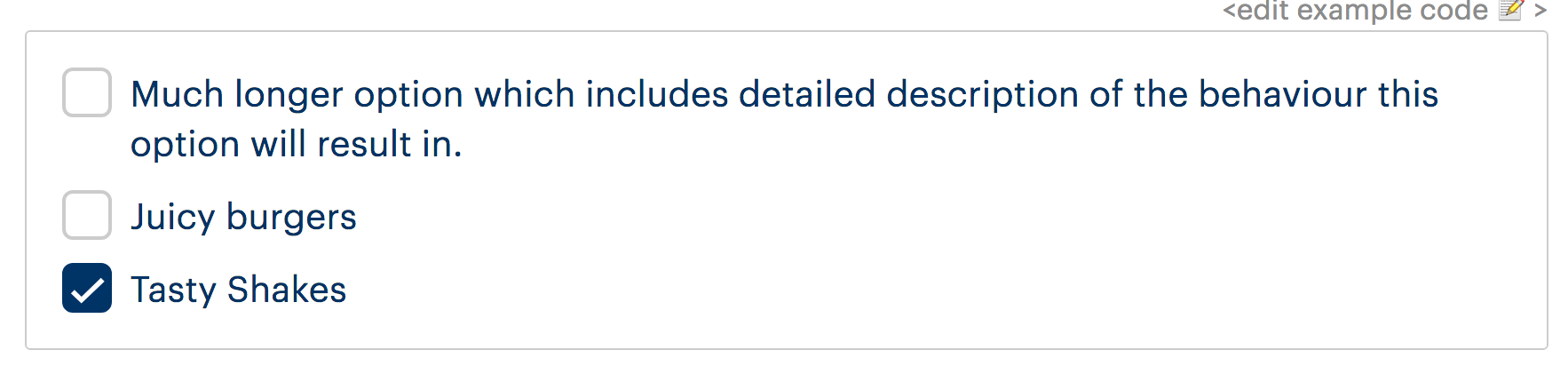
The main factor here though is that we simply don't know if the content is going to wrap or not, something that doesn't wrap on a large screen may well wrap on a small one. We can't set up any rules for these to behave differently at different breakpoints because it's entirely dependent on the character length of the label not the screen size.
Here's an example of something that doesn't wrap on desktop, but starts to wrap at a undefinable point.

Aligning the label to the top of the checkbox would fix this as you say, however with our radios and checkboxes being larger than normal, I think you'll agree it makes them look a little odd when the labels are short and don't wrap.

I think it would be acceptable to adjust this spacing manually for individual use cases with known content but from a Design System perspective, when designing for the unknown there's not a huge amount we can do to change the spacing based on content length of each label.

Not wishing to divert the existing topic of alignment on labels for checkboxes, I wanted also to propose a 'Select all' option for checkboxes.
Would it be useful to include such a check-all option? We found a need for something similar at DVSA and added it to our prototype, but perhaps others have needed this also?
Of course it'd be JS-driven, but the first option to 'select all' could be removed if JS is disabled, so it's an enhancement...
Eg. [] Select all [] Option 1 [] Option 2 [] Option 3
The first option would also track the state of the other options, so if you checked everything, it'd automatically check itself...
Thoughts on the feasibility of this?

Had a go prototyping this:
https://select-all-govuk-frontend-prototype.glitch.me/
We could take advantage of the indeterminate property:
- https://www.w3.org/TR/html52/sec-forms.html#dom-htmlinputelement-indeterminate
- https://developer.mozilla.org/en-US/docs/Web/HTML/Element/input/checkbox#Indeterminate_state_checkboxes
- https://css-tricks.com/indeterminate-checkboxes/
Quick observations:
- this is a JavaScript only behaviour, so we'd have to be OK with this.
- does it make sense for a user using assistive technologies?
- does the indeterminate option include semantics that are announced to assistive technologies?
Edit: Just realised my example is a bit broken, will make it work properly when I get a second...

Thanks for the examples and experiments, Dave. I think it we can find a way to adjust them manually, when the majority of options start to wrap, it will help.
On Thu, 11 Oct 2018 at 14:37, Dave House [email protected] wrote:
Hi Tory,
I think many people have tried (and failed) to dynamically vertically centre the text next to a checkbox or radio button, however when we put these components together we didn't find any examples where the first line wasn't vertically aligned to the middle of the checkbox, with the content wrapping below that.
In our case this looks slightly more dramatic as our radios and checkboxes are certainly larger than most. Here's a few examples from other design systems.
[image: screen shot 2018-10-11 at 13 55 35] https://user-images.githubusercontent.com/23356842/46807015-efe33700-cd60-11e8-9770-52169b9e3c88.png
[image: screen shot 2018-10-11 at 13 56 24] https://user-images.githubusercontent.com/23356842/46807033-fa9dcc00-cd60-11e8-8e8f-ddb522490ef6.png
[image: screen shot 2018-10-11 at 13 58 58] https://user-images.githubusercontent.com/23356842/46807041-ff628000-cd60-11e8-8506-940c3e2755b7.png
[image: screen shot 2018-10-11 at 13 59 30] https://user-images.githubusercontent.com/23356842/46807053-038e9d80-cd61-11e8-8106-6506f647c1d0.png
The main factor here though is that we simply don't know if the content is going to wrap or not, something that doesn't wrap on a large screen may well wrap on a small one. We can't set up any rules for these to behave differently at different breakpoints because it's entirely dependent on the character length of the label not the screen size.
Here's an example of something that doesn't wrap on desktop, but starts to wrap at a undefinable point.
[image: checkbozx-wrap] https://user-images.githubusercontent.com/23356842/46807275-7566e700-cd61-11e8-9c87-dc481bef1936.gif
Aligning the label to the top of the checkbox would fix this as you say, however with our radios and checkboxes being larger than normal, I think you'll agree it makes them look a little odd when the labels are short and don't wrap.
[image: screen shot 2018-10-11 at 14 26 11] https://user-images.githubusercontent.com/23356842/46807381-afd08400-cd61-11e8-99b4-04d20f42aacc.png
I think it would be acceptable to adjust this spacing manually for individual use cases with known content but from a Design System perspective, when designing for the unknown there's not a huge amount we can do to change the spacing based on content length of each label.
— You are receiving this because you were mentioned. Reply to this email directly, view it on GitHub https://github.com/alphagov/govuk-design-system-backlog/issues/37#issuecomment-428958075, or mute the thread https://github.com/notifications/unsubscribe-auth/Aildwu63RcpaPHxzV3M6rHAQWlB6Ytt-ks5uj0mHgaJpZM4RcUPt .
-- Tory Dunn
Head of Design | CDIO Digital Services | Dorset House | 07392 289160
I'd like the design system to support dividers for checkboxes as it does for radios - it confused me when it didn't.
Like radios, checkboxes sometimes have options that are unlike others - such as 'none of the above' - in this case a divider helps communicate this.
Example:

Why
Similar reasoning to having it for radios - it helps communicate the options and that these are slightly different.

Just a note that if we supported the 'None' of the above' pattern specifically, we might want to consider JavaScript to unselect the other checkboxes.

Just a note that if we supported the 'None' of the above' pattern specifically, we might want to consider JavaScript to unselect the other checkboxes.
Yep - and unselect 'none of the above' if you then pick one of the others ones.
You would also need to handle it when JavaScript is not available.
Do we want to use 'None of the above' in the example or something like 'My event will not include any of these'?

Dropbox Paper audit
On 5 Feb 2019 the Design System team reviewed a Dropbox Paper document discussing the Checkboxes component.
The aim was to reduce the number of places containing guidance and code by:
- migrating relevant, useful content into the Design System itself
- recording important research findings in the community backlog
- removing the original Dropbox Paper page
Below is a record of the outcomes of that review.
If you need to, you can see the original Dropbox Paper content in the internet archive.
Review outcomes
Updates to the Design System
The Design System team will carry out the following updates to ensure that relevant, useful content from the Dropbox Paper file is added to the Design System.
Add guidance explaining:
- to order checkboxes alphabetically by default, but in order of most-to-least common if applicable to be consistent with radios guidance
- not to pre-select checkboxes as doing so means you cannot be certain about whether a user selected the pre-selected option intentionally, or didn't notice that it was pre-selected
Research and examples
The following research findings and examples are from the archived Dropbox Paper file.
Carer’s Allowance
The Carer's Allowance tested a range of different styles for the active and hover states of radio buttons, none of which caused users to click the label instead of the control.
Only when they removed the controls did people start to click the labels:

They got rid of radios and checkboxes and replaced them with a kind of button. They tested very well and no-one hesitated to use them.
GOV.UK Verify
GOV.UK Verify tested some variations on this, and never got a level of confidence they were happy with. Some people paused when presented with a novel interface element. After interacting they were generally fine.


Just to note that in the Verify gif above, the options all had a grey background that got lost in the gif capture, so they looked like normal buttons
I'm a bit late to reply... I can see how having the "or" for None of the above could be helpful, but it generally isn't necessary, and seems like it is creating more cognitive load. I've also noticed that the use of "or" within a series of radio buttons usually masks that the question should be broken into two.
Had a go prototyping this:
https://select-all-govuk-frontend-prototype.glitch.me/
We could take advantage of the
indeterminateproperty:
- https://www.w3.org/TR/html52/sec-forms.html#dom-htmlinputelement-indeterminate
- https://developer.mozilla.org/en-US/docs/Web/HTML/Element/input/checkbox#Indeterminate_state_checkboxes
- https://css-tricks.com/indeterminate-checkboxes/
Quick observations:
- this is a JavaScript only behaviour, so we'd have to be OK with this.
- does it make sense for a user using assistive technologies?
- does the indeterminate option include semantics that are announced to assistive technologies?
Edit: Just realised my example is a bit broken, will make it work properly when I get a second...
Hi @nickcolley , do you have any thoughts if this feature is included into the next releases of govuk-frontend or not?

Just to show one approach, we've used a 'Select all' pattern in MTS (our version doesn't use indeterminate)
https://dvsa-front-end.herokuapp.com/library/mts/select-all .
JS code: https://github.com/dvsa/front-end/blob/master/src/assets/js/dvsa-mts/modules/check-all/check-all.js .
Nick's refs on Indeterminate are helpful; and looking at the MDN docs it's defined as 'a state in which it's impossible to say whether the item is toggled on or off'.
In the case of a Select All, I don't think this applies. If we're talking only about a 'Select all' component as in the prototype and the Design System link ^, I'd suggest indeterminate is not appropriate to use here; the parent checkbox is always 'known'.
Perhaps if used on a different component where a selected option might reveal further options, it could be useful, but I think it'd serve to confuse if used on your standard 'Select all' where a simple on/off is better suited?
Are we at a point where the code for this solution is useful and I could include in a PR to the govuk-front-end?
I can't get hint text to appear when using the Nunjuck code snippet? HTML version works. Tried it on Chrome and Edge.

I can't get hint text to appear when using the Nunjuck code snippet? HTML version works. Tried it on Chrome and Edge.
Hey Jonathan,
Do you have an example of the nunjucks code that you're using? Can you also confirm what version of GOV.UK Frontend and/or GOV.UK Prototype Kit you're using?
Thanks
I can't get hint text to appear when using the Nunjuck code snippet? HTML version works. Tried it on Chrome and Edge.
Hey Jonathan,
Do you have an example of the nunjucks code that you're using? Can you also confirm what version of GOV.UK Frontend and/or GOV.UK Prototype Kit you're using?
Thanks
Hi 36degrees -
I just tried the code snippet in the design system:
`{% from "checkboxes/macro.njk" import govukCheckboxes %}

{{ govukCheckboxes({
  idPrefix: "nationality",
  name: "nationality",
  fieldset: {
    legend: {
      text: "What is your nationality?",
      isPageHeading: true,
      classes: "govuk-fieldset__legend--xl"
    }
  },
  hint: {
    text: "If you have dual nationality, select all options that are relevant to you."
  },
  items: [
    {
      value: "british",
      text: "British",
      hint: {
        text: "including English, Scottish, Welsh and Northern Irish"
      }
    },
    {
      value: "irish",
      text: "Irish"
    },
    {
      value: "other",
      text: "Citizen of another country"
    }
  ]
}) }}`
Not sure on the versions - can you advise how I find out?
Hi @jonathaninch I'm going to contact you on Slack as it might be an easier way to debug this problem.
I've again found a need for an 'or' option - would the team be open to a pr to add support for it? I hope I could follow the pattern used for radios to make them consistent.
Hey @edwardhorsford I spoke to the team and that sounds like a good idea. Let me know if you need any help opening a pull request for that. If you don't have time you could open an issue on the GOV.UK Frontend repository.
If possible it would be good to consider what guidance changes might be needed: if this new feature should have an example on the Design System website or not.
Also having some clear real user use cases may help with reviewing your proposal.
@nickcolley thanks, I'll give it a go. I'm slammed this week so it probably won't be coming quickly.
I assume I'll be able to reuse much of what's mentioned about 'or' in the radios example. Probably with the addition of text that if it's a 'none of the above' option you may want to use js to toggle the other items.
@edwardhorsford take care of yourself, don't do more work than you need to. You can always raise an issue if you're busy.
I assume I'll be able to reuse much of what's mentioned about 'or' in the radios example. Probably with the addition of text that if it's a 'none of the above' option you may want to use js to toggle the other items.
I think the 'none of the above' JavaScript logic may make this proposal more complicated. So perhaps an issue, rather than a pull request, with the different use cases and scenarios can open up that discussion on the best way to proceed?
@nickcolley I'm only suggesting mentioning it - not doing that bit of work.
Hello everyone,
We've been made aware of some issues surrounding the conditional revealing content pattern.
- their visual state is announced inconsistently for users of assistive technologies in VoiceOver and JAWs
- they use aria attributes not permitted by the aria specification, which is flagged by automated accessibility tools
We have made the decision not to change this pattern at the current time as we need more evidence of the impact to real users of assistive technologies.
We need your help to gather more feedback from user research that includes disabled people to help us make a decision in the future.
It would be really helpful if you could tell us what assistive technologies your participants have used if possible.
You can read our full investigation and conclusions here: https://github.com/alphagov/govuk-frontend/issues/979#issuecomment-530320650
Hey @nickcolley, we've just took our agent facing service to usability testing with someone who uses JAWS. Our biggest issue that we kept encountering was the use of conditional reveal, we think that with familiarity this issue would go away but it's definitely something we want to just work straight away without explanation.
User was presented with radio buttons as seen below:
 The user selected yes and then tabbed as they thought they had completed the section.
It read out the label for the conditionally revealed input (although this was inconsistent, we want to get a JAWS device over the coming weeks and try and replicate the different behaviours, as sometimes the label was getting skipped)
The user selected yes and then tabbed as they thought they had completed the section.
It read out the label for the conditionally revealed input (although this was inconsistent, we want to get a JAWS device over the coming weeks and try and replicate the different behaviours, as sometimes the label was getting skipped)
The user then used the cursor down option in JAWS to see what else was on the page, and the next thing was "no"; this caused a lot of confusion because they thought it had jumped into the next radio button group, so this caused a lot of tabbing back and forth to try and find out where that "no" was coming from, at this point we then explained where that conditional content was in relation to the page.
We have multiple other questions like this with similar content being revealed and this was a consistent theme, unsure which radio group they were in after entering the conditionally revealed content. This was also an issue when we had a legend explaining the question which was then being read out before the "no", because then it was as if tab had put them backwards in the form.
To summarise, user pressed tab after selecting radio button, which put them into the conditionally revealed content, they thought that was the next question so when they looked at the next part of the page and it was the remaining radio options they were completely unsure of where they were.

We're using the Checkbox items with hints pattern in our service and I've noticed something in VoiceOver (can't comment on JAWS or NVDA). Here's an abbreviated version of the code from the example:
<fieldset aria-describedby="nationality-hint">
    <legend>
        <h1>What is your nationality?</h1>
    </legend>
    <span id="nationality-hint">
        If you have dual nationality, select all options that are relevant to you.
    </span>
    <div>
        <input id="nationality" name="nationality" type="checkbox" value="british" aria-describedby="nationality-item-hint">
        <label for="nationality">British</label>
        <span id="nationality-item-hint">
            including English, Scottish, Welsh and Northern Irish
        </span>
    </div>
    <!-- etc. -->
The hint text for the aria-describedby on the input type="checkbox" supersedes the hint text for the aria-describedby on the fieldset. So the user only gets one hint read to them when they jump to the input through the tab index – the one on the input, rather than the legend.
It doesn't feel right that the hint text on the fieldset isn't read out, when it would be if there was no hint text on the input, but maybe it's deliberate to reduce noisiness or for some other reason. Anyone encountered this before?

Hey @tempertemper,
I've raised your comment as a new issue on the GOV.UK Frontend repository for us to investigate: https://github.com/alphagov/govuk-frontend/issues/1696