

 allure-framework
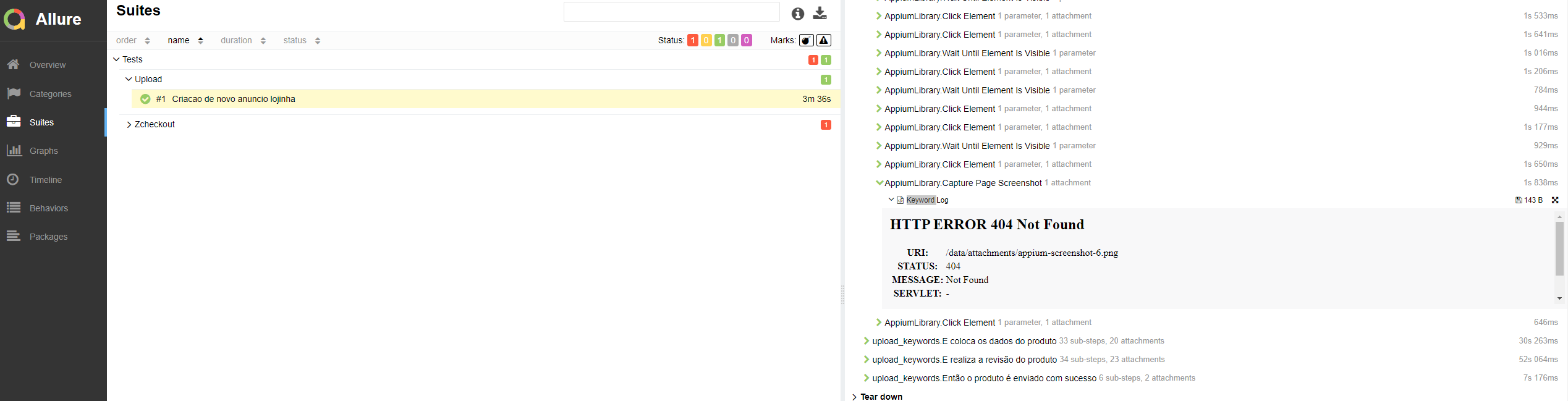
Robotframework + AppiumLibrary + Allure: Screenshot attachments return 404 error using
I'm submitting a ...
- [x] bug report
- [ ] feature request
- [ ] support request => Please do not submit support request here, see note at the top of this template.
What is the current behavior?
Screenshot attachments return 404 error.
If the current behavior is a bug, please provide the steps to reproduce and if possible a minimal demo of the problem
- Generate Allure report:
$ allure serve results/allure
- Go to Allure and open any
Capture Page Screenshotstep.
What is the expected behavior?
Screenshot attachment is displayed without issues.
What is the actual behavior?
Failed to load resource: the server responded with a status of 404 (Not Found)
http://192.168.1.2:50104/data/attachments/selenium-screenshot-6.png 404 (Not Found)
Please tell us about your environment:
- Allure version: 2.15.0
- Test framework: robotframework 4.1.1
- Allure adaptor: allure-robotframework 2.5.2
- AppiumLibrary: robotframework-appiumlibrary 1.6.3

I did this to solve this problem. I see this here in Github, but someone solve this problem for SeleniumLibrary. This is the fix for AppiumLibrary
import allure
from robot.libraries.BuiltIn import BuiltIn

class AppiumLibraryHelper(object):
    ROBOT_LIBRARY_SCOPE = "TEST SUITE"
    ROBOT_LISTENER_API_VERSION = 2

    def __init__(self):
        self.ROBOT_LIBRARY_LISTENER = self

    def _start_suite(self, name, attrs):
         BuiltIn().set_library_search_order('AppiumLibraryHelper')

    def capture_page_screenshot(self):
        ul = BuiltIn().get_library_instance('AppiumLibrary')
        path = ul.capture_page_screenshot()
        allure.attach.file(path, name="screenshot", attachment_type=allure.attachment_type.JPG)
        return path
The link to the screenshot here is just a part of appium log. I don't think it's wise to try to parse and post-process html logs - they are just information the library considered suitable to tell you.
The proper way to add a screenshot to the report is to use Attach File keyword from AllureLibrary:
*** Settings ***
Library    AppiumLibrary
Library    AllureLibrary

*** Test cases ***
Reproduce issue 635
    Open Application  http://127.0.0.1:4723  platformName=Windows  deviceName=WindowsPC  app=C:\\Windows\\System32\\notepad.exe
    Capture Page Screenshot  ./screenshots/i635.png
    Attach File  ./screenshots/i635.png  name=Notepad window
    Close Application
And of course, it's always possible to reshape the report with custom code like the one just above.
I'm closing it, since this is not a bug. If someone feels otherwise, please, notify me here with additional info.
