
ai2thor
 ai2thor copied to clipboard
 allenai
If it is possible to use a customized scene?
Hi, I am wondering if it is possible to build and add a customized scene to AI2THOR? I'd like to have a scene corresponding to my real room environment so that I can finetune the agent trained from existing AI2THOR scenes on the customized one.

This is possible, though pretty difficult to do. What you're describing is similar to what we did for RoboTHOR, where we built a bunch of rooms, in both simulation (AI2-THOR) and the real-world, and began testing how well ObjectNav models trained in paired simulated rooms generalize to reality.
It would require creating a bunch of 3D objects that match what is in your real room, placing them via. Unity, and adding a few components to each object from Unity, such that they appear as sim objects. This last step is quite difficult, but it allows for all the metadata for an object to be generated (e.g., is the object visible to the agent?)
If you are just looking for an easier way to customize existing scenes, perhaps consider checking out the Domain Randomizations page of the documentation.

Thanks! @mattdeitke
It is good to know this is possible. I can imagine that it will take a huge effort to create a new scene. Customizing an existing scene seems a better choice.
Thanks for the link you shared. I see that randomizing the position of Pickupable objects can be easily achieved in AI2THOR. I am wondering is it true that we need to modify an existing scene with Unity to change the position of furnitures to a certern place or replace an existing furniture with another one?
Hello!
I am wondering is it true that we need to modify an existing scene with Unity to change the position of furnitures to a certern place or replace an existing furniture with another one?
This is correct. For this type of modification or customization, you would need to modify the existing scene within the Unity editor itself. If you would like to dive a bit deeper into doing this, make sure you get the correct version of the Unity Editor. Be sure to get the LTS 2019.4.20f1 release here.
Once there, you can open up one of our scenes from the Assets/Scenes/... directory and manipulate game objects from there. There are a few more steps to set up objects to be able to be used in the scene, so if you get that far please post here and I can help with more details, as it is a rather involved process.

Hi @winthos, I'm also trying to modify scenes on Unity editor but I'm not sure what I've done is correct.
For now, I'm able to load the project to the Unity editor(actually I use unity 2019.4.28f1, no problem occurs yet), modify the scenes and rebuild the project with invoke local-build --arch=Linux64 successfully. I can also find my changes on python.
What I actually do is copy one object (e.g. Egg) from FloorPlan1 to FloorPlan2, and I change its' Transform parameters(position, rotation) only. However, I found there is some difference between the new object and original objects when I view it on python (e.g. the new egg lays down on the table while other eggs stand).
My question is, are there any other things that I need to do with the newly added object?

BTW, I found initialRandomSpawn didn't work for the newly added object (It just remains still in the same position).
Hello! The following info also applies to your questions in issue #787.
First, in regards to the egg falling over, I believe it could be a number of things, all most likely related to the way you have placed the egg. The egg has a rounded capsule collider, so if it is placed not completely flush with a surface, or on a surface that has a slant or a bump, the physics resolution when the scene is actually in "Play" mode will be different from the static position you see while just in editor mode.
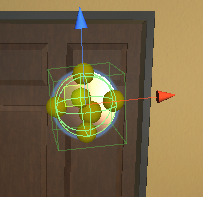
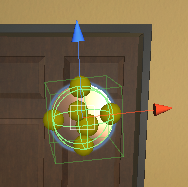
To test this, hit the "Play" button with the right facing arrow at the top middle of the screen while in editor. Select the egg you have placed from the Heirarchy view and press "F" on your keyboard to focus it and observe how it behaves. You might need to do some Unity Editor placement tips to try and position the egg on the surface a bit cleaner. One tip is to hold "Shift + Ctrl" before selecting the object and manipulating it with the axis gizmo inside the Scene view. Doing this will change the center of that gizmo to a little square. Clicking on this central white square will allow you to move the object so that it is flush with a surface. This Surface Snapping is an easy way to get the initial position of an object onto a surface quickly.
Here is how the egg looks when selected normally
This central white square appears when holding "Shift + Ctrl"
After positioning the object on a surface, its still a good idea to let the physics resolution settle it so that when the scene starts, it doesn't fall over as it tries to come to rest. We have added a custom editor function to help with this. After you position the egg where you want, click on the green, y-axis handle of the axis gizmo and raise it above the surface you want the egg to be placed on. You can then navigate to the unity editor menus and find GameMenu/SettlePhysics This will start a physics simulation in editor mode, that will reposition the object so that when you hit the Play button, the object has already come to rest so it should not fall over. This will likely take some trial and error to place the egg so that it doesn't roll and fall over.
After positioning your egg, the next issue of InitialRandomSpawn not working can be solved by making sure to add the egg and any other new objects you have edited into your scene to an couple arrays of objects stored on the PhysicsSceneManager.cs component on the PhysicsSceneManager game object that you can find in the object heirarchy view.
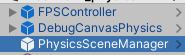
Then find the Inspector tab in Unity to find the PhysicsSceneManager component itself. The two arrays in question are Required Objects and Spawned Objects.
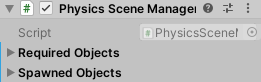
Both of these arrays need any additional sim objects added to the scene referenced in the array. A fast way to add them to the array is to select the egg you have added by clicking it in the Heirarchy tab, and then dragging it into the both arrays. Once the egg is included in the array, InitialRandomSpawn should work as expected.
Thank you for your super quick response, that exactly answers my questions! I've just tested it and it works well, all problems solved and I'll close the issue #787. AI2thor is a great Sim environment, please keep on making it better. Thanks again!