
ai2thor
 ai2thor copied to clipboard
 allenai
Several InitialRandomSpawn/Remove Object issues
When I run the following 3 times, on ai2thor==3.0.0:
import copy
import os
from ai2thor.controller import Controller

controller = Controller(scene="FloorPlan1", gridSize=0.1, width=84, height=84)
included_receptacles = "CounterTop"
included_objects = ["Knife"]

# Remove objects from the scene except for the ones we're looking for
event = controller.step("Pass")
scene_objects = copy.deepcopy(event.metadata["objects"])  # Make sure we're not refetching the list as we remove objs
for obj in scene_objects:
    if obj["objectType"] not in included_objects and obj["pickupable"]:
        event = controller.step('RemoveFromScene', objectId=obj["objectId"])

        if not event.metadata["lastActionSuccess"]:
            print(f"Removing {obj['objectType']} failed with {event.metadata['errorMessage']}")

# Check objects before randomization
event = controller.step("Pass")
pickupable_objects = [obj for obj in event.metadata['objects'] if obj["pickupable"]]
print(f"Before random, objs: {[obj['objectType'] for obj in pickupable_objects]}")

# Randomize the environment, only spawning into the desired receptacles
event = controller.step("Pass")
receptacle_types = {obj["objectType"] for obj in event.metadata['objects'] if obj["receptacle"]}
excluded_receptacles = receptacle_types - set(included_receptacles)
seed = int.from_bytes(os.urandom(4), byteorder="little")
print(f"Seeding with {seed}")
event = controller.step("InitialRandomSpawn", excludedReceptacles=list(excluded_receptacles), seed=seed)

# Check where objects are in the room
pickupable_objects = [obj for obj in event.metadata['objects'] if obj["pickupable"]]
print(f"After random, Objs: {[obj['objectId'] for obj in pickupable_objects]}")

# Check where objects are placed
parent_receptacles = [obj['parentReceptacles'] for obj in event.metadata['objects'] if obj['objectType'] in included_objects]
print(f"Parents: {parent_receptacles}")
I get:
Removing PaperTowelRoll failed with PaperTowelRoll|-02.06|+01.01|-00.82 could not be found in this scene, so it can't be removed
Removing Statue failed with Statue|+01.96|+00.17|-02.54 could not be found in this scene, so it can't be removed
Before random, objs: ['Knife', 'PaperTowelRoll', 'Statue']
Seeding with 3137338953
After random, Objs: ['Knife|-01.68|+00.79|-00.24', 'PaperTowelRoll|-02.06|+01.01|-00.81', 'Statue|+01.95|+00.18|-02.54']
Parents: [['Drawer|-01.56|+00.84|-00.20']]


Removing PaperTowelRoll failed with PaperTowelRoll|-02.06|+01.01|-00.82 could not be found in this scene, so it can't be removed
Removing Statue failed with Statue|+01.96|+00.17|-02.54 could not be found in this scene, so it can't be removed
Before random, objs: ['Knife', 'PaperTowelRoll', 'Statue']
Seeding with 580241517
After random, Objs: ['Knife|-01.68|+00.79|-00.24', 'PaperTowelRoll|-02.06|+01.01|-00.81', 'Statue|+01.95|+00.18|-02.54']
Parents: [['Drawer|-01.56|+00.84|-00.20']]


Removing PaperTowelRoll failed with PaperTowelRoll|-02.06|+01.01|-00.82 could not be found in this scene, so it can't be removed
Removing Statue failed with Statue|+01.96|+00.17|-02.54 could not be found in this scene, so it can't be removed
Before random, objs: ['Knife', 'PaperTowelRoll', 'Statue']
Seeding with 1040437699
After random, Objs: ['Knife|-01.68|+00.79|-00.24', 'PaperTowelRoll|-02.06|+01.01|-00.81', 'Statue|+01.95|+00.18|-02.54']
Parents: [['Drawer|-01.56|+00.84|-00.20']]
The following are the issues I see:
- Why are some objects that I just fetched from the scene "not found in the scene" to be removed? (The objects do not appear twice in the scene_objects list.) Sometimes "Egg" is also not able to be removed, though not in the 3 runs shown.
- Even though I'm seeding with different numbers, the locations of the pickupable objects are always the same after RandomInitialSpawn.
- I'm specifying that only CounterTop should be an allowed receptacle, but nevertheless the knife is spawning in the Drawer. (Drawer does indeed appear in "excluded_receptacles.") The CounterTops are definitely not all full.

Hello! It seems there is an issue with the internal logic being called every time an action that could change the number of objects in scenes executes. Whenever you execute RemoveFromScene all objects remaining in the scene have their objectId values re-assigned. The problem here is due to some Unity-side floating point errors. The way we assign objectId is the object's type + its position values. When replicating your code, I found that for a rare few objects like the PaperTowelRoll or the Statue have rounding errors in their position, even though the actual position of the object has not changed at all.
Effectively at some point when looping through all objects in scene_objects, an assignment of the objectId to the Statue got messed up so that the expected objectId found when you first get all the objects via scene_objects = copy.deepcopy(event.metadata["objects"]) is mismatched. When scene_objects is assigned to, the statue's id is something like Statue|+01.96|+00.17|-02.54, but after one of the successful removals within the loop, the id changes slightly to Statue|+01.95|+00.18|-02.54 causing the object to not be found.
So there is a temporary solution to get around this issue. I think what you can do is instead of looping through your scene_objects all in one go, you need to make sure to update that array after every successful RemoveFromScene action just in case something changed.
I am working on a fix that will make it so objectIds are not arbitrarily re-assigned in this way to prevent them from unexpectedly changing, and will update this post once that PR is ready to go.

One question here: why are objectIds reassigned when one calls RemoveFromScene?
I can somewhat see why this is necessary for something like InitialRandomSpawn, which may add an object in such a way that if one didn't redo the objectIds, there could be duplicated objectIds in a rare case.
However, if an object is merely being removed, then the remaining objects already have a perfect 1-1 mapping between objectIds and actual objects. For RemoveFromScene, can we just remove this line where objectIds are recomputed?

The issue is RemoveFromScene calls a helper function in the base agent called SetupScene() which currently does multiple things, one of which is repopulating a ObjectIdToSimObjPhysics dictionary used by a ton of additional actions whenever we try to find an object in the scene by objectId. This dictionary caches all Sim Objects currently active in the scene so subsequent calls to lookup an object are faster, so it has to be updated whenever a change in number of sim objects in the scene happens, be that removal, spawning, cloning, hiding, etc. The thing is, in SetupScene() all objects are ALSO currently having their objectIds overwritten while this is happening.
I could see some sort of fix where in cases like RemoveFromScene we skip over this recalculation of objectId for all objects that already have an assigned objectId, but this bandaid fix for this one case might be messier than having a more fully formed refactor of how objectIds are handled across all actions.
so it has to be updated whenever a change in number of sim objects in the scene happens, be that removal, spawning, cloning, hiding, etc
The dict shouldn't all have to be updated though, correct? Why not just delete the key of the object that is being removed from the dictionary, instead of also modifying the keys of every other object. This is also be a faster operation.
Yes, something like this is what I'm thinking for a fix here. I'm currently checking how a change like this might affect some of our other actions like Slice and Break or SpawnTargetCircle to make sure they play nice with this logic. Currently each of those sort of handle updating the dict with the nuclear method of completely wiping it, which will likely lead to other issues like the one posted here.
Question: why are the objectIds meaningful in this way at all (i.e. including object location)? In my experience a UUID is a much more reliable id; a "meaningful" one can get out of sync or needs to be constantly updated, etc. (Then it's also not an issue if when you regenerate a room an object of the same type spawns in the same location as the object had previously - they both just get their own unique identifiers, and all is well.)
Also I'm hoping my other 2 open issues in this question don't get lost? The lack of randomization in InitialRandomSpawn is probably the one most concerning to me.
Anyhow, thanks for looking into these!
Even though I'm seeding with different numbers, the locations of the pickupable objects are always the same after RandomInitialSpawn.
This issue might be related to the "object not found" issue. My guess is if you are trying to remove objects and it fails, it might be messing up something with the random spawn. When you try different seeds with InitialRandomSpawn, not all objects will move. What happens is, a selection of objects will attempt to move to a new receptacle based on the seed. Different seeds should allow multiple objects to move, but its not guaranteed that every object will move as they move individually and their placement is restricted by other objects in the scene.
For example, lets say you had two receptacles in a room, a Table and a Chair. The chair has a Book on it, the Table has an Apple, a Bread, and a Pan. Based on the seed, the Book might be selected to try and move to an open spot on the Table first, and if there is room then it will relocate to a new random spawn. If, however, the seed chose the Apple to move onto the Chair first, the book may be taking up so much space in the Chair's receptacle area, that it can't fit on the Chair so the Apple instead stays in place where it originally was. Our random spawn logic basically loops through all potentially moveable objects in a scene in a random order based on the seed, and then one by one tries to place them in a different receptacle with free space. When an object tries to spawn to a different spot, it does a check to make sure it does not clip inside any other sim object, so because of this the order in which objects are attempted to be placed is affected by the order.
What I would do to ensure InitialRandomSpawn is working correctly is try to run a test sequence where all you do is use InitialRandomSpawn without trying to remove any objects or anything like that. If you try a ton of seeds and they still don't shuffle objects around, reply back here because that would be an issue.
I'm specifying that only CounterTop should be an allowed receptacle, but nevertheless the knife is spawning in the Drawer. (Drawer does indeed appear in "excluded_receptacles.") The CounterTops are definitely not all full.
The way receptacle constraints for InitialRandomspawn work is it simply removes a receptacle category as a potential place the object can be repositioned to. If, however, the placement of the to-be-moved object fails for another reason, like not enough free space in a valid receptacle, it will instead default back to its original location. This is likely the behavior you are seeing. If you only allow CounterTops as valid receptacles, all objects moved to them will fill up the free space quickly, and potentially not have room for subsequent objects. If that is the case and all countertops are full,, the knife would end up defaulting back to its original position.
As for the issue of the countertops not being full, this may be due to the default number of placement attempts.. I would try increasing this number so more potential positions of a receptacle are tried by the object before failing and defaulting to the original position. This is a very expensive check due to having to check collision at multiple points per object, so the default value of this is set relatively low.
I think I understand what you're proposing the issue is (basically that there are more objects than free space, so the objects I'm looking at are not able to move), but I'm trying to say that's not likely to be the case. There is free countertop space, counter tops are the only valid receptacle, and then after InitialRandomSpawn they still have free space and the object is still in its original location.
If you add the following to the end of the script I pasted above, you'll see what I mean:
print(f"CounterTop contents? {[counter_top['receptacleObjectIds'] for counter_top in event.objects_by_type('CounterTop')]}")
This is the result:
CounterTop contents? [[], [], ['Toaster|-01.84|+00.90|+00.13', 'CoffeeMachine|-01.98|+00.90|-00.19', 'PaperTowelRoll|-02.06|+01.01|-00.81', 'HousePlant|-01.95|+00.89|-02.52']]
So the 3rd countertop has 4 things in it, but the other 2 are completely empty. Perhaps in FloorPlan1, only one counter top has any space? I have tried FloorPlans1-4, and 2&3 seem okay, but 4 also has this issue: the knife is kept in the sink even when one counter top is completely empty. I increased numPlacementAttempts to 10 with no change. (Also the object locations are always generated to be exactly the same ... leading to my next point.)
I also ran an InitialRandomSpawn test sequence without removing objects or anything, comparing one randomization to the previous one:
from deepdiff import DeepDiff
from ai2thor.controller import Controller
controller = Controller(scene="FloorPlan1", gridSize=0.25, width=84, height=84)
all_randomizations = []

for seed in range(1000):
    controller.reset()
    event_post = controller.step("InitialRandomSpawn", seed=seed)
    post_randomization = [o for o in event_post.metadata['objects'] if o['pickupable']]
    all_randomizations.append(post_randomization)
    if len(all_randomizations) >= 2:
        obj_diff = DeepDiff(all_randomizations[-1], all_randomizations[-2], ignore_order=True, significant_digits=2)
        print(f"seed {seed}: {obj_diff}")
The only real obj_diffs I've seen while doing this are the temperature of an object and occasionally whether or not it isMoving.
I can add more InitialRandomSpawns after that one in the loop, and each will be different from the prior, but regardless of what seeds are used they always randomize the same way. I.e. the book will always, after a reset, be at: {'x': 0.07909541577100754, 'y': 1.106600046157837, 'z': -0.5065479278564453} then at: {'x': -0.05909985303878784, 'y': 1.106600046157837, 'z': 0.2517738342285156} then: {'x': -0.3354904055595398, 'y': 1.106600046157837, 'z': -0.5065479278564453}
Note that they are only the same to about the 2nd decimal, they actually do change by quite small amounts between runs (by the way, significant_digits in DeepDiff actually refers to digits past the decimal, not the standard definition).
Thank you for looking into these things; it's important for me to be able to trust that the environments are actually being truly randomized. Right now it seems like they're always on the same seed as of reset, regardless of what is passed in.
I think I've discovered some of what the issue might be. First, the problem of the seed seemingly behaving the same regardless of what seed you use seems to be linked to a syntax problem.
Your random spawn call is currently: event_post = controller.step("InitialRandomSpawn", seed=seed)
However, the seed parameter is not actually changing the seed. You need to pass your chosen seed in as randomSeed instead. When you pass it in as seed it's not doing anything and so the actual seed used by the action defaults to "0" which explains why you seem to be seeing the same seeded behavior, because it has just been defaulted.
The other issue of objects not spawning into Countertops, even though they should be the only valid receptacle, might be a combination of the seed = seed needing to change to randomSeed = seed as well as the removed objects in the scene happening earlier in the script.
InitialRandomSpawn only shuffles around Pickupable objects. What I believe is happening based on what I'm seeing when I run your script on my end is that first you remove all Pickupable objects in the scene except for the ones that failed to be removed due to the uniqueId issue (ie: the PaperTowelRoll and Statue based on your debug printout). From here, you have a scene where there are a lingering PaperTowelRoll and Statue as well as some Moveable typed objects that remain sitting on the countertop. With these being the only objects left in the scene, when randomized, they get shuffled around according to the default seed value of 0 because your seed isn't being used because of the wrong syntax. The result of this is that every time you try and run this, regardless of the seed, it will always be the same behavior of seeing the countertop with
CounterTop contents? [[], [], ['Toaster|-01.84|+00.90|+00.13', 'CoffeeMachine|-01.98|+00.90|-00.19', 'PaperTowelRoll|-02.06|+01.01|-00.81', 'HousePlant|-01.95|+00.89|-02.52']]
This is because the CoffeeMachine, Toaster, and HousePlant are not currently shuffled by InitialRandomSpawn because they aren't Pickupable. The remaining PaperTowelRoll is likely being shuffled into the same CounterTop that it started on, but always being shuffled to the same position due to the seed parameter problem.
Oh! Huh, I wonder where I got the seed parameter from in the first place. Thanks for pointing out it should be randomSeed. (Actually in my real code it is randomSeed, just a mismatch with the min repro I tried to make. Oops!)
But the problem with the InitialRandomSpawn is that the Knife never leaves the drawer. The paper towel roll and all the other stuff are just buggy bystanders to my real goal. Even with the static seed, that should not be happening, right? (This is the undesirable behavior I've been in observing in my main code, that I was trying to make a min repro for in the first place.)
(Also I know the seed issue was my fault, but in my own analogous code I've found it to be helpful if any unknown parameters to these controller methods cause an exception, so the author knows immediately there's been a typo or mis-read API.)
We have added a ValueError exception that should be thrown in Python when an invalid parameter is passed in. This should help with syntax clarity in the future.
Additionally, I've found the remaining issue with the Knife staying in the drawer is due to this line:
# set(included_receptacles) is generating a set from "CounterTop": {'T', 'C', 't', 'n', 'e', 'p', 'r', 'o', 'u'}
excluded_receptacles = receptacle_types - set(included_receptacles)
This is causing excluded_receptacles to not have CounterTop removed from the set, so effectively you are passing in all receptacles in the scene as invalid. This is why the Knife does not leave the drawer, because no valid receptacles are found.
I believe changing this line to: excluded_receptacles = receptacle_types - set(["CounterTop"]) should correctly allow the excluded_receptacles set to be populated as intended.
I additionally ran your test code both with the randomSeed syntax fix and increased numPlacementAttempts and I was able to succesfully spawn the Knife onto different CounterTops. I've run this using a build including a fix for the objectId re-assignment that will be merged onto the main branch and released relatively soon, but for now I am explicitly passing in the commit id in order to test the results with the fix.
import copy
import os
from ai2thor.controller import Controller

# note we are initializing with a specific commit id for the Pull Request that includes the objectId regeneration fix
controller = Controller(commit_id='1dfe13e4926bb2e0be475e28405e98514c4035dc', scene="FloorPlan1", gridSize=0.1, width=84, height=84)

included_receptacles = "CounterTop"
included_objects = ["Knife"]
# Remove objects from the scene except for the ones we're looking for
event = controller.step("Pass")
scene_objects = copy.deepcopy(event.metadata["objects"])  # Make sure we're not refetching the list as we remove objs
for obj in scene_objects:
    if obj["objectType"] not in included_objects and obj["pickupable"]:
        print(obj["name"])
        print(obj["objectId"])
        event = controller.step('RemoveFromScene', objectId=obj["objectId"])

        if not event.metadata["lastActionSuccess"]:
            print(f"Removing {obj['objectType']} failed with {event.metadata['errorMessage']}")

# Check objects before randomization
event = controller.step("Pass")
pickupable_objects = [obj for obj in event.metadata['objects'] if obj["pickupable"]]
print(f"Before random, objs: {[obj['position'] for obj in pickupable_objects]}")

# Randomize the environment, only spawning into the desired receptacles
event = controller.step("Pass")
receptacle_types = {obj["objectType"] for obj in event.metadata['objects'] if obj["receptacle"]}
excluded_receptacles = receptacle_types - set(["CounterTop"])
print(f"All excluded receptacle are currently: {excluded_receptacles}")

seed = int.from_bytes(os.urandom(4), byteorder="little")
print(f"Seeding with {seed}")
# including `randomSeed` syntax fix as well as `numPlacementAttempts` to increase chance of success
event = controller.step("InitialRandomSpawn", excludedReceptacles=list(excluded_receptacles), randomSeed=seed, numPlacementAttempts = 20)

# Check where objects are in the room
pickupable_objects = [obj for obj in event.metadata['objects'] if obj["pickupable"]]
print(f"After random, Objs: {[obj['position'] for obj in pickupable_objects]}")

# Check where objects are placed
parent_receptacles = [obj['parentReceptacles'] for obj in event.metadata['objects'] if obj['objectType'] in included_objects]
print(f"Parents: {parent_receptacles}")
Note that due to the way receptacle placements are checked, you may need to bump up the numPlacementAttempts value closer to 100 to have a higher chance of every seed succesfully placing the Knife.
The way it works is there are roughly 100 or so possible spawn positions in every receptacle. Many of these positions are invalid as placing the object's centerpoint exactly on that position would cause it to clip with the environment, other objects, or potentially be hanging off a ledge of the receptacle in a way that would cause it to fall off of it and onto the floor the moment after being repositioned. All of these are checked for, and if any one of these cases would happen at a given position, the check fails and a new position is chosen. numPlacementAttempts is the total number of positions that are tried for each object per receptacle. The actual positions are chosen randomly based on the randomSeed, so its possible to find a configuration where if only using 5 numPlacementAttempts that all 5 of those random points within the receptacle's area are on the edge that might cause the object to fall off. This is especially common for long objects like a Knife which can be placed lengthwise as would be expected. Because of this, there is no guarantee that even with every object cleared and there being "enough free space" on a CounterTop that every random spawn will be successful, as we are limited by our abstraction of the receptacle's free space and the actual dimensions and orientations of the repositioned objects themselves.
Er, sorry that I created the min repro too quickly (I was trying to figure out the issues rapidly before a deadline), but again in my real code it's ["CounterTop"], not just "CounterTop". And I was nevertheless seeing the Knife spawn in the Drawer and not the CounterTop. (Oops again, and thanks for finding it.)
But numPlacementAttempts seems plausibly the "real" issue for me, so I collected some data (post ["CounterTop"] and randomSeed fixes, plus adding a reset() before removing objects), running each of the following 50 times, and seeing how many times the knife spawned in the drawer vs on the countertop.
numPlacementAttempts = 10: 22/50 spawns in Drawer numPlacementAttempts = 100: 27/50 spawns in Drawer
I was going to run more granularly, but it's actually pretty slow to run this experiment, so I did just these two. Are they what you're observing? And what you would expect? I didn't switch to the commit you mentioned, so there are the 2-3 other objects (a bit more realistic for my scenario anyway - I want a couple objects in view as distractor objects) - they'd make finding a good spot harder, but it shouldn't be impossible, right? I was expecting some improvement with nPA=100, but didn't really observe any. Is that to be entirely explained by the existence of the 3 not-removed objects?
I also ran without removing any objects, and saw basically the same ratio of successes: 23/50 for 10 nPA and 32/50 for 100. That seems surprising to me?
Is there a way to say "I want the Knife definitely placed randomly on the CounterTop, and the other stuff place as you can but preferably also on the CounterTop"? Or just somewhat more granular randomization in general? (Without having to create the object locations json manually.)
Thanks for all the help here!
The behavior you are observing is expected. One thing I'm curious about is your results show:
numPlacementAttempts = 10: 22/50 spawns in Drawer numPlacementAttempts = 100: 27/50 spawns in Drawer
Is this using the exact same set of seeds for each of the 50 spawns? I'd expect the greater number of placement attempts to increase successful spawns outside the drawer, and the only thing I can think of that might be affecting this is this double layer of randomness due to the seed being different across each set of 50 combined with the way the numPlacementAttempts actually interacts with our abstraction of a receptacle area. Due to the way it works, which is detailed below, 50 spawn attempts may not be a high enough number to see the odds be affected by only a 10 to 100 count change.
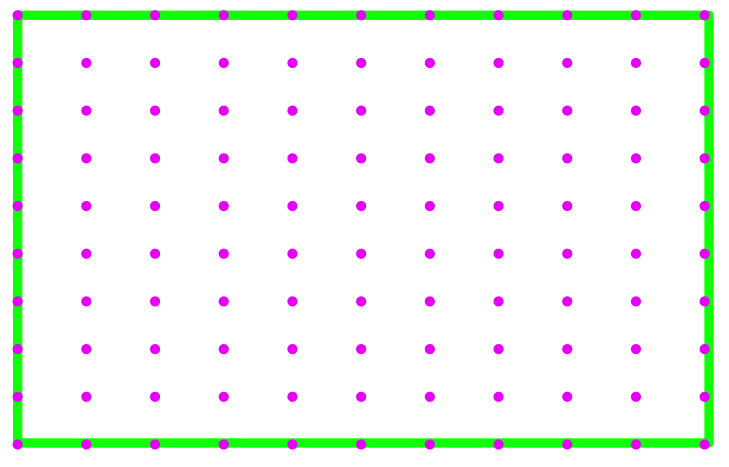
I threw together some graphics here to represent what is going on a bit more clearly (i hope). This green box with purple dots represents a "receptacle box" which is just a 3D volume of space we define with a box that has within it 100 points distributed across a grid defined by the bounds of this box. I've drawn this in a top down perspective, so imagine this box being placed on the surface of a countertop.
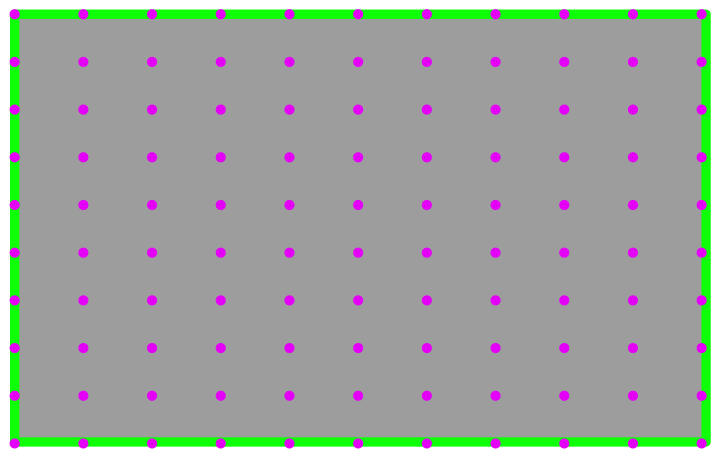
This grey image shows a countertop with a receptacle box placed on top of it. Additionally, there is a round grey shape that demonstrates how a set of "receptacle boxes" might be set up to try and encompass the area of a rounded table. I've color coded the spawn points for the rounded table's receptacle boxes to be orange and purple to show that each box tracks its own set of points. Note that this is an example of how sometimes a receptacle may seem to have a lot of free space, but its actually limited slightly by our receptacle boxes not being able to fully encompass the surface area.
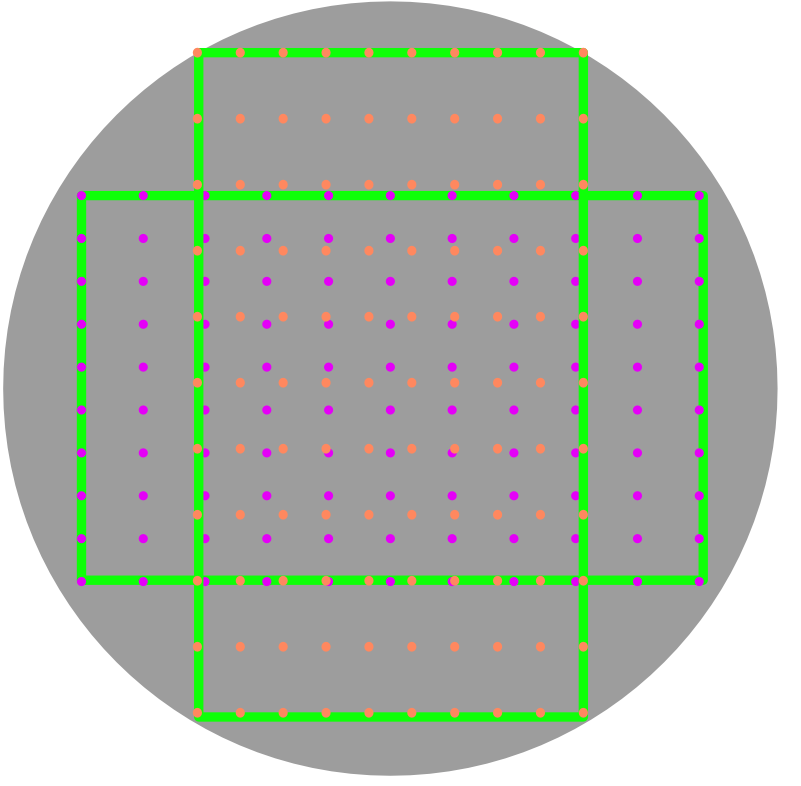
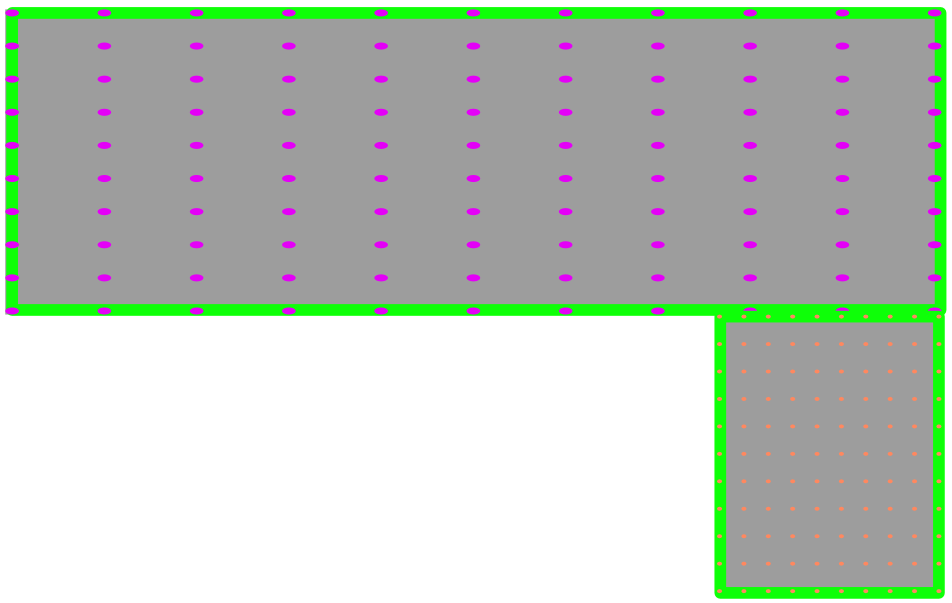
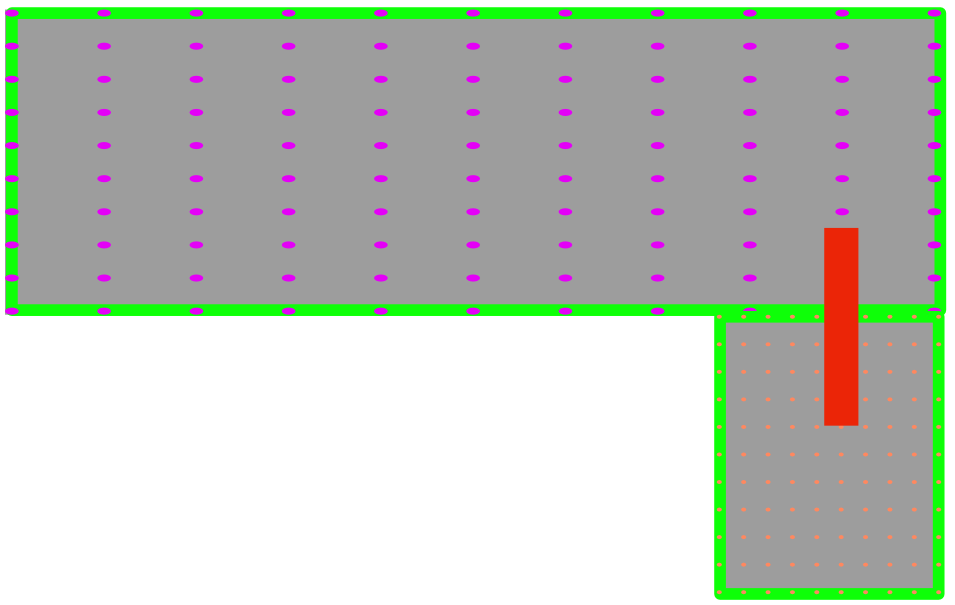
Here is an example of a plausible configuration of receptacle boxes for an "L-shaped" counter. Note that because of the dimensions one of the receptacle boxes for this case is much smaller with a much higher density of points.
The total logic flow of the random spawn action for any single given object is as follows:
- for every valid receptacle in the scene (which can be filtered via
excluded_receptacles) gather a number of random spawn points for this receptacle. These spawn points are returned by each "receptacle box" that belongs to the object, and each spawn point tracks which box it belongs to. - the maximum number of spawn points grabbed is defined by
numPlacementAttempts - try to spawn the object at various orientations (rotating 90 degrees about each x, y, and z axis) at each point returned. A check is done here to make sure the object is fully contained by the box that this particular spawn point belongs to.
- if
numPlacementAttemptshas been exceeded, move on to the next receptacle in the scene
The issue here is that there are many spawn points that the object could fail to spawn at, so only trying 100 for a given random set of points may not be enough. This is because of an additional check that checks to see if after an object is spawned, if any part of the object is outside of the specific receptacle box that this spawn point belongs to, it will fail and move on to trying another point. Here are some diagrams that show a "knife" or some other long object trying to be spawned centered at some of the edge points of a receptacle box. Note that if this object had multiple boxes, or multiple small boxes like an L-shaped counter, the number of incompatible points would likely increase.
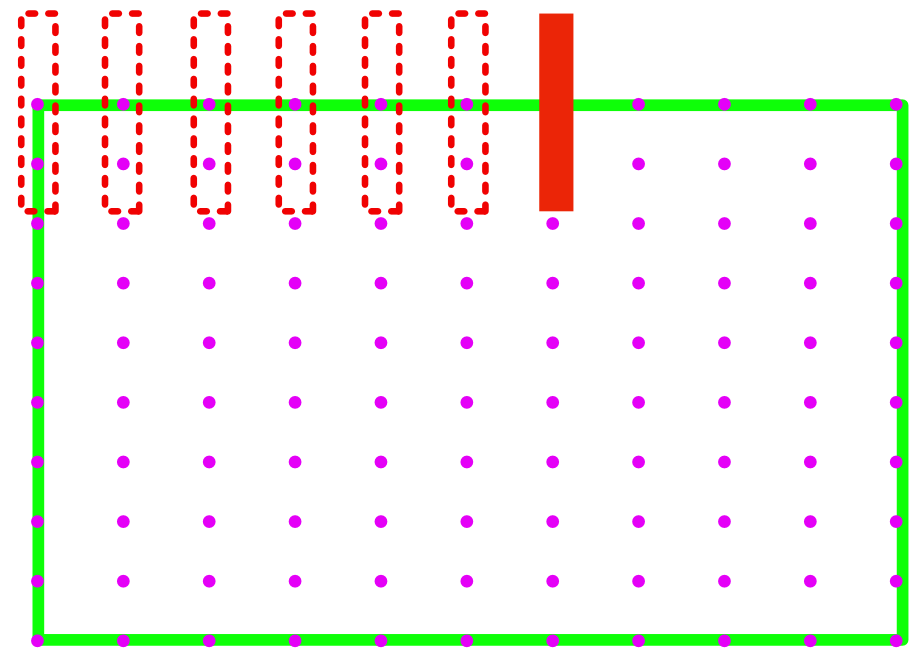
In the case of something like an L-shaped countertop, the knife would fail to spawn centered around this orange point because half of it would be hanging outside of the orange-pointed box. This is due to the way we have abstracted and placed these receptacle boxes, and we can currently only check if the repositioned object is within the bounds of individual receptacle boxes even though some larger receptacles could contain the object with multiple boxes. This is something I'm looking to update in the logic at some point in the future, but it would require a rather robust rework so it is not a trivial update.
So I was a bit unclear in my earlier response suggesting increasing the number of attempts to 100. Due to the way objects are set up and the fact that spawned objects can easily fail spawn points close to the edge, trying only 100 placement attempts might not give you the level of increased accuracy you were expecting. Many objects have more than 100 total points, so even setting numPlacementAttempts to 100 means you could randomly get 100 points all along an edge where the entire object has something like 1,000 total points available.
Effectively, the way to get a more accurate, and as guaranteed as you can successful repositioning is to set the numPlacementAttempts to an exceedingly high value, something like 10,000. Note that for every single point checked, an object is repositioned to that point, checked for collision, and then rotated about each of its 3d axes in 90 degree increments and then checked for collision again after each rotation. This is an exceedingly expensive check, so while you will have greater accuracy when using a very high numPlacementAttempts you will also likely have an extreme drop in performance.
My recommendation would be to run whatever numPlacementAttempts seems reasonable and then cache all the seed values that get successful knife to countertop movement, and then cache them in some way. Then, you can either reset the scene using this pool of good seeds for however many runs you need, or restore the cached metadata of the objects via SetObjectPoses.
Thanks for the thorough explanation! (And sorry about the delay in reply.)
As you indicated, I've been playing with SetObjectPoses, and I would like to be able to use it to add a cached object that doesn't currently exist in the scene (i.e. there was Bread, and then it was Sliced, but I would like to generated an unsliced loaf of bread in the scene). Is this possible with it? When I try, I get "'No Pickupable or Moveable object of name Bread_a13c4e42 found in scene.'"
If that's not possible with SetObjectPoses, how can I go about adding a single object to an existing room?
Thanks!
there was Bread, and then it was Sliced, but I would like to generated an unsliced loaf of bread in the scene
Currently we don't have a way to spawn in additional objects dynamically in the scene that didn't already exist in the scene by default. SetObjectPoses only takes the listed objects and repositions them, it doesn't allow for spawning of new objects. Dynamically spawning in new object from our asset library is something that we are looking to be able to add to the python api via a new action, but currently the only way to add in new objects to a scene is to manipulate the scene itself via the Unity editor.
Ah okay. Is there any estimate for when that functionality might be available?
Oh, and also SetObjectPoses indicates that "Objects which are specified twice will be copied." I'm not sure what that means if no new objects are added to the scene? If there is a loaf of a bread at the beginning, can I copy it to make many loaves up front?
Another SetObjectPoses question: I initialize two controllers to the same scene. I manipulate the first in some ways, and I want to make the second match. I run:
      event = controller.step("Pass")
      object_poses = event.metadata["objects"]
      for object_data in object_poses:
          object_data["objectName"] = object_data["name"]  # Handling an inconsistency in key definition

      goal_controller.reset(self.current_scene_name)
      goal_event = goal_controller.step("SetObjectPoses", objectPoses=object_poses)
When I do this I get the error "'No Pickupable or Moveable object of name Faucet_198329de found in scene.'" (Using FloorPlan1.) A faucet by that name does exist in goal_event.metadata["objects"], so I'm not sure what the disconnect is.
Ah okay. Is there any estimate for when that functionality might be available?
I'm actively working on integrating this functionality, but I don't have a good estimate on how long until it is usable. I will be sure to update this issue as soon as I am able to give a more defined timeline.
Oh, and also SetObjectPoses indicates that "Objects which are specified twice will be copied." I'm not sure what that means if no new objects are added to the scene? If there is a loaf of a bread at the beginning, can I copy it to make many loaves up front?
Yes, if you look at the example script in our documentation, it shows an Alarm_Clock_19 being specified twice at different positions.
controller.step(
  action='SetObjectPoses',
  objectPoses=[
    {
      "objectName": "Alarm_Clock_19",
      "rotation": {
        "y": 270,
        "x": 0,
        "z": 0
      },
      "position": {
        "y": 0.8197357,
        "x": 2.45610785,
        "z": 0.054755792
      }
    },
    {...},
    {
      "objectName": "Alarm_Clock_19",
      "rotation": {
        "y": 270,
        "x": 0,
        "z": 0
      },
      "position": {
        "y": 0.8197357,
        "x": 2.64169645,
        "z": -0.134690791
      }
    }
  ]
)
When I do this I get the error "'No Pickupable or Moveable object of name Faucet_198329de found in scene.'"
I believe this is because a Fuacet is not a moveable or pickupable type object. Faucets are fixed to the counter or table near the sink that they are associated with. These cannot be repositioned, so trying to set its pose via SetObjectPoses will fail.
Ah, so we also need to filter the object poses we get from the metadata for moveable objects. Is there a quick way to freeze a scene in a way that is SetObjectPose-compatible?
Also is there a way to determine a bunch of valid locations for objects without moving them there using InitialRandomSpawn? I.e. like how GetInteractablePoses can get poses where an object can be interacted with, is there a way to ask "given these receptacles, get me the valid object locations in them for these objects"?
Ah, so we also need to filter the object poses we get from the metadata for moveable objects. Is there a quick way to freeze a scene in a way that is SetObjectPose-compatible?
Pretty much anytime you grab metadata for all objects of a scene, as long as all objects have the isMoving value of their metadata as false, that means the scene is effectively at rest and all object positions and rotations can be set to exactly that via something like SetObjectPoses
Also is there a way to determine a bunch of valid locations for objects without moving them there using InitialRandomSpawn? I.e. like how GetInteractablePoses can get poses where an object can be interacted with, is there a way to ask "given these receptacles, get me the valid object locations in them for these objects"?
This currently doesn't exist. The best thing to do would be to try either a bunch of individual object placements on an object to object basis, using something like PutObject with forceAction = True to try and place objects in receptacles without being restricted by the agent's camera view, and then cache all the successes for future use. Both the InitialRandomSpawn and the PutObject actions include checks to try and place an object in a receptacle like if the area is free of obstruction, and currently separating out just the functionality to see if an object can be placed without actually fully placing it is a bit tricky to isolate.
I'm currently trying to rework the InitialRandomSpawn and by extension the PutObject actions to accomodate more functionality and have better performance, so this is something that I can also add to the list of features that would be nice to have exist with the next iteration of random spawn.
Follow-up clarification question:
So if I have controller A where the bread has been sliced, and controller B that I want to have exact clone of controller A's scene, this cannot be done using only SetObjectPoses. This is because sliced bread is a "new" object that doesn't exist by default on reset of controller A, so SetObjectPoses on controller B fails with "No Pickupable or Moveable object of name Bread_1_Slice_1 found in scene.".
Is this true? If so, what would be the correct way to exactly clone an entire scene state into a new controller?
(I mean it does make sense given that the method does specify only "Poses", but it's the closest thing I've found to what I'd like, without having to roll a bunch of custom object creation code.)
Yes this is true. The SetObjectPoses action only allows you to reposition objects, not actually change their object state directly. If you wanted to recreate a new scene with the bread sliced, as part of the initialization step before you actually start running anything else, you would need to do something like call SliceObject with forceAcion = true on the bread in order to get it to slice regardless of where your agent(s) are.