
axion-release-plugin
 axion-release-plugin copied to clipboard
 allegro
currentVersion Gradle 8.0 fail -- needs migration
Hello, running currentVersion with plugin version '1.14.3' gives a deprecation warning for incompat with gradle 8.0, which was recently released...this will apparently need to be migrated for it to work on 8.0
see:
12:11:26 PM: Executing 'currentVersion --warning-mode all'...
Task :currentVersion Cannot access input property 'versionConfig.repository.directory' of task ':currentVersion' (see --info log for details). Accessing unreadable inputs or outputs has been deprecated. This will fail with an error in Gradle 8.0. Declare the task as untracked by using Task.doNotTrackState(). Consult the upgrading guide for further information: https://docs.gradle.org/7.5.1/userguide/upgrading_version_7.html#declare_unreadable_input_output


We found the following workaround (gradle kotlinscript style):
tasks.withType<OutputCurrentVersionTask> { doNotTrackState("Workaround for gradle 8") }

@sreich @adenhartog I've just tested latest version with gradle 8 and it works for my test project - could you share your build gradle?
@bgalek sure,
Make sure you are using the gradle wrapper and have it updated to 8.0.2. then run ./gradlew currentVersion and it should fail for you too 😛 . sometimes gradle can be a bit over aggressive with its caching and creates situations like these. def recommend just using the spring initializer or intellij new project and trying that, if you still have issues
plugins {
    id 'java'
    id 'pl.allegro.tech.build.axion-release' version '1.14.4'
}

group 'org.example'
version '1.0-SNAPSHOT'

repositories {
    mavenCentral()
}

dependencies {
    testImplementation 'org.junit.jupiter:junit-jupiter-api:5.8.1'
    testRuntimeOnly 'org.junit.jupiter:junit-jupiter-engine:5.8.1'
}

test {
    useJUnitPlatform()
}
@sreich see https://github.com/allegro/axion-release-example/actions/runs/4473502342/jobs/7860957686#step:4:24 https://github.com/allegro/axion-release-example/blob/main/app/build.gradle.kts
thank you @bgalek , fast turnaround. interesting that it's building fine...i'm not sure what to think, i'll try to reproduce it. i wonder if it is specific to structuring or something like that. you're using gradle kts, same as me...so that isn't a variable here...hm.
@adenhartog thoughts here, or are you able to come up with a test case for them?
This issue occurs when the axion plugin is applied in the root project, as the manual says you should always do, and which is in line with my own experiences.
@bgalek build above applies it only in the app subproject. I've tried that as well but this leads to issues where axion will not set the correct subproject version after the first one which defaults to v0.1.0. And yes I did set (sub)project.version = scmVersion.version.
@adenhartog when using this plugin with sumobdules you should also setup
scmVersion {
    repository {
        directory.set(project.rootProject.file("../"))
    }
}
@adenhartog could you try to reproduce the problem by making a PR ot https://github.com/allegro/axion-release-example?
I cloned the repo and the currentVersion task already fails on my system.
$ g cV
> Task :app:currentVersion FAILED

FAILURE: Build failed with an exception.

* What went wrong:
Execution failed for task ':app:currentVersion'.
> Cannot access input property 'versionConfig.repository.directory' of task ':app:currentVersion'. Accessing unreadable inputs or outputs is not supported. Declare the task as untracked by using Task.doNotTrackState(). See https://d
ocs.gradle.org/8.0.2/userguide/incremental_build.html#disable-state-tracking for more details.
   > Failed to create MD5 hash for file content.

* Try:
> Run with --stacktrace option to get the stack trace.
> Run with --info or --debug option to get more log output.
> Run with --scan to get full insights.

* Get more help at https://help.gradle.org

BUILD FAILED in 36s
1 actionable task: 1 executed
So I now suspect the difference lies not in applying the plugin in a subproject (which has its own issues as stated above but that's not relevant for this issue), but in the operating system or more precisely: the filesystem. I'm running Windows 10 (NTFS) and the CI build runs on a Linux filesystem which does not lock the files in the same way.
I can't see the exact files which are locked at the moment, but I recall seeing earlier that is was a file in the .gradle folder, which we can assume would be locked on windows by the Gradle itself. I think it was .gradle/8.0.2/checksums/md5-checksums.bin. I'll try to verify.
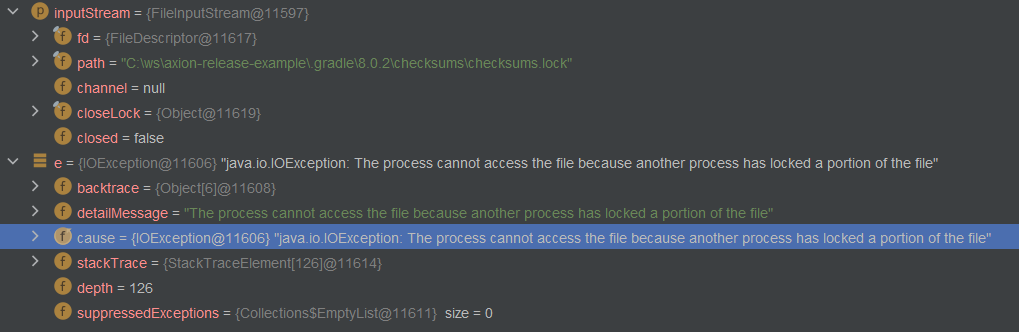
The message contains a hint:
Cannot access input property 'versionConfig.repository.directory' of task ':app:currentVersion'
It seems gradle is trying to determine whether the currentVersion task is up-to-date, and therefore creates md5 hashes for all files in versionConfig.repository.directory . This directory defaults to the project root directory which contains the .gradle folder with the checksums.lock file but this file is already locked by the Gradle itself on Windows systems.
$ g cV --no-build-cache
Starting a Gradle Daemon, 2 incompatible and 1 stopped Daemons could not be reused, use --status for details
> Task :app:currentVersion FAILED

FAILURE: Build failed with an exception.

* What went wrong:
Execution failed for task ':app:currentVersion'.
> Cannot access input property 'versionConfig.repository.directory' of task ':app:currentVersion'. Accessing unreadable inputs or outputs is not supported. Declare the task as untracked by using Task.doNotTrackState(). See https://docs.gradle.org/8.0.2/usergui
de/incremental_build.html#disable-state-tracking for more details.
   > Failed to create MD5 hash for file content.
@adenhartog just another idea: could you set your versionConfig.repository.directory as a absolute path? just to make sure that it finds it
scmVersion {
    repository {
        directory.set(File("c:\\ws\\axion-release-example"))
    }
}
$ g cV
> Task :app:currentVersion FAILED

FAILURE: Build failed with an exception.

* What went wrong:
Execution failed for task ':app:currentVersion'.
> Cannot access input property 'versionConfig.repository.directory' of task ':app:currentVersion'. Accessing unreadable inputs or outputs is not supported. Declare the task as untracked by using Task.doNotTrackState(). See https://docs.gradle.org/8.0.2/usergui
de/incremental_build.html#disable-state-tracking for more details.
   > Failed to create MD5 hash for file content.
I cannot reproduce it; maybe it's a windows-path-kind problem. Could you check your project on some Linux OS? If it's windows based I'll find some windows box to test it.
Are you saying that you cannot reproduce it from your axion-release-example repo on a Windows machine or that you do not have access to a Windows machine?
I think we have already established that the axion-release-example repo works on your Linux build and gives the errormessage on my Windows machine. This error also occurs on my colleagues and sreichs machines, so it is not very likely to be a machine specific issue. And it happens in multiple of my own projects (very small and simple ones) as well as your axion-release-example project, so it is unlikely to be a project specific configuration issue.
I do use "git bash" on windows. Maybe that is a factor. I'll try it on the Windows commandline.
I don't have access to Windows machine to debug the problem easily. You could check out WSL2 env to see if it works. I will download an free windows VM and set up a test but it will take a while. Or maybe you could debug it.
I have already found the direct cause in a debugging session above. I can debug it some more if you have a specific question.
I don't have enough information. The question is whether Axion wants the currentVersion task to use gradle's up-to-date check on it's inputs because it might save some time. If we want it to always run, then the workaround above can be added to the task itself (a one-line PR). But if we don't because maybe with some Axion settings it can be too expensive to run each time on a large git tree, then we should either adjust its default location or annotate it as internal.
Although since it should always print something to stdout (a version) that might mean that we always want it to run. Which would be easiest to fix as mentioned above.
I have the exact same problem with gradle 8.1 running in Windows 11.
`* What went wrong: Execution failed for task ':currentVersion'.
Cannot access input property 'versionConfig.repository.directory' of task ':currentVersion'. Accessing unreadable inputs or outputs is not supported. Declare the task as untracked by using Task.doNotTrackState(). See https://docs.gradle.org/8.1/userguide/incremental_build.html#disable-state-tracking for more details. Failed to create MD5 hash for file content.`
In linux for the same repo ./gradlew cV works as intended.

We found the following workaround (gradle kotlinscript style):
tasks.withType<OutputCurrentVersionTask> { doNotTrackState("Workaround for gradle 8") }
This works for me as well with Gradle 8.1.1, thanks.
