
avatarify-python
 avatarify-python copied to clipboard
 alievk
ModuleNotFoundError: No module named 'modules'
Traceback (most recent call last):
File "afy/cam_fomm.py", line 175, in

Same I got this as well. Seems like it is expecting a "modules" directory in avatarify/afy?

Do you have fomm dir inside scripts dir? Try to move it to avatarify dir

Do you have
fommdir insidescriptsdir? Try to move it toavatarifydir
No i dont have
Then I suppose you need to check why the script didn't download the fomm project. It's downloaded with git clone command in install script
This issue usually arises from two things:
- You didn't install git.
- You installed
gitbut Anaconda prompt can't find it for some reason. Try to rungitin the prompt to find this out.

My Anaconda environment is able to find git so I am not sure why it isnt working. There doesnt seem to be the "fomm" directory in the master branch as well. Is that a potential reason?
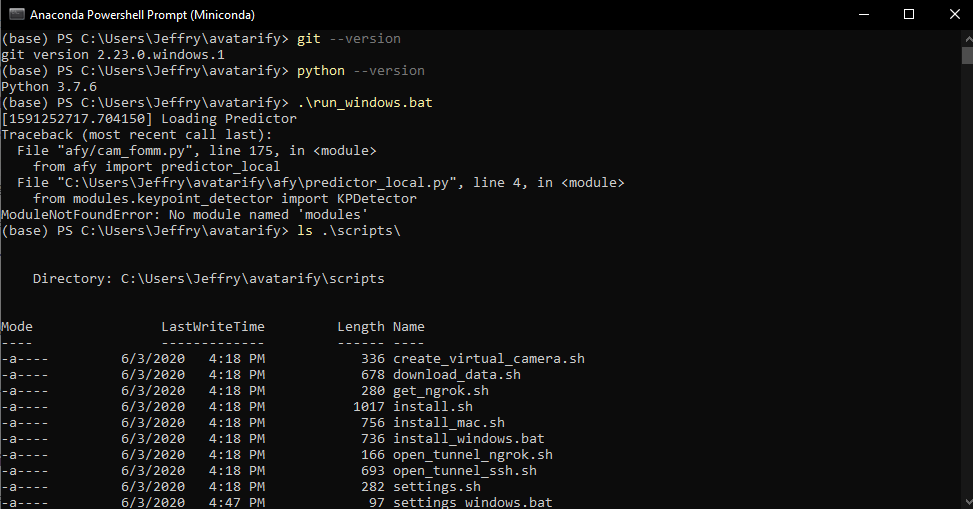
This issue usually arises from two things:
- You didn't install git.
- You installed
gitbut Anaconda prompt can't find it for some reason. Try to rungitin the prompt to find this out.
i have re-install avatarify 3 times, in windows 2 times with same error. the last one i install it at my linux (first try it can run, but second try they are error with different line)
I had this error, so I reran a clean install and then I had the yaml module not found error I ran these commands pip install pyyaml pip install requests pip install cv2 pip install scipy pip install face_alignment pip install sklearn pip install pandas I also copied the 7 files from the modules folder into the fomm folder.
This now works

After running "scripts/install_windows.bat", my avatarify virtual env loses git. And I see the following conflicting messages. I think the .bat file recreates the avatarify virtual env without git so git clone fails. Anyway I can go around this?

I've tried copying the modules files from https://github.com/AliaksandrSiarohin/first-order-model but his version of OcclusionAwareGenerator does not have "encode_source".
please help me out i am having issue running avatarify
Traceback (most recent call last):
File "afy/cam_fomm.py", line 4 in

please help me out i am having issue running avatarify
Traceback (most recent call last): File "afy/cam_fomm.py", line 4 in import yaml ModuleNotFoundError: No module named 'yaml'
You can check whether your git is installed properly noting that the .bat files are creating a virtual environment. In my case, all virtual environments don't come with git by default. So I had to open the .bat files as text and added "conda install -c anaconda git" after "conda activate avatarify"
please help me out i am having issue running avatarify Traceback (most recent call last): File "afy/cam_fomm.py", line 4 in import yaml ModuleNotFoundError: No module named 'yaml'
You can check whether your git is installed properly noting that the .bat files are creating a virtual environment. In my case, all virtual environments don't come with git by default. So I had to open the .bat files as text and added "conda install -c anaconda git" after "conda activate avatarify"
@jamjs98764 thanks so much for replying but i have tried again but still same issue

hello after fixing all these bugs I got another " File "afy/cam_fomm.py", line 75, in load_images if img.ndim == 2: AttributeError: 'NoneType' object has no attribute 'ndim'" can anyone help me

@PuvShur how did you fix this error, i.e. "No module named 'modules'"? I'm trying to figure out if this still exists or if it can be closed. Regarding your new error, I guess you might have a broken image in the avatars folder. I'm adding a check to the code so that it doesn't crash when this happens #345

@JohanAR, when installing avatarify, I downloaded something to the fomm folder, I created a modules folder in the C: \ Users \ **** \ miniconda3 directory and copied this folder and its contents there


Please how do I fix this On Fri, Dec 16, 2022 at 4:40 PM vuexiaob @.***> wrote:
您好,您的来信已收到,谢谢!
— Reply to this email directly, view it on GitHub https://github.com/alievk/avatarify-python/issues/198#issuecomment-1355098820, or unsubscribe https://github.com/notifications/unsubscribe-auth/A4ZE6BCWFNW4T35EP635UPTWNSENHANCNFSM4NR2Q5SA . You are receiving this because you commented.Message ID: @.***>

This is what I got when I run_windows.bat please help
did you get help for this? im also stuck here

hello,
pls am stuck here
(avatarify) C:\Users\HP\avatarify-python>run_windows.bat
[1675832575.880838] Loading Predictor
Traceback (most recent call last):
File "afy/cam_fomm.py", line 216, in

Just start over with this method https://github.com/technopremium/avatarify-python-youtube/blob/master/README.md
if it works please let me know


I had this error, so I reran a clean install and then I had the yaml module not found error I ran these commands pip install pyyaml pip install requests pip install cv2 pip install scipy pip install face_alignment pip install sklearn pip install pandas I also copied the 7 files from the modules folder into the fomm folder.
This now works
decided to try this solution and got to install cv2 but keep showing this below
(avatarify) C:\Users\PHAVOUR OTF\avatarify-python>pip install cv2 ERROR: Could not find a version that satisfies the requirement cv2 (from versions: none) ERROR: No matching distribution found for cv2
did you specify any version when installing cv2?
