
GGEditor

GGEditor copied to clipboard
 alibaba
官网上的bug怎么修复
重现链接
https://ggeditor.com/zh-CN/examples/component/item-panel
重现步骤
拖动节点时,虚影不是当前节点虚影
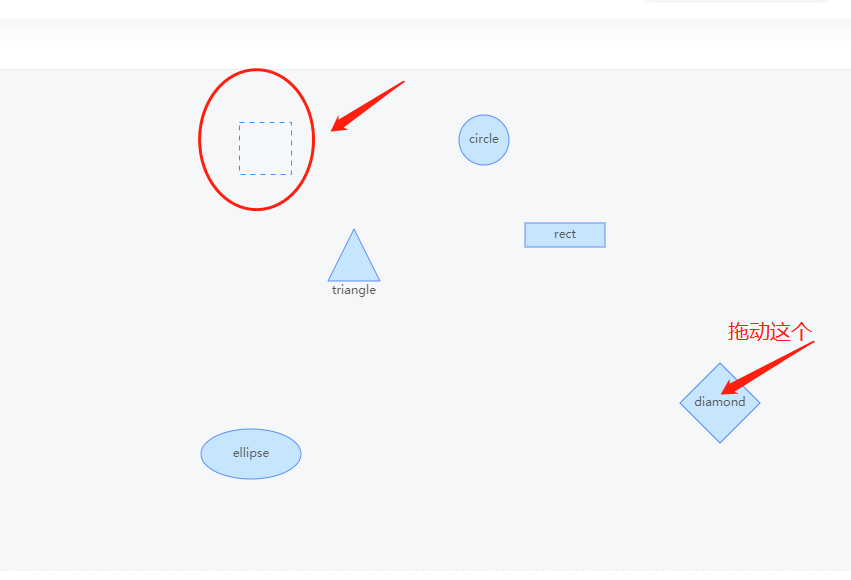


这个 bug 还挺严重的。默认情况下 drag-node 行为开启了 enableDelegate 特性,当节点 A 被选中,此时拖动节点 B,则会出现上述的 bug。这个 bug 不是 gg-editor 独有的,而是 g6 带来的问题,可以参考这个 demo:https://g6.antv.vision/zh/examples/interaction/setMode
在上面的 demo 中,右边的代码是支持热重载的,所以你可以尝试把 default mode 中的 drag-node 改为:
{
      type: 'drag-node',
      enableDelegate: true
}
然后选中某个节点,就会重现这个 bug。
目前还没有特别好的解决方案,对于 gg-editor 而言,如果太影响体验建议在 customMode 中自定义一下 default mode 就可以了。

enableDelegate: true
请问是这样定义么?
 <RegisterNode
        name="customNode"
        config={{
          getCustomConfig(model:any) {
            return {
              wrapperStyle: {
                fill: '#000000',
              },
              default: {
                'drag-node': {
                  type: 'drag-node',
                  enableDelegate: false,
                }
              }
            };
          },
        }}
        extend="bizFlowNode"
      />

<Flow
  customModes={(mode: string, behaviors: any) => {
    if (mode === 'default') {
      behaviors['drag-node'].enableDelegate = false;
    }
    return behaviors;
  }}
/>
