

 alexkay
0.8.4 still crashing in macOS Sierra 10.12.5
Error Message: (Please help)
Process: Spek [29446] Path: /Applications/Spek.app/Contents/MacOS/Spek Identifier: org.spek-project Version: 0.8.2 (0.8.2) Code Type: X86-64 (Native) Parent Process: ??? [1] Responsible: Spek [29446] User ID: 501
Date/Time: 2017-06-15 21:50:34.554 -0600 OS Version: Mac OS X 10.12.5 (16F73) Report Version: 12 Anonymous UUID: BBC7BF75-EEF4-1377-AF6F-723161D1797F
Sleep/Wake UUID: 410C4F55-AE7F-4ABA-8FBD-0DA58A7AC111
Time Awake Since Boot: 180000 seconds Time Since Wake: 21000 seconds
System Integrity Protection: enabled
Crashed Thread: 6
Exception Type: EXC_BREAKPOINT (SIGTRAP) Exception Codes: 0x0000000000000002, 0x0000000000000000 Exception Note: EXC_CORPSE_NOTIFY
Termination Signal: Trace/BPT trap: 5 Termination Reason: Namespace SIGNAL, Code 0x5 Terminating Process: exc handler [0]
Application Specific Information: *** CFRelease() called with NULL ***

I have a similar issue on Sierra 10.12, but with a different error message:
Process: Spek [36403] Path: /Applications/Spek.app/Contents/MacOS/Spek Identifier: org.spek-project Version: ??? Code Type: X86 (Native) Parent Process: ??? [1] Responsible: Spek [36403] User ID: 501
Date/Time: 2017-06-19 11:22:26.546 -0700 OS Version: Mac OS X 10.12 (16A323) Report Version: 12 Anonymous UUID: 6EEEADC0-DDBF-C92F-5A2C-D67404540427
Sleep/Wake UUID: AAFF6436-E95A-4B0A-8283-3FAD16749B03
Time Awake Since Boot: 370000 seconds Time Since Wake: 310000 seconds
System Integrity Protection: enabled
Crashed Thread: Unknown
Exception Type: EXC_BAD_ACCESS (SIGSEGV) Exception Codes: KERN_INVALID_ADDRESS at 0x00000000241499f5 Exception Note: EXC_CORPSE_NOTIFY
Termination Signal: Segmentation fault: 11 Termination Reason: Namespace SIGNAL, Code 0xb Terminating Process: exc handler [0]
Backtrace not available
Unknown thread crashed with X86 Thread State (32-bit): eax: 0x248b8b5b ebx: 0xbffffcd8 ecx: 0x241499f5 edx: 0x00000001 edi: 0xbffffd0c esi: 0x00000000 ebp: 0xbffffc98 esp: 0xbffffc50 ss: 0x00000023 efl: 0x00010297 eip: 0x000011bb cs: 0x0000001b ds: 0x00000023 es: 0x00000023 fs: 0x00000000 gs: 0x0000000f cr2: 0x241499f5
Logical CPU: 0 Error Code: 0x00000004 Trap Number: 14
Binary images description not available
External Modification Summary: Calls made by other processes targeting this process: task_for_pid: 0 thread_create: 0 thread_set_state: 0 Calls made by this process: task_for_pid: 0 thread_create: 0 thread_set_state: 0 Calls made by all processes on this machine: task_for_pid: 350982 thread_create: 0 thread_set_state: 0
Model: iMac17,1, BootROM IM171.0105.B09, 4 processors, Intel Core i5, 3.2 GHz, 32 GB, SMC 2.33f10 Graphics: AMD Radeon R9 M380, AMD Radeon R9 M380, PCIe, 2048 MB Memory Module: BANK 0/DIMM0, 8 GB, DDR3, 1600 MHz, 0x802C, 0x31364B544631473634485A2D314739453220 Memory Module: BANK 0/DIMM1, 8 GB, DDR3, 1600 MHz, 0x859B, 0x435438473353313630424D2E4D313646500 Memory Module: BANK 1/DIMM0, 8 GB, DDR3, 1600 MHz, 0x802C, 0x31364B544631473634485A2D314739453220 Memory Module: BANK 1/DIMM1, 8 GB, DDR3, 1600 MHz, 0x859B, 0x435438473353313630424D2E4D313646500 AirPort: spairport_wireless_card_type_airport_extreme (0x14E4, 0x14A), Broadcom BCM43xx 1.0 (7.21.171.10.1a16) Bluetooth: Version 5.0.0f18, 3 services, 27 devices, 1 incoming serial ports Network Service: Ethernet, Ethernet, en0 Network Service: Wi-Fi, AirPort, en1 PCI Card: pci11c1,5901, IEEE 1394 Open HCI, Thunderbolt@195,0,0 Serial ATA Device: APPLE HDD ST1000DM003, 1 TB USB Device: USB 3.0 Bus USB Device: Bluetooth USB Host Controller USB Device: FaceTime HD Camera (Built-in) USB Device: Communication Device USB Device: Keyboard Hub USB Device: 2.4G Keyboard Mouse USB Device: My Passport 259F USB Device: Apple Keyboard USB Device: USB Audio Device FireWire Device: Pike F145B, AVT, Up to 800 Mb/sec Thunderbolt Bus: iMac, Apple Inc., 28.1 Thunderbolt Device: Thunderbolt to FireWire Adapter, Apple Inc., 3, 5.6


@lunrdj @beterhans @chelsell 0.8.4 alpha works here. Running smooth on my macOS Sierra --> https://github.com/alexkay/spek/releases/tag/v0.8.3

Both
Tim Toole
On Jul 5, 2017, at 5:57 PM, withmorten [email protected] wrote:
When does this occur? When opening a file or at startup?
— You are receiving this because you were mentioned. Reply to this email directly, view it on GitHub, or mute the thread.


Same here, can't open Spek on MacOS 10.12.6. This is the crash report I get: Process: Spek [6067] Path: /Applications/Spek.app/Contents/MacOS/Spek Identifier: org.spek-project Version: ??? Code Type: X86 (Native) Parent Process: ??? [1] Responsible: Spek [6067] User ID: 502
Date/Time: 2017-08-13 13:51:25.539 +0200 OS Version: Mac OS X 10.12.6 (16G29) Report Version: 12 Anonymous UUID: E959996D-4117-A536-F14B-2E989FA671EB
Sleep/Wake UUID: 1D4BAA44-8450-4117-9FAA-8AE0941C1C2F
Time Awake Since Boot: 43000 seconds
System Integrity Protection: enabled
Crashed Thread: Unknown
Exception Type: EXC_BAD_ACCESS (SIGSEGV) Exception Codes: KERN_INVALID_ADDRESS at 0x00000000241499f5 Exception Note: EXC_CORPSE_NOTIFY
Termination Signal: Segmentation fault: 11 Termination Reason: Namespace SIGNAL, Code 0xb Terminating Process: exc handler [0]
Backtrace not available
Unknown thread crashed with X86 Thread State (32-bit): eax: 0x248b8b5b ebx: 0xbffffd10 ecx: 0x241499f5 edx: 0x00000001 edi: 0xbffffd40 esi: 0x00000000 ebp: 0xbffffcd8 esp: 0xbffffc90 ss: 0x00000023 efl: 0x00010297 eip: 0x000011bb cs: 0x0000001b ds: 0x00000023 es: 0x00000023 fs: 0x00000000 gs: 0x0000000f cr2: 0x241499f5
Logical CPU: 0 Error Code: 0x00000004 Trap Number: 14
Binary images description not available
External Modification Summary: Calls made by other processes targeting this process: task_for_pid: 0 thread_create: 0 thread_set_state: 0 Calls made by this process: task_for_pid: 0 thread_create: 0 thread_set_state: 0 Calls made by all processes on this machine: task_for_pid: 25475 thread_create: 0 thread_set_state: 0
Model: Macmini7,1, BootROM MM71.0220.B29, 2 processors, Intel Core i5, 2.8 GHz, 8 GB, SMC 2.24f32 Graphics: Intel Iris, Intel Iris, Built-In Memory Module: BANK 0/DIMM0, 4 GB, DDR3, 1600 MHz, 0x80AD, 0x483943434E4E4E424C54414C41522D4E5444 Memory Module: BANK 1/DIMM0, 4 GB, DDR3, 1600 MHz, 0x80AD, 0x483943434E4E4E424C54414C41522D4E5444 AirPort: spairport_wireless_card_type_airport_extreme (0x14E4, 0x13B), Broadcom BCM43xx 1.0 (7.21.171.130.1a1) Bluetooth: Version 5.0.5f1, 3 services, 27 devices, 1 incoming serial ports Network Service: Wi-Fi, AirPort, en1 PCI Card: Apple 57761-B0, Ethernet Controller, Thunderbolt@191,0,0 PCI Card: pci11c1,5901, IEEE 1394 Open HCI, Thunderbolt@190,0,0 PCI Card: pci12d8,400e, USB Open Host Controller, Thunderbolt@194,0,0 PCI Card: pci12d8,400e, USB Open Host Controller, Thunderbolt@194,0,1 PCI Card: pci12d8,400f, USB Enhanced Host Controller, Thunderbolt@194,0,2 Serial ATA Device: APPLE SSD SM0128F, 121.33 GB Serial ATA Device: APPLE HDD ST1000LM024, 1 TB USB Device: USB 2.0 Bus USB Device: Hub USB Device: Apple USB SuperDrive USB Device: FaceTime HD Camera (Display) USB Device: Apple Thunderbolt Display USB Device: Display Audio USB Device: USB 3.0 Bus USB Device: Samsung M3 Portable USB Device: iFi (by AMR) HD USB Audio USB Device: IR Receiver USB Device: BRCM20702 Hub USB Device: Bluetooth USB Host Controller USB Device: Keyboard Hub USB Device: USB Receiver USB Device: Apple Keyboard Thunderbolt Bus: Mac mini, Apple Inc., 26.1 Thunderbolt Device: Thunderbolt Display, Apple Inc., 3, 26.2

Same as far as 0.8.3 goes-- the alpha of 1.8.4 is working so far. Will update if I encounter issues.

Hi, I installed Spek 0.8.4 (from your link : spek-0.8.4-alpha.dmg) on High Sierra (10.13.2), and it works very well. Thank you very much. Lionel

spek-0.8.4-alpha is also working on Mojave 10.14.6, just wanted to add this info for anyone who might need it. Thanks
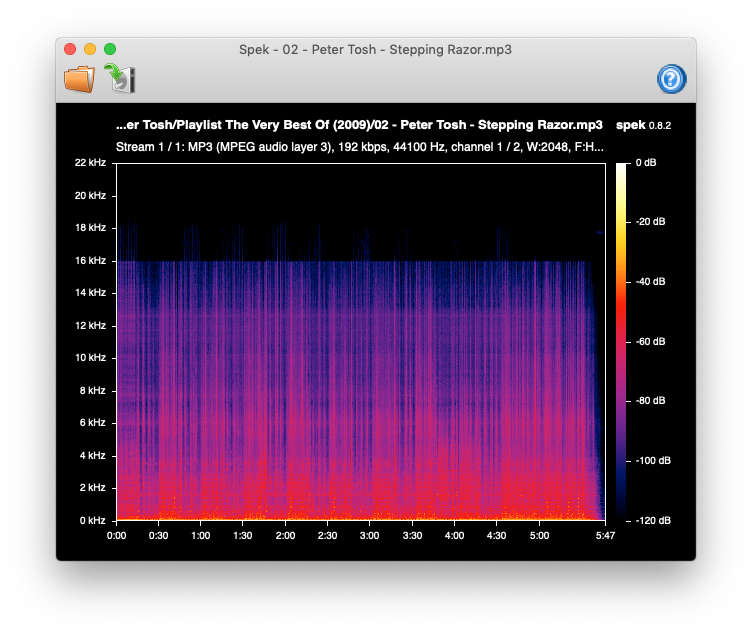
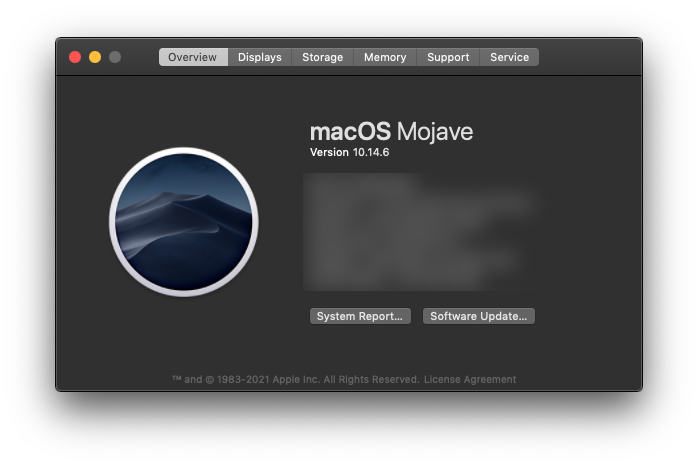 !
!

I added an updated beta package of macOS for the latest release. Try it out and let me know if anything is off: https://github.com/alexkay/spek/releases/tag/v0.8.5

I have installed and tested it with various mp3 and flac files and it worked fine on MacOS 13.2 on a MBP 15-inch, 2019